IL2CPP support is something I’d like to look into eventually.
BepInEx 6 does have IL2CPP builds, but the bigger issue is that IL2CPP games work quite differently internally compared to Mono. So it would likely need a separate plugin build and quite a bit of rework, especially for detecting animation parameters and highlighting model parts.
Even then, some games may need specific adjustments, and some can be blocked by extra protection or unusual loading. So it probably wouldn’t quite be a “works for everything” solution.
If there’s a specific game you have in mind, feel free to mention it. I’ll check how realistic support for it might be.
Is there a hybrid mode where by standard the plugin would track movement but when there is a scripted event happening (climax) tracking would be overwritten for the duration of a user made script? So you could have a funscript for those parts but tracking for the rest. In many games the visual movement pretty much stops during climax and they are often scripted so you could make better motion happen during those times.
For it to work properly, the plugin needs some reliable way to know when that scripted event starts and ends. In some games that might be detectable through animation parameters, scene names, log messages.
In other games it would need a deeper integration with something like EDI to hook into the actual event.
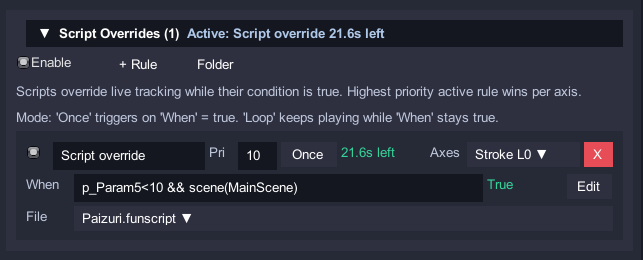
I might add is a simple rule system at some point, where CubiLink can trigger existing funscripts when user-defined conditions are met. For example when a certain parameter exists/changes, a scene name matches, or an Auto-Load rule activates. During that time, the script could override normal tracking, then hand control back to live tracking afterward.
So been messing around with Summer Clover (still no idea what the formulas do, just simply picking the elements), and first of all let me just explain how to get this game working since it took a while.
Get the game (it’s on F95)
Install BepInEx_win_x64_5.4.23.5
Create a folder called “unstripped_corlib” on the same folder as the game executable
Extract those 2 into the “unstripped_corlib” folder
Edit “doorstop_config.ini” and change the line with “dll_search_path_override” into
dll_search_path_override = "unstripped_corlib"
Install CubiLink normally
BepInEx will now work and load CubiLink
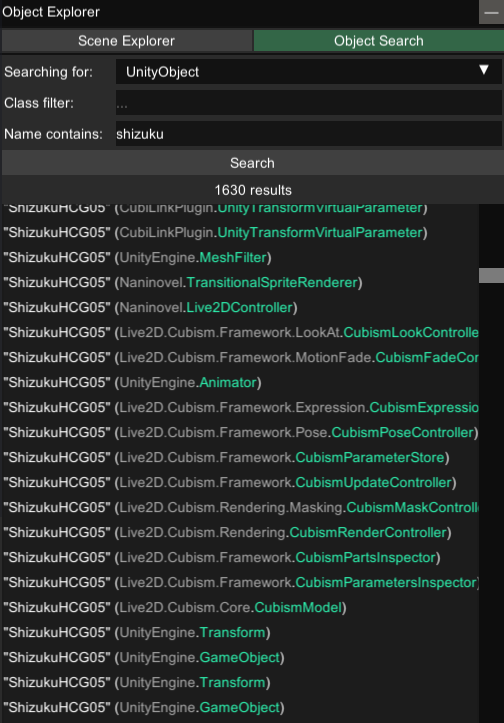
Anyway, I wanted to setup auto loading but there’s no logs and I think the scene is always the same, but different models are loaded on each event (each girl has 5), I could confirm that with resource explorer. There’s some CubiLink objects in there too. No idea what it means practically but wouldn’t it be easy to also implement a check for active objects present? Technically even when switching events the objects still show when doing a search but I’m guessing they are disabled somewhere, at least resource explorer knows something is going on because it’ll show the current object on the event as the first results, instead of showing the various events’ objects all at random.
And in case anyone has interest, I already picked the elements for 3 scenes (template has the girl’s name + scene number) as best as I could, it takes a while since scenes can have like 8+ movements and in some cases it can be fine for 7 and then on the 8th it’s screwed up but for only half of the animation… which could maybe be fixed by the formulas and conditions but I still have no idea how yet.
EDIT: After messing around with the saves, I don’t there’s much point in sharing the file for now (although you can check the history of this comment and get it), as the game progresses it seems like there’s slight changes on the params used and it’s not that they completely break but they do get off sync and the ones I thought were good eventually need to be inverted or have different timing.
In general, it seems like “Param2” is good enough to track the movement across all scenes, except during the slow modes, at which point it seems to be inverted for some reason (but also not in all slow modes…)
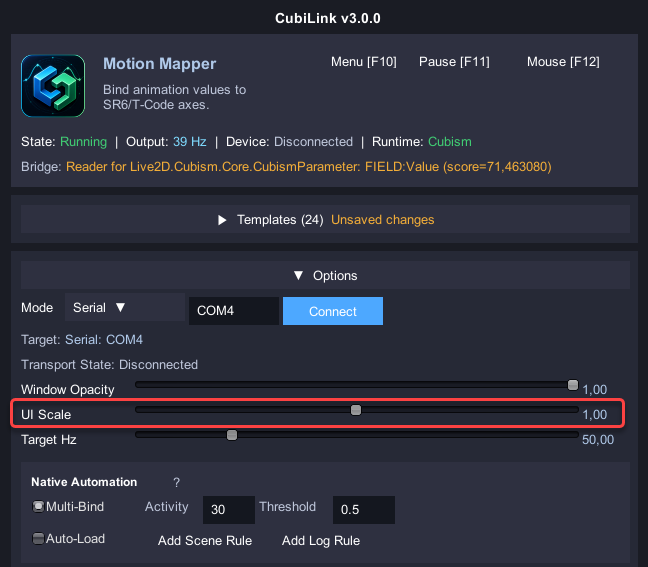
CubiLink appeared on the screen, but the text is too small to read.
Even changing the resolution and zooming in doesn’t help; the text is still blurry and difficult to read.
I think I was able to connect to the Intiface and load the JSON file.
However, nothing happens in the game, and the indicator doesn’t respond either. (I don’t even know where it is.)
I would like to express my deepest gratitude to everyone who dedicated themselves to the development of CubiLink Ver3.
While this update will likely significantly increase the number of Live2D games that work with the Mono format,
I think it’s a real shame that CubiLink doesn’t work with IL2CPP format games.
The game I would most like to see work is “Take Me To The Dungeon.”
Originally a Lovense-compatible game,
it doesn’t work with The Handy or SR6, so volunteers have been trying to get it to work in a separate thread.
I also tried it, but the result was the same: commands are received, but nothing happens. It seems development is stalled in that thread as well.
I understand that testing this game in IL2CPP format will be difficult, but I would appreciate your help.
The Unity scene name works best when the game actually uses separate Unity scenes, which seems to be more common/reliable in Live2D games. For Spine and Unity Transform games it can be too generic, depending on how the game loads them.
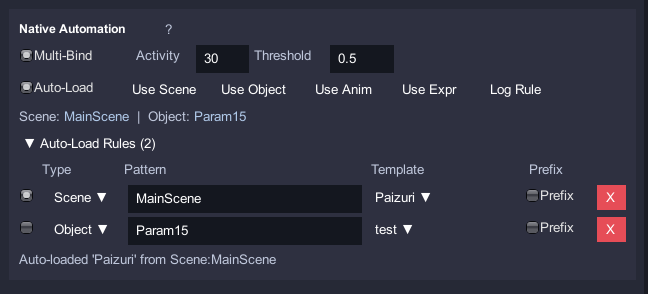
I added a few more Auto-Load rule types that should help:
Scene: current Unity scene name
Object: detected active model/root object
Animation: detected animation/clip name
Expression: parameter/formula-based condition
Log: match Unity/BepInEx log text
For games where scene/object/animation names do not change reliably, Expression rules are probably the best fallback. That means the template can switch based on the animation data itself, for example when a certain parameter exists, starts moving, enters a known range, or when a detected animation/object name matches.
The Auto-Load UI now also shows the currently detected scene/object/animation values.
It lets CubiLink temporarily play a selected .funscript when a condition is met. So for example, you could have tracking during normal motion, then trigger a custom script during a climax/event where the visual movement slows down or stops.
The condition uses the same expression system, so it can be based on parameters, movement, scene/object/animation names, etc.
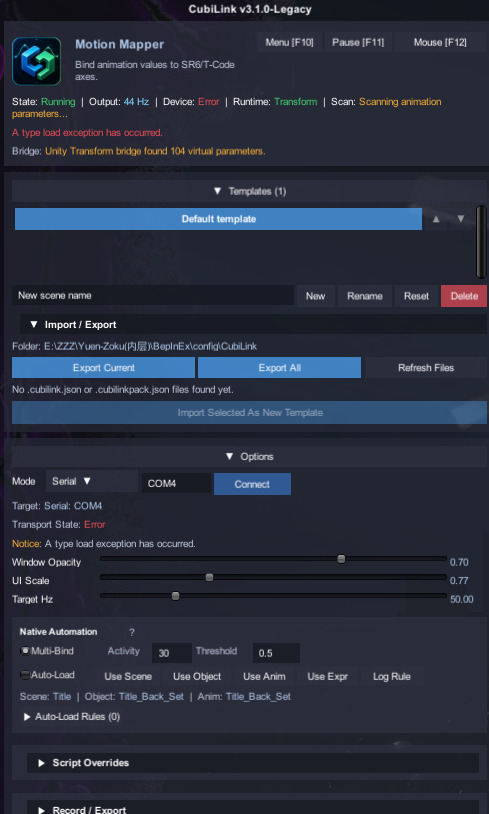
I tried the updated CubiLink-Legacy.dll you released. (your updated time:5.10 3:52 version)The previous bug (UI becoming completely blank right after connecting) has been fixed — thank you!
However, I’m now facing a new issue: I can’t connect to the device. It keeps showing Transport State: Error.
My device works perfectly with the latest CubiLink.dll (non-legacy version), so I’m sure it’s not a hardware or game-specific problem. I’ve tested it on two different games and got the same error.
I’ve attached screenshots and the BepInEx log below for reference.
[Message: BepInEx] BepInEx 5.4.23.5 - Yuen-Zoku (4/17/2020 8:36:40 AM)
[Info : BepInEx] Running under Unity v2017.4.36.13001694
[Info : BepInEx] CLR runtime version: 2.0.50727.1433
[Info : BepInEx] Supports SRE: True
[Info : BepInEx] System platform: Bits64, Windows
[Message: BepInEx] Preloader started
[Info : BepInEx] Loaded 1 patcher method from [BepInEx.Preloader 5.4.23.5]
[Info : BepInEx] 1 patcher plugin loaded
[Info : BepInEx] Patching [UnityEngine.CoreModule] with [BepInEx.Chainloader]
[Message: BepInEx] Preloader finished
[Warning: HarmonyX] AccessTools.Property: Could not find property for type UnityEngine.Application and name isBatchMode
[Message: BepInEx] Chainloader ready
[Message: BepInEx] Chainloader started
[Info : BepInEx] 1 plugin to load
[Info : BepInEx] Loading [CubiLink 3.1.0]
[Info : CubiLink] v3.1.0 Initialization successful!
[Warning: CubiLink] Local config load failed: A type load exception has occurred.. Falling back to legacy PlayerPrefs migration.
[Info : CubiLink] CubiLink local config created: E:\ZZZ\Yuen-Zoku(内层)\BepInEx\config\CubiLink.cfg
[Warning: CubiLink] CubismParameter type was not found in loaded assemblies.
[Warning: CubiLink] CubismRenderer type was not found in loaded assemblies.
[Warning: CubiLink] Spine types were not found in loaded assemblies.
[Info : CubiLink] Using Transform runtime bridge.
[Info : CubiLink] CubiLink runtime initialized (runtime).
[Message: BepInEx] Chainloader startup complete
[Info : CubiLink] Using Transform runtime bridge.
[Error : CubiLink] Output transport operation failed: A type load exception has occurred.
[Error : CubiLink] Output transport operation failed: A type load exception has occurred.
This looks like a Legacy-build serial backend issue. The legacy version was still trying Unity/.NET’s normal SerialPort path first, and in some older Unity 2017 / CLR 2.0 games that can fail before it reaches the fallback.
I changed the Legacy build so Serial mode now skips that fragile .NET SerialPort path and directly uses the Win32 serial backend instead.
I updated the Legacy build, so you can give it another try.
Thanks for the update. There does seem to be a bug with the range option, it’s changing back to locked range but visually still shows as learning when you switch params with it in learning mode, and then you have to change it to locked and back to learning for it to work.
Is there a way to get this to populate the list with Cubism Parts and Drawables too? I’m trying to test it out with NTRMAN arrival of the goddess and the parameters that show up on the list are not the right objects for tracking the motion for his games I guess.
Hi, thanks for the mod. It is working pretty well for what i have tested
Is there any way it can work with this kind of game ?https://www.dlsite.com/maniax/work/=/product_id/RJ01062836.html the parameters it find is static and when an animation loop start nothing appear
I looked into it and this game is a Spine game, but it seems to have several active/static Spine skeletons loaded at the same time. CubiLink was picking up the first few Spine objects Unity returned, which could be static/background objects instead of the actually animated character loop. That’s why the list showed parameters, but they didn’t move when the animation started.
I changed the Spine detection so it now prefers active/visible skeletons that are actually playing a Spine animation. That should make the moving parameters show up properly.
The parameter list may be slightly larger in some Spine games, but it should mostly just pick better targets now.
It might be ambitious, but how about a highlight option that hides everything on the scene and only shows the selected param? Or somehow make it more visible, things like mouths or tongues can be very hard to pick up for example.
I already tried something like that. For Spine animations, CubiLink currently does this by dimming the rest of the skeleton / making it more transparent and trying to isolate the related slot/attachment.
For Live2D and Unity Transform games it is much harder to do reliably. A parameter often does not map cleanly to just one visible object.
Hiding scene renderers/materials can also cause visual bugs, broken masks/flickering, or performance issues, especially if it has to happen constantly while hovering through the parameter list.
I may keep improving the highlighter where possible, but a full “show only this parameter” mode probably cannot be made universal across all runtimes.
How about some object like an arrow next to the highlighted parts? Worst case it’s off screen/just wrong (like when the param is something like steam clouds all over the screen) but could help in some scenarios.
But I understand the performance issues, especially with the new update, in some scenes it looks like there’s almost thousands of params and just scrolling through the list with bars display enable already causes issues.
it work perfectly thanks ! another feedback :
i run into a small problem i can’t weel up or down to load my auto rules
it would be nice to have a speed limit
For Unity Transform parameters CubiLink already draws a small marker/crosshair near the detected object, and for Spine it tries to isolate the related slot/attachment directly.
Live2D is trickier because a parameter often affects multiple drawables/parts at once, but I’ve tried to increase the highlight color/visibility.
For the Auto-Load rules: yes, that was a UI issue. If many rules were added, the rule list could take over the whole Options section and there was no proper way to scroll through all of them. I added a dedicated scroll area for Auto-Load rules now, so long rule lists should stay usable.