any idea why my anti-virus keeps deleting EDI? it keeps quarantining it saying its malware
What antivirus
There are dozens of them
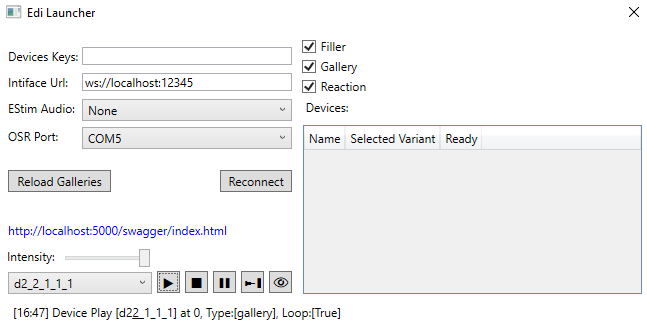
Hi!, I want to use the OSR2+ to play “[MountBatten] Aesop’s Fables”. The game’s patch can be applied successfully, and it can connect to EDI. The status also changes with the game progress. The problem is with the communication between the device and EDI. When connecting to EDI, it can select the corresponding COM port COM5, but I cannot add it to the “devices” column. During gameplay, the OSR2+ seems to be randomly spinning and resetting continuously (it looks like initialization or something). Am I doing something wrong?

1 Like
bitdefender to be specific
fixed in the next version! i already make the changes
1 Like
@dimnogro what can you say about this js API?
code
Edi = {
  game: JSON.parse(require('fs').readFileSync(__dirname + '/package.json', 'utf-8')).name,
  base: `http://localhost:5000/Edi`,
  activeScriptName: null,

  parseScriptName(name) {
    return name.replace('./data/video/', '')
      .replace('.mp4', '')
      .replace(/[/]/g, '-')
  },

  send(path, data) {
    const query = new URLSearchParams({...data, game: this.game, now: Date.now()})
    return fetch(`${this.base}/${path}?${query}`, {method: 'POST'})
  },

  parseVideoEvent(event) {
    const scriptName = this.parseScriptName(event.target.getAttribute('src'))
    const seek = ~~(event.target.currentTime * 1000)
    return {scriptName, seek, loop: event.target.loop}
  },

  playVideo(event) {
    const {scriptName, seek, loop} = this.parseVideoEvent(event)
    this.activeScriptName = scriptName
    return this.send(`Play/${scriptName}`, {seek, loop})
  },
  syncVideo(event) {
    const {scriptName, seek, loop} = this.parseVideoEvent(event)
    if (scriptName && this.activeScriptName !== scriptName) return
    return this.send(`Sync/${scriptName}`, {seek, loop})
  },
  stopVideo(event) {
    const {scriptName} = this.parseVideoEvent(event)
    if (scriptName && this.activeScriptName !== scriptName) return
    this.activeScriptName = null
    return this.send('Stop')
  },
}

document._createElement = document.createElement
document.createElement = (tagName, options) => {
  const el = document._createElement (tagName, options)
  if (tagName === 'video') {
    el.addEventListener('play', (e) => Edi.playVideo(e))
    el.addEventListener('seeked', (e) => Edi.playVideo(e))
    el.addEventListener('timeupdate', (e) => Edi.syncVideo(e))
    el.addEventListener('pause', (e) => Edi.stopVideo(e))
    el.addEventListener('ended', (e) => Edi.stopVideo(e))
  }
  return el
}
Check this folder for funscript video js integration with edi in html
ik that I’m asking how my refactor looks like
(probably can make a better one now when I have the original source)
Does EDI works well with sending the same /Start/<animation>?seek=<current time> often?
How often would you recommend sending that for minor sync (that slides by 1-5%)?
for the sync frequency: if you’re trying to fix a small desync, sending it every few seconds is fine. But don’t call it too frequently, or you might cause jittering—especially with The Handy.
I think the best practice is to send a play request right when the video starts, and then send another play one second later using the current video time. That’s how the Handy’s official site handles playback sync.
I am currently modding a game and I have some weird behaviour on looping scripts. For example
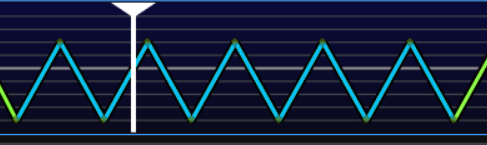
I have this blue marked area inside my definitions.csv StartTime and EndTime. The part is about 6 seconds long and is set to loop = true. However when the end is reached the Handy makes a short break before it loops. I have no idea why and how to fix it. This happens in a few parts in the script.
Are you using the OFS generated chapters to create the definitions file?
The chapter timings in OFS export differently than the stroke points and can have rounding errors.
If they mismatch it’s possible the points at either end aren’t included when Edi loads the funscript.
no I am not using chapters I am manually typing in the timestamps
Is there a better way to stop the device if the filler is disabled?
Currently when the device is playing a Funscript but you want to play the filler you would do a
POST /Play/Filler
however if the Edi Client has filler checkbox unchecked it would just continue playing the funscript so to stop you would have to send two requests
POST /Stop
POST /Play/Filler
can this be done in just a single request like
POST /Play/Filler?stopIfDisabled=true
The same would apply if the requested funscript is missing.
POST /Play/<name>?stopIfMissing=true
Would that make sense?
You’re right about your observation. I’m going to change EDI so that when a filler is sent and the filler is disabled, it stops. For now, the easiest way to handle this would be the reverse of how you’re currently doing it: you can set the filler first and then send the stop command. The stop won’t affect the filler at all.
In other implementations, filler control has been integrated into the game itself — like pressing a key or doing a double tap. In that case, if you want to disable the filler from within the game, you can create a gallery called FillerStop with points at position 0, and send that filler from the game as a way to turn it off.
I have encountered the same problem
2025-07-02 08:48:52.444 +08:00 [INF] Variants discovered: Detailed, Simple, None.
2025-07-02 08:48:52.444 +08:00 [INF] Finalizing reading process in FunscriptRepository.
2025-07-02 08:48:52.444 +08:00 [INF] Fetching available variants.
2025-07-02 08:48:52.737 +08:00 [INF] Initializing for AudioRepository with path: .\Gallery.
2025-07-02 08:48:52.738 +08:00 [INF] Discovered 0 assets in path: .\Gallery.
2025-07-02 08:48:52.739 +08:00 [INF] Variants discovered: None.
2025-07-02 08:48:52.740 +08:00 [INF] Finished reading galleries for AudioRepository.
2025-07-02 08:48:53.822 +08:00 [INF] Initializing ButtplugProvider...
2025-07-02 08:48:53.823 +08:00 [INF] Attempting to connect to Buttplug client.
2025-07-02 08:48:53.824 +08:00 [WRN] Config.Key is null or empty. Initialization aborted.
2025-07-02 08:48:53.835 +08:00 [WRN] Configuration key is empty; initialization aborted.
2025-07-02 08:48:53.837 +08:00 [INF] Initialization started.
2025-07-02 08:48:53.837 +08:00 [WRN] DeviceId is set to -1. Initialization will be skipped.
2025-07-02 08:49:01.137 +08:00 [INF] ebsocket-handler: Setting up webSocket
[INFO] mdns-handler: Setting up MDNS
[INFO] settings-handler: Web address: http://tcotting up MDNS
[INFO] settings-handler: Web address: http://tcode.local
Firmware v0.451b

TCode v0.3

Ready!
ets Jul 29 2019 12:21:46

rst:0x1 (POWERON_RESET),boot:0x13 (SPI_FAST_FLASH_BOOT)
configsip: 0, SPIWP:0xee
clk_drv:0x00,q_drv:0x00,d_drv:0x00,cs0_drv:0x00,hd_drv:0x00,wp_drv:0x00
mode:DIO, clock div:2
load:0x3fff0030,len:4604
ho 0 tail 12 room 4
load:0x40078000,len:15468
load:0x40080400,len:4
ho 8 tail 4 room 4
load:0x40080404,len:3180
entry 0x400805b8
Startup DRAM heaps free 177736

[INFO] main: Firmware version: 0.451b
[INFO] main: ESP IDF version: v5.1.4-972-g632e0c2a9f-dirty
[INFO] main: ESP32 Chip model = ESP32-D0WD-V3 Rev 301
[INFO] main: This chip has 2 cores
[INFO] main: Chip ID: 14386948

[INFO] settings-factory: Loading file: /networkSettings.json
[INFO] settings-factory: Loading file: /userSettings.json
[INFO] settings-factory: Loading file: /pins.json
[INFO] settings-handler: Loading channel profile
[INFO] settings-handler: Loading motion profiles
[INFO] settings-handler: Loading buttons
[INFO] settings-factory: Save file: /userSettings.json
[INFO] settings-factory: Save file: /pins.json
[INFO] display-handler: Setting up display
[INFO] settings-handler: Looking for I2c address: 60
[INFO] settings-handler: Scanning for I2C...
[INFO] settings-handler: I2C device found at address 0x3c, byte 60
[INFO] display-handler: Setting up display finished
[INFO] ble-handler: Disable BLE
[INFO] main: Setting up wifi...
[INFO] main: Connecting to: ***
[INFO] wifi-handler: Setting up wifi
[INFO] wifi-handler: Mac: ***
[INFO] wifi-handler: Establishing connection to ***
[INFO] wifi-handler: Station Mode Started
[INFO] wifi-handler: Connected to: ***
[INFO] wifi-handler: IP Address: 192.168.1.40
.[INFO] udp-handler: Starting UDP on port: 8000
[INFO] udp-handler: UDP2 Listening
[INFO] web-handler: Starting web server on port: 80
[INFO] websocket-handler: Setting up webSocket
[INFO] mdns-handler: Setting up MDNS
[INFO] settings-handler: Web address: http://tcode.local
Firmware v0.451b

TCode v0.3

Ready!

2025-07-02 08:49:01.359 +08:00 [ERR] Error while attempting to connect TCode device: Fail get valid Name response
System.Exception: Fail get valid Name response
   at Edi.Core.Device.OSR.OSRDevice.GetDeviceName()
   at Edi.Core.Device.OSR.OSRDevice..ctor(SerialPort devicePort, FunscriptRepository repository, OSRConfig config, ILogger logger)
   at Edi.Core.Device.OSR.OSRProvider.Connect()
2025-07-02 08:49:03.368 +08:00 [ERR] Failed to connect to client: Websocket Connection Exception! See Inner Exception
2025-07-02 08:49:03.368 +08:00 [INF] ButtplugProvider initialization complete.
2025-07-02 08:49:07.613 +08:00 [INF]
2025-07-02 08:49:07.838 +08:00 [ERR] Error while attempting to connect TCode device: Fail get valid Name response
System.Exception: Fail get valid Name response
   at Edi.Core.Device.OSR.OSRDevice.GetDeviceName()
   at Edi.Core.Device.OSR.OSRDevice..ctor(SerialPort devicePort, FunscriptRepository repository, OSRConfig config, ILogger logger)
   at Edi.Core.Device.OSR.OSRProvider.Connect()
2025-07-02 08:49:14.087 +08:00 [INF]
2025-07-02 08:49:14.304 +08:00 [ERR] Error while attempting to connect TCode device: Fail get valid Name response
System.Exception: Fail get valid Name response
   at Edi.Core.Device.OSR.OSRDevice.GetDeviceName()
   at Edi.Core.Device.OSR.OSRDevice..ctor(SerialPort devicePort, FunscriptRepository repository, OSRConfig config, ILogger logger)
   at Edi.Core.Device.OSR.OSRProvider.Connect()
2025-07-02 08:49:20.725 +08:00 [INF]
2025-07-02 08:49:21.376 +08:00 [ERR] Error while attempting to connect TCode device: Timeout waiting for TCode Name response
System.Exception: Timeout waiting for TCode Name response
   at Edi.Core.Device.OSR.OSRDevice.GetDeviceName()
   at Edi.Core.Device.OSR.OSRDevice..ctor(SerialPort devicePort, FunscriptRepository repository, OSRConfig config, ILogger logger)
   at Edi.Core.Device.OSR.OSRProvider.Connect()
2025-07-02 08:49:23.382 +08:00 [INF] Reconnection timer triggered. Attempting to reconnect.
2025-07-02 08:49:23.382 +08:00 [INF] Attempting to connect to Buttplug client.
2025-07-02 08:49:23.382 +08:00 [INF] Removing all devices.
2025-07-02 08:49:23.382 +08:00 [INF] All devices removed.
2025-07-02 08:49:23.382 +08:00 [INF] Existing client disposed and devices removed.
2025-07-02 08:49:31.527 +08:00 [ERR] Failed to connect to client: Websocket Connection Exception! See Inner Exception
2025-07-02 08:49:34.106 +08:00 [INF] ebsocket-handler: Setting up webSocket
[INFO] mdns-handler: Setting up MDNS
[INFO] settings-handler: Web address: http://tcotting up MDNS
[INFO] settings-handler: Web address: http://tcode.local
Firmware v0.451b

TCode v0.3

Ready!
ets Jul 29 2019 12:21:46

rst:0x1 (POWERON_RESET),boot:0x13 (SPI_FAST_FLASH_BOOT)
configsip: 0, SPIWP:0xee
clk_drv:0x00,q_drv:0x00,d_drv:0x00,cs0_drv:0x00,hd_drv:0x00,wp_drv:0x00
mode:DIO, clock div:2
load:0x3fff0030,len:4604
ho 0 tail 12 room 4
load:0x40078000,len:15468
load:0x40080400,len:4
ho 8 tail 4 room 4
load:0x40080404,len:3180
entry 0x400805b8
Startup DRAM heaps free 177736
It seems to be restarting repeatedly
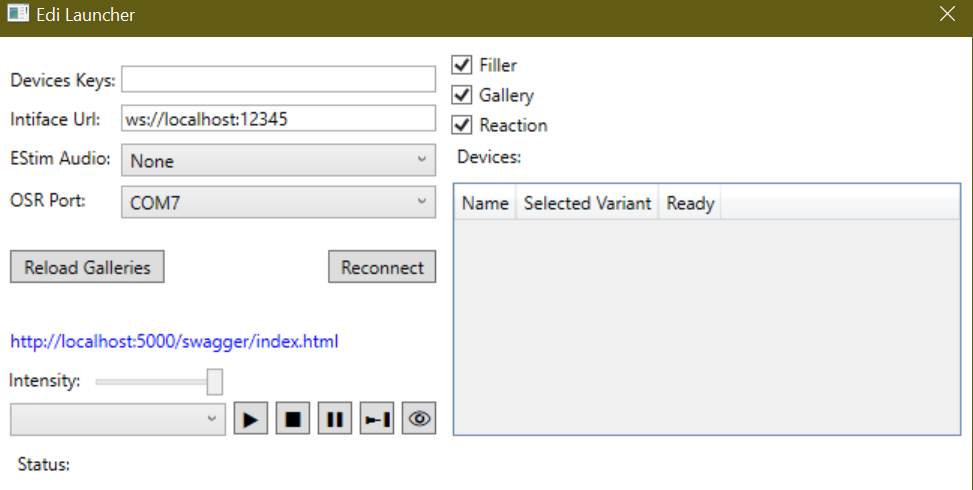
From the attached logs it does look like Khrull’s firmware. If that’s the case, there are more recent changes I made that should fix this.
Here’s a slightly newer version of Edi that I’ve been using. Can you try it and let me know if it fixes the issue?
This edi.exe doesn’t seem to be connecting or generating a log file
Did you do a drop-in replacement on your existing Edi.exe?
You can try redownloading the latest Edi folder from the link in the OP and replacing the exe.
alright. I did just download and drop in the exe since I had downloaded the folder yesterday. I’ll try downloading the whole thing again, unless that’ what you where asking