to find possible problems you can do the following:
- run the environment check from the help menu
- create a diagnostic-bundle from help menu and send it to me please
also which device are you using?
to find possible problems you can do the following:
does the software need continues patreon membership to stay unclock file limit?
at the moment yes
Pausing behavior seems inconsistent with the solace pro through intiface. Sometimes the toy pauses when the sync does, sometimes it doesn’t at all, and sometimes it just keeps doing whatever pace it had at the moment of the pause.
please send an diagnostic bundle
this is the behavior I encountered with the solace pro myself, I have since moved on to a new device. I believe it has something to do with the update intiface 3.0 as I find it happening when FLM is not running. I have yet to test on the older version.
i did some changes that could possibly fix this or at least would improve it.
Will be in the next release
Release preview:
New direct TCode device backend for controlling OSR2, SR6, and other TCode-compatible devices without requiring Intiface Central.
| Device | Connection | Axes |
|---|---|---|
| OSR2 | USB Serial | L0, L1, L2, R0, R1, R2 |
| SR6 | USB Serial | L0, L1, L2, R0, R1, R2 |
| SSR1 | USB Serial | L0, R0 |
| Custom TCode | Serial/TCP/UDP | Configurable |
BETA: This feature is under active development. Please report issues.
New offline licensing for users who cannot reach Patreon (e.g., behind the Great Firewall of China or on restricted networks).
Instead of authenticating via Patreon OAuth, users can import a .license file that grants the same tier benefits. License files are:
.license file from the developerThe status bar shows your license source:
If both Patreon and a license file are active, the higher tier wins.
There is currently no purchase or subscription system for offline licenses. A suitable payment and distribution solution is being evaluated. If you have suggestions for a good platform or method, I’d be grateful to hear them! This section will be updated once a method is available.
Patreon authentication takes priority over offline licenses. If your Patreon connection is active and gives a higher tier, the offline license is kept as a fallback but the Patreon tier is used.
New toggle to pin playback controls in fullscreen mode, preventing them from auto-hiding.
--include-package usage for pyserial and cryptography modulesRelease is out, links have been updated.
I’m not sure if anyone else has a problem with some parts being in another language, but I’ve got it set to English (double checked even) and parts like intensity tags, and list view columns being in Deutsch. All intensity tags are in Deutsch, and the list view columns it’ll show some in English such as from left to right: Status; Kategorie; Bewertung; Thumbnail; Name; Heatmap; Dauer; Dateigrosse; Geaendert; Format; Aufloesung/VR; Speicherort; Quelle; Hinzugefuegt; ensi.
There might be other areas doing the same but those are the the most noticeable ones. Had this issue in versions 0.9.16.26032 and 0.10.8.26059.
Side note: How difficult would it be to add a function to change scanning/updating cpu priority/usage? I get that it takes a bit to scan when doing deep scans and all, and I’ve got a Ryzen 9 7950x which helps with the ffmpeg load, but it’s using enough of the cpu that basic computer use such as a twitch or youtube stream will lag or hang when minimizing a browser or file explorer window because it’s waiting on the cpu.
Thx for the report.
I will check both and see what i can do on the CPU usage.
Finally spent some decent time trying to get everything to work with HereSphere and the like (especially since the direct connect to the SR6 works amazingly well, Intiface did not want to work with FunLibrary) and wanted to share some thoughts/ideas. I’m thoroughly appreciative of how much better this is compared to other players I’ve used and there’s definitely a lot of potential for it to be the defacto go-to player/all-in-one organizer. So thanks for your work so far! 
Would it be possible for it to be able to see other axis in the funscript files that are combined through eroscripts, and have it detected as multi-axis? I’ve found that no other player/program I’ve tried can detect these additional axis (as in separate them being labeled multi-axis) if they are merged into the one file, even though said file clearly has descriptors for said axis. This would be a godsend for MA scripts downloaded here, and save having to download each axis on its own.
Not sure if this would be possible because of HereSphere, but would there be a way to label MA scripts as a tag similar to how the intensity tag is shown/displayed in HereSphere? Same for separating between 2D, VR, and present scripts. Using the web player you can use all of these just fine, but the web player in HereSphere and DeoVR can’t play the VR videos that way, probably because of the h265 codec. (8k 60/120fps I’m sure doesn’t help either.)
For thumbnails, if there could be something that could force generate thumbnails for files that did not generate any that would be amazing.
This one may not be a big priority as I’m sure I’m part of a very small minority, but a setting to remember the FunLibrary window size and position would be equally amazing. At least for those of us on superwide 5120x1440 monitors. 
Speaking of HereSphere, I wonder if it’d be feasable to as an option have the heatmaps be merged at the bottom of the thumbnail due to HereSphere not showing any of that.
I’d also like to follow up on my last post, latest 0.11 version still has the issue with different languages, but I noticed using the web browser in HereSphere that is not an issue and works fine. Lastly, not sure if it just hasn’t been coded in yet, but it doesn’t save which COM device that was selected, so I keep having to change it to the correct one before it can connect to the SR6.
HI, thx for the detailed findings and ideas, i will see what i can implement.
Heresphere is quite limited in its features when it comes to “customization” i have to “misuse” some things to achieve those features. I will see.
The language related stuff is hopefully complete in the next release.
next release teaser:
The application now remembers its window position and size across sessions.
New context menu action to regenerate thumbnails for videos.
/thumb_hm/ endpoint serves thumbnails with funscript heatmaps overlaid — HereSphere shows richer previewscharset=utf-8 header and ensure_ascii=False to fix display of non-ASCII characters (e.g., Japanese, Chinese titles)New performance setting to reduce system lag during deep scans.
Added vib1 (V1) axis mapping for TCode multi-axis support, enabling a second vibration channel for compatible devices.
Full support for the Handy API v3 alongside the existing v2 implementation.
/auth/token/issue endpointNote: v2 implementation is fully preserved and unaffected. Both API versions use the same hosting upload and HSSP playback flow.
Support for funscript files that contain multiple axes in a single file via the channels key (OFS/MultiFunPlayer format).
video.roll.funscript) always take priority over embedded channels with the same nameBETA: This feature is under active development. Please report issues.
Optional HTTPS and Basic Authentication for all server endpoints, granularly configurable.
Note: Self-signed certificates may trigger a browser security warning on first connection. Accept the warning to proceed.
tr() calls)INTENSITY_LEVEL_LABELS_DE with locale-aware get_intensity_label() functionfindText to findData)header_duration, header_added, header_intensity, and other missing keys to all 9 languagesAfter doing the initial full scan + full deep scan. On succeeding app usage, do we need to always do update scan + deep update scan or just update scan is enough?
The normal scan methods do not create thumbnails, heatmaps and are not extracting metadata from the video file itself (ffprobe/ffmpeg).
Those are meant if you just wan to do an quick update.
Deep Update is doing the full set of work including thumbnails, heatmaps and file metadata extraction.
sidenote:
i’m thinking about making it possible to do that to specific folders optionally like it is in the enrichment widget (would shorten the scan)
Not sure if someone has mentioned this already but it would be nice if we can add metadata in Media Browser where adding a category/performer/studio in the folder automatically adds it to all the files under that folder. Metadata Enrichment does a good job but it is not enough especially if you have your own weird way of categorizing your things.
Also question regarding the Sorting in the Library. Am I correct in my understanding that “Added” meant sorting by the date it was added in the FunLibrary Manager? Also what is meant by sorting by “Date” there? Is it Date Created? Date Modified? perhaps can we have “Date Created” and “Date Modified” in the sorting instead?
Yes, you’re correct:
So “Date” is the file’s Date Modified, not Date Created. This is a deliberate choice because
mtime is reliably available across all operating systems and filesystems, while creation
time (ctime) behaves differently on different platforms — on Linux ctime is actually the
last metadata change time, not the creation time, and many filesystems don’t preserve
original creation dates when files are copied or moved.
That said, adding a “Date Created” sort option is possible on Windows (where st_birthtime is
available). I’ll note it as a feature request.
Great suggestion! Currently, categories/performers/studios are assigned per-video, and the
Media Browser doesn’t have folder-level metadata assignment that propagates down to child
videos.
What you’re describing would work like this: right-click a folder in Media Browser → assign
a category (e.g. “Anal”) or performer → all videos inside that folder (and subfolders)
automatically inherit those assignments. This is essentially “bulk categorization by folder
structure” — which makes a lot of sense if you’ve organized your library by studio or
performer folders.
This is on the roadmap. The building blocks are already there (bulk category assignment
works in the Library tab, and the Media Browser already has folder context menus), so it’s
mainly about connecting them — adding a “Assign Category to All Videos” option in the Media
Browser folder context menu that recursively applies to all videos underneath.
In the meantime, you can do this manually in the Library tab:
Not as convenient as a one-click folder assignment, but it gets the job done for now.
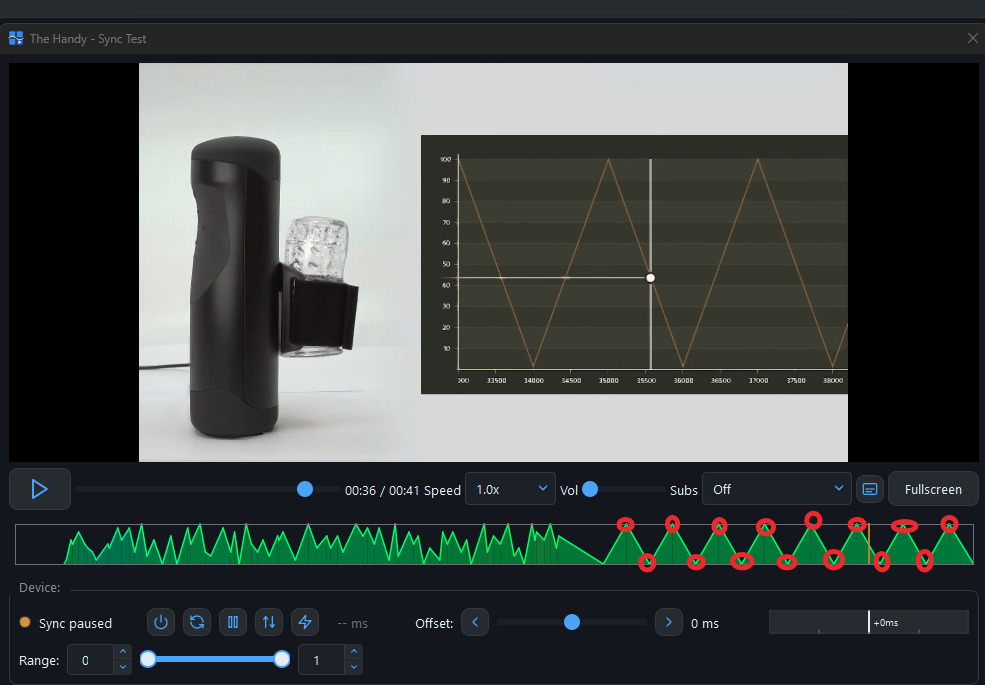
So I tried the built-in intiface integration to sync my Lovense Solace Pro but there seems to be an issue on slow parts of the scripts.
So this is how the heatmap look like
sounds strange, can you please send me the test video with the test script?
Found the bug!
On slow funscript movements, the oscillation speed was calculated using a clamped 400ms duration instead of the real duration.
So a 2-second slow stroke was being treated as a 400ms fast stroke — causing the Solace to suddenly speed up at slow parts.Fixed in the next version.
The speed calculation now uses the full movement duration for oscillator devices (Solace, etc.).
This should eliminate the random fast strokes during slow sections.