Figure anything out? still seems busted to me, and I wanted to try the library functions
How long is the daily challenge open. I waited all day to play and now its not available. It say 21hr till next one.
Hey buddy, we had a problem with the cron job running which didn’t update the new daily challenge. This has now been fixed so you should be able to see the new daily challenge. Let me know if you have any problems.
Hey buddy, I have gone in and done some testing but it seems to work my end. As you mentioned you had it working previously I’m not sure what the issue is. I am using a MacBook Pro on Google Chrome with the latest version of interface Central. Here is a video that might help with some troubleshooting:
Please let me know if you get it working. Many thanks, Ed.
This site has come along way since its launch. I’m not too interested in the AI control at its current pricing, so I stick with the video player.
Couple things I’d like to see in the player.
- Heat map above or below progress bar to make it easier to find certain parts of a script.
- Recognise when space button is press on keyboard to pause the video
- Add more “finish” buttons. I would like to add custom buttons to trigger custom actions. Like a slow button, fast, pause and finish. The a return to video script so it returns seamlessly to the script for the video.
1 Like
Amazing feedback, thank you. As for the AI control, as time goes on the API costs for the AI should hopefully reduce and in turn I will be able to reduce the costs associated with it.
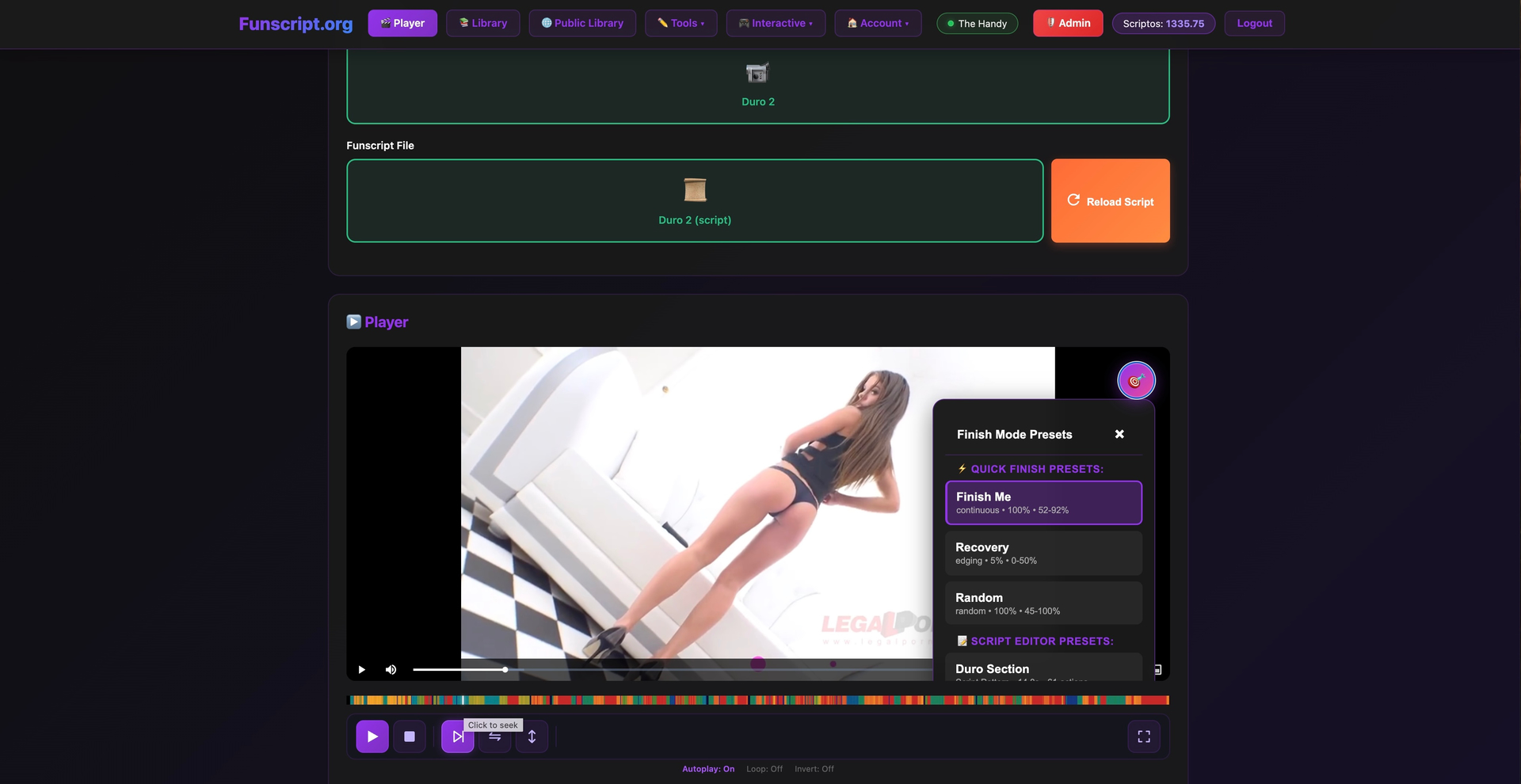
I have now added the heat map below the video in the player, you. can also click on areas of the heat map to move directly to that section of the video/script.
I have added spacebar functionality for play/pause, also changed the 2 buttons (Play and Pause) into a single reactive button.
As the platform uses Pjax to keep devices connected across pages, you may need to clear your browsers cache or do a hard refresh in order to see the changes.
As for the multiple finish mode buttons I am trying to get my head around the functionality as on devices like the handy it will over rule the funscript meaning you need to reload the script for video/script playback after switching to finish mode.
You can hold the finish mode button to see and switch between finish modes at present which keeps the video player clean. I was thinking of adding some more buttons but would like to decide on what would be most beneficial.. Things like:
disable script actions - so the video would keep playing but it would disable the device/script as a recovery method, then when un-toggled the device would start up again..
Reduce intensity - this would automatically reduce the stroke range by 50% etc..
This are all ideas but I want to know what the users want before making significant changes to the UI. So any ideas are welcomed.
Thanks again for the feedback.
2 Likes
Great work, especially on the heat map and space bar, two things I missed the most from using other players.
The AI cost is exactly what I expected as a response. AI costs are slowly coming down across the board, but demand is high and hardware is trying to keep up. It’ll get there eventually.
I experienced a bug during the daily challenge yesterday. It got stuck trying to load the next rounds script and I had no way to help it, so had to abandon the challenge.
Thanks for reporting that, we tracked down the issue: when a round’s script failed to sync to your device, the system had no timeout and no way to recover, so it just got stuck on “Syncing round to device…” indefinitely. We’ve fixed it by adding proper timeouts and a retry/skip option, so if a sync ever fails now you’ll see a “Retry Sync” or “Skip Round” button instead of being stuck.
If you run into any other issues, please let me know!
Hi,
I have a few feature ideas that I think would be fun
Manual Handy Control (like Handverse / Wingman)…I’d love a dedicated manual control mode for The Handy with different presets for speed, stroke length, and patterns. It would be even better if users could save their own presets or use community-created random patterns designed specifically for edging and tease & denial sessions. This would make longer, more varied solo play much more fun and customizable.
Multiplayer games & challenges…multiplayer functionality is really exciting and could add a fantastic social layer to the site. The current multiplayer game is a cool start, but it’s hard to tell if anyone is actually waiting in the queue, which has made it impossible to find a game for me at least.
Some rough ideas…
A visible lobby or queue system that shows how many people are currently waiting, along with their preferred script intensity or device type.
Simple real-time multiplayer modes, such as synchronized play (both users following the same script at the same time) or competitive modes where users race to complete a script or hold out the longest.
I’m sure others might have even better ideas!
Thanks for making an awesome platform!
I may be tripping here but sometimes the heatmap on the public library video thumbnails don’t seem to always match the video/scripts actual intensity as well as the avg speed… I may be alone in this feeling?
Thank you for your suggestions. We have just run a massive upgrade on cruise control which should give you much more flexibility for manual control.
Please see the video demo here: Cruise Control.mov
We have also added a games lobby. This is a work in progress which we will be updating, but it will definitely help orchestrating a game between two people.
Please see the video demo here: lobby.mov
Thanks again for the suggestions.
As for the heat map, this is automatically generated based off of the script so it should be 100% accurate. Obviously it is going based on actions across the whole script so some scripts may be long but have sections with a lot of actions such as vibrate scenes et cetera. This can make it seem different from what you may expect.
1 Like
Wow…overnight! You’re awesome, thanks for getting them out so quickly!
On the heatmap - that’s kind of what I thought it was haha
1 Like
Just wanted to let you know what amazing work you guys are doing at your website. I decided to try it on my day off and I really like the results!
Really impressed by the memory recollection in your AI-conversations!
It all takes some time to set up (im not great at tech), but once set up, it really delivers 
Keep up the good work!!!
2 Likes
Thank you so much for those kinds words, it really means a lot to me.
1 Like
Couldn’t agree more with @misterenigma excellent work.
I do have another feature suggestion… An intensity slider/dial like theedgy.app has that allows users to dial back the stroke range of the script from full to 1%. Being able to consistently stay on the edge without having to pause the video/script would be another great addition.
Hopefully this would be an easy add. Thanks for the great platform!
1 Like
Hey buddy, again, thanks for the kind words. I have taken on board what you requested and have added a reset option to cruise control. Just about to post a video about some of the new updates. I will take a look at somehow adding stroke control. Thanks again!
Here is a quick update video showing some of the recent updates that have been added like script requests, cruise control reset, AI studio and the script editor.
1 Like
Quite excited about this bro, im new to scripting and have done a few scripts now, and my advice is keep everything easy to understand and it should be great, im excited about that insert preset function that would really be a stress free way of doing 10-5 fast bj ec, one thing id reccomend sorry about my spelling it a 1 week free premium for newcomers to try it out and if we like it we will buy premium. Congrats on this bro, question i have hp chromebook will it work ?
It’s great to hear your excitement about scripting and the features we have on the platform! The Save Selection as Preset function is definitely designed to streamline your workflow, making it easier to reuse motion patterns, which should help with those quick and fun scripts.
Regarding your Chromebook, absolutely! Funscript.org is entirely browser-based, so as long as you can access a supported browser on your HP Chromebook, you should be good to go. Just connect your device, and you can dive right into scripting and enjoying your content without any installations.
As for your suggestion about a trial for newcomers, we did think about that but have found in the past people abuse this by creating multiple accounts which starts clogging up the system with inactive users. As of this we decided to keep the subscription as low as possible and to give scripters the oppertunity to earn scriptos by fulfilling script requests, further down the line, we will be introducing subscription by scriptos.
It’s always great to hear how we can better serve the community. If you have any specific questions while you’re scripting or exploring, feel free to ask!
Great work on the site. The videos are very helpful too. After joining as a premium member and playing around with the site for a couple of days I had some suggestions.
Library
- The ability to sort by name, date added, length, rating, play count, intensity, etc. I’m a little surprised this isn’t already present as this type of filtering is common on any video platform and is sorely missed here.
- The ability to bulk import. Point at a directory and import everything in it. As an option use the filename as the title of the video. Adding videos one by one is painful. After pointing to a directory and then selecting import, it could show a list of three columns; The left column would contain all the videos, the middle column (across from each video) would be the highest matching funscript (with the ability to select a different one), then on the right column would be the thumbnails. This would greatly speed up adding a large library of videos.
- The ability to edit the name of a video in the library
- Sometimes, after adding a video (eg, MP4), it will not generate thumbnails and therefore cannot add the movie to the library. I think I’ve added 30 or so videos to my library and so far 5 have not been able to be added because they could not generate thumbnails. Note, these videos play fine using Heresphere, VLC or any other video player I tried.
- I’d love the ability to add videos from the Public Library to my personal Library. I realize the videos and funscript files would stay remote, I just want to see those videos appear in my list when I go to my Library.
- In the Public Library, when I click on either ‘Favorite” or the heart icon nothing happens and my choices are not recorded. I’m on Chrome 148.0.7778.217
Player
- Editable single key keyboard shortcut for all player functions. I’m using my Quest 3 VR headset connecting to my desktop with Chrome over Virtual Desktop. Some things are difficult to accomplish with the controller, like skipping forwards/backwards. Using the Quest 3 with Heresphere video player I can just tap the joystick button left or right to skip forward or backwards. It’s possible to run a program on my desktop to convert the controller buttons to keyboard buttons, so if keyboard shortcuts could be added to all of the player controls then VR controllers like the Quest would be better able to use the player controls. Shortcuts for play/pause, skip forward/backwards, speed up/slow down, full screen, exit full screen, etc
- It’s difficult to select any of the player controls with the Quest controller as the player controls are so small. Larger controls when in full screen would be helpful.
- Buttons to Jump Forward and backward (maybe 30 seconds forward, 10 seconds back)
- Allow for playing a video even if the Handy is disconnected
- Option to show the heatmap when in full screen and be able to click on the heatmap to go to that part of the video
- When playing a video and you are loving how the pattern is doing its thing, I’d like to have a button that when pressed will then automatically loop the last (10, 20, 30?) seconds of the video. Basically, when you hit a part of the video that is absolutely blowing your mind and you just want it keep doing that section until you tell it to stop, the player could have a button that when pressed will start looping the last 10, 20, or 30 (maybe press once for 10 seconds, twice for 20, etc) seconds of the video until told otherwise. To get it to stop it could generate a ‘STOP’ button next to the LOOP button when the loop button was pressed. In the Heresphere video player for the Quest 3 you can do this but it is a bit clunky; as the video is playing you have to press and hold a button and press up on the thumbstick at the same time to start the intro point then press the same button and then down on the thumbstick to set the out point, then it will loop b/w those two points. That gives finer control over exactly where the loop starts and stops but is a mood killer to have to find and scrub through the timeline to set those points. If you are worried about cluttering the interface you could make them show they only show if you hover over the top/bottom of the player window
- When in full screen mode, I find it difficult to get the exit button to pop up. Sometimes it does but sometimes I have trouble getting it to appear
- As others have been requesting, more ‘finish’ modes. Something like the below would give 5 finish presets. Perhaps keep it in the upper right but only make it visible when the mouse moves up in that direction. Or maybe only keep the central button visible but when the mouse moves up towards it the outer 4 buttons become visible.

- Save segment as preset. There have been a number of times when I’m watching a video and the script just does something that blows my mind and I think, “I’d like to save that segment as a preset”. I know you can do that with the script editor, but I’d like to be able to do that on the fly in a couple of seconds as the video is playing without leaving the player because in the past I find that I either forget where in the video that was, what video it was, or I just totally forget about it. Here is how I would envision that working:
A video is playing, the script changes to something that, say, 3 seconds in you realize is amazing and want to save as a preset. You click the ‘save preset’ button and then it looks backwards and forwards 10 seconds and it sees, “hey, looking back 10 seconds the script changed to this current pattern the player is playing 4 seconds ago so I’ll discard the 6 seconds previous to that, and looking forward 10 seconds it sees the current pattern continuing for the entire 10 seconds. So it has that pattern isolated and saves it as a preset. I don’t know how difficult it would be to implement this but it would be pretty awesome. Alternatively, if isolating the pattern would prove too difficult, if there was a way to set a marker as the video is playing so that when I do come back later I can open up my ‘Saved Markers” and it will show: Marker 1 saved at 18:37 in Video XYZ, which would make it easier for me to remember, find, and then create the preset.
Thanks for listening, keep up the good work!