How is the update process? Do I need to completely replace the old version and add the api keys again?
Yes, I would suggest replacing the old files but you can keep your API key file as-is, then:
- Copy ApplicationFullPath from your old file to the new .override.config in the root folder:
  "SharedObjects": [
    {
      "$id": "TranscriberToolPurfviewWhisper",
      // Remove '//' on next line and change [TOREPLACE-WITH-PathToPurfview] to the path of SubtitleEdit\Whisper (with '\' doubled => '\\').
      "ApplicationFullPath": "D:\\OthersPrograms\\SubtitleEditor\\Whisper\\Purfview-Whisper-Faster\\faster-whisper-xxl.exe",
    },
and replace ‘???’ in the subtitles to inject in the same file.
1 Like
Sorry, I am not entierly sure what you mean with that.
I mean this part where a subtitle is injected in the final .srt.
    {
      "Id": "final-ai-srt",
      "SubtitlesToInject": [
        {
          "Origin": "Start",
          "InjectInAllFiles": true,
          "OffsetTime": "00:00:00",
          "Duration": "00:00:10",
          "Lines": [
            "Created by ???, using the FunscriptToolbox and SubtitleEdit.",
            "Using AI with manual review to improve accuracy and quality."
          ]
        }
      ]
    }
1 Like
A lot of my subtitles after using the workflow contain “Ah, …” at the beginning. Do you edit them out / reduce them manually afterwards or how do you handle that?
I didn’t really notice that so far.
It could be how you set your timings in .manual-input.srt. You might want to try to ‘cut’ the Ah part. But, after having checked a few ‘Aah’ line in the subtitles you mades, I think it’s also a Hinako Mory’s thing. For the line I checked, she really seem to like to start her sentence with Ah.
1 Like
I really appreciate all the work I’ve been able to get a lot of decent subs from your setup.
Question though, how do you update from version to version? I often set config options and tweak things, but when updating the config files can be setup differently, with new options right. So when updating I’m unsure if I typically can just rename my old config file to the new name, thus preserving my changes.
Painfully? 
In theory, the .override files should have been the ‘user’ files that you would be able to keep from version to version. In practice, I always made important changes in those files too.
I might add another layer to the override at some point: .user-override.json.
Right now, I would suggest restarting with my latest file and trying to reapply your changes in them.
The good news is that I feel the process is now stable, so I don’t plan to make changes in the near future. You should be able to keep tinkering with your config ‘in peace’ for a while.
1 Like
I just hit a pending time of 2 hours with my batch request, it’s getting ridiculous 
edit: I think either the Google servers are down or there is something broken 
I found this GitHub - meizhong986/WhisperJAV which produces decent results and is also pretty easy to use and lower effort.
2 Likes
This tool is incredible, I plan to share more here once I’m done with my first translation (I chose HUNVR-077 which is like 4 hours, probably a bad idea).
I think I’m close to being done with the singlevad-ai-refined job that pairs the initial translation with the screenshot (I think).
But I’m getting stuck on the same chunk because Google keeps spitting back this:
The answer received from the AI doesn't look like JSON:


PromptFeedback.BlockReason: PROHIBITED_CONTENT
PendingTime: 00:09:19.0016432
RunningTime: 00:07:59.5913913
InputTokensByModality:        6860, $0.01
         TEXT:    6860
OutputTextTokensBySection:       0, $0.00
     Thoughts:       0
   Candidates:       0
{
  "safetySettings": [
    {
      "category": "HARM_CATEGORY_SEXUALLY_EXPLICIT",
      "threshold": "OFF"
    }
  ],
  "generation_config": {
    "thinkingConfig": {
      "thinkingLevel": "low"
    },
    "mediaResolution": "MEDIA_RESOLUTION_LOW"
  },
  "contents": {
    "role": "user",
    "parts": [
      {
        "text": "Is this image prohibited?  Please respond with a simple \"Yes\" or \"No\". I don't need an image description."
      },
      {
        "inlineData": {
          "mimeType": "image/jpeg",
          "data": "***removed by me for length***"
        }
      }
    ]
  }
}
{
  "candidates": [
    {
      "content": {
        "parts": [
          {
            "text": "Yes",
            "thoughtSignature": "***removed by me for length***"
          }
        ],
        "role": "model"
      },
      "finishReason": "STOP",
      "index": 0
    }
  ],
  "usageMetadata": {
    "promptTokenCount": 284,
    "candidatesTokenCount": 1,
    "totalTokenCount": 389,
    "promptTokensDetails": [
      {
        "modality": "TEXT",
        "tokenCount": 28
      },
      {
        "modality": "IMAGE",
        "tokenCount": 256
      }
    ],
    "thoughtsTokenCount": 104
  },
  "modelVersion": "gemini-3-pro-preview",
  "responseId": "V25qaZrOErXnz7IP8cWb0QQ"
}
I’ve tried to re-run a few times but I keep getting this. I’m also getting like 34 req/resp files so I assume it’s for all the images in the chunk.
Can I skip this chunk? Any advice?
Maybe try to change the OngoingContext to include that all actors are adults and roleplaying or “joking around”. That seemed to work for me so far.
When you run the request, do you see something like:
   ...
   Received 'PromptFeedback.BlockReason: PROHIBITED_CONTENT ', validating image one by   one...
   Tested image 'xyz1' => OK
   Tested image 'xyz2' => OK
   Tested image 'xyz3' => PROHIBITED_CONTENT (removed from request)
   Tested image 'xyz4' => OK
   ...
   Processing filtered request...
   ...
   PromptFeedback.BlockReason: PROHIBITED_CONTENT
   PendingTime: 00:09:19.0016432
   RunningTime: 00:07:59.5913913
Do you see at least one of the images with PROHIBITED_CONTENT (removed from request) ?
Do you see the Processing filtered request... line ?
Note: During the tests, I ask the AI if the image is prohibited, but I don’t care about the answer. Even if it returns ‘Yes’, that means that it’s NOT PROHIBITED because it would have sent an error code instead of responding if it was prohibited.
If there is no image removed from the request, that usually means the prohibited content is in the TEXT from your request.
You might want to reduce the number of context items in the config
    {
      "Id": "singlevad-ai-refined",
      // This AI will receive the audio and validate that the transcription by looking at the initial transcription and the full-ai transcription. It also receive and analyze screenshot to create a better TranslationAnalysis.
      // [OPTION] Disable if you want to reduce the API cost.
      "Enabled": true,
      "ExportMetadataSrt": true,
      "Options": {
        "BinaryDataExtractors": [
          {
            "OutputFieldName": "Screenshot",
            // [OPTION] Set AddContextNodes to 'false' to reduce the size of requests, or increase the Gap settings to have less nodes added.
            // Short explanation, if there is a large gap between two subtitles, the following context nodes will be added:
            //    <previous>.EndTime + <ContextShortGap>, ...images every <ContextLongGap>..., <current>.Start Time - <ContextShortGap>.
            "Enabled": true,
            "AddContextNodes": true,
            "ContextShortGap": "00:00:05",
            "ContextLongGap": "00:00:30"
          }
        ],
        // [OPTION] Increase the batch size to reduce the number of request but it also mean that there will be less 'thinking' time allocated per node.
        "BatchSize": 16,
        "BatchSplitWindows": 2,
        "NbContextItems": 15,
        "NbItemsMinimumReceivedToContinue": 1
      }
    },
Try using:
        "BatchSize": 8,
        "BatchSplitWindows": 2,
        "NbContextItems": 0,
I’m kind of curious why your request is censored. I haven’t had any issues with censoring with version 2.1.1 so far.
If you could also link me your ‘.wipsubtitle’ file in a direct message (zip it, then add “.txt” at the end of the file => ‘HUNVR-077.zip.txt’), I could debug it on my machine.
Hmm, I’m not getting back any PROHIBITED CONTENT results so sounds like it may be the text.
I’m rerunning the batch with your suggested params now. I’ll follow up with my results.
I’ll DM you the .wipsubtitle file here as well.
Thanks for the help!
I did some tests. Gemini didn’t seem to like this translation analysis in the context:
“TranslationAnalysis”: “Speaker: Background Girl (Right/Nene).\nShe breaks the fourth wall or addresses the group/man. ‘Sainenshou’ (The youngest one) refers to Noi (Center). She’s framing the scene as a spectacle: ‘Everyone wants to see how the youngest one fucks, right?’\nOption 1 (Voyeur): You want to see the youngest one in action, right?\nOption 2 (Direct): You want to see the youngest one’s sex scene, right?\nOption 3 (Teasing): We gotta see how the baby of the group does it, huh?\nOption 4 (Meta): Everyone wants to see the youngest girl, right?\nOption 5 (Simple): Want to see the youngest, right?”,
Usually, in the parts that you control, try using “woman” instead of “girl” (i.e., “The girls are POV-man’s friends” in OngoingContext). But, once the term “girl” starts being used in the translation analysis, changing the OngoingContext won’t fix the problem.
I was able to complete the request with "NbContextItems": 0. You might want to change “girl” for “woman” in OngoingContext. Run the request with NbContextItems to 0. I suggest waiting for it to finish the first request, then cancel Q the next request, and change the value back to 15.
I noticed another issue in your wipsubtitles file, and I believe it’s a bug in the default configuration that I will have to fix (i.e., some steps depend on visual-analysis instead of singlevad-ai-refined, which might cause them to run even if singlevad-ai-refined is not completed).
In your case, the following steps are already marked as finished: voice-texts, translated-texts_maverick, finalized_maverick, and final-ai-texts.
To fix this, once singlevad-ai-refined is done.
- Backup your
.wipsubtitlesfile, just in case. - Open the
.wipsubtilesfile in Notepad++ (or something similar). - Find all instances of
"Id": "in the file, you should get something like this:
4.Double click on the line forvoice-texts,translated-texts_maverick,finalized_maverickandfinal-ai-textsand add-BADto the end of the id. - Find all instances of
"Id": "again, you should get:
- Save the file. Rerun the application and those steps should run.
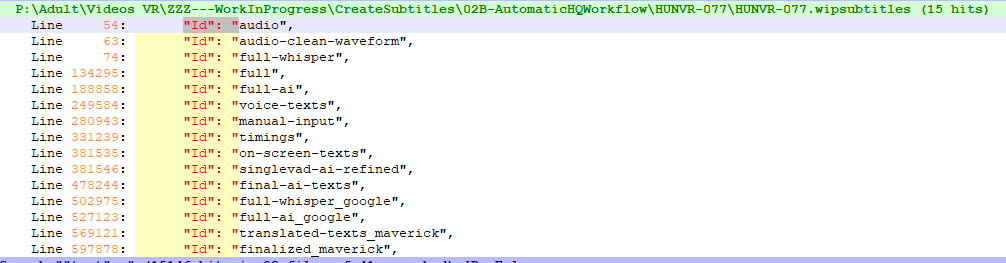
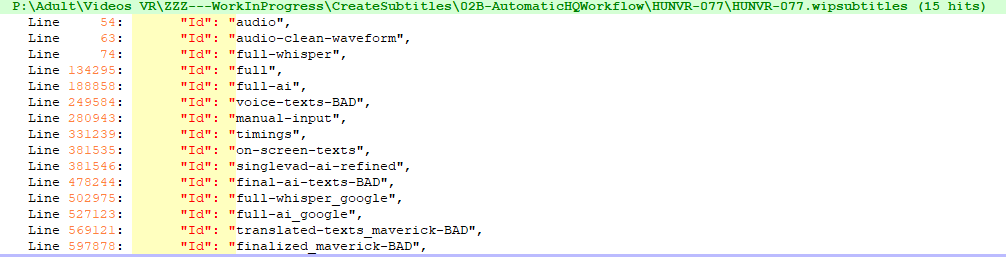
1 Like
Thanks @Zalunda! The tip on girl vs woman makes sense and yes, changing those configs as directed let me finish the singlevad-ai-refined job. Good things to keep in mind for my second video.
I marked the other processes as OLD which let additional jobs run but now that those are done I don’t have any additional .srt files in my project folder.
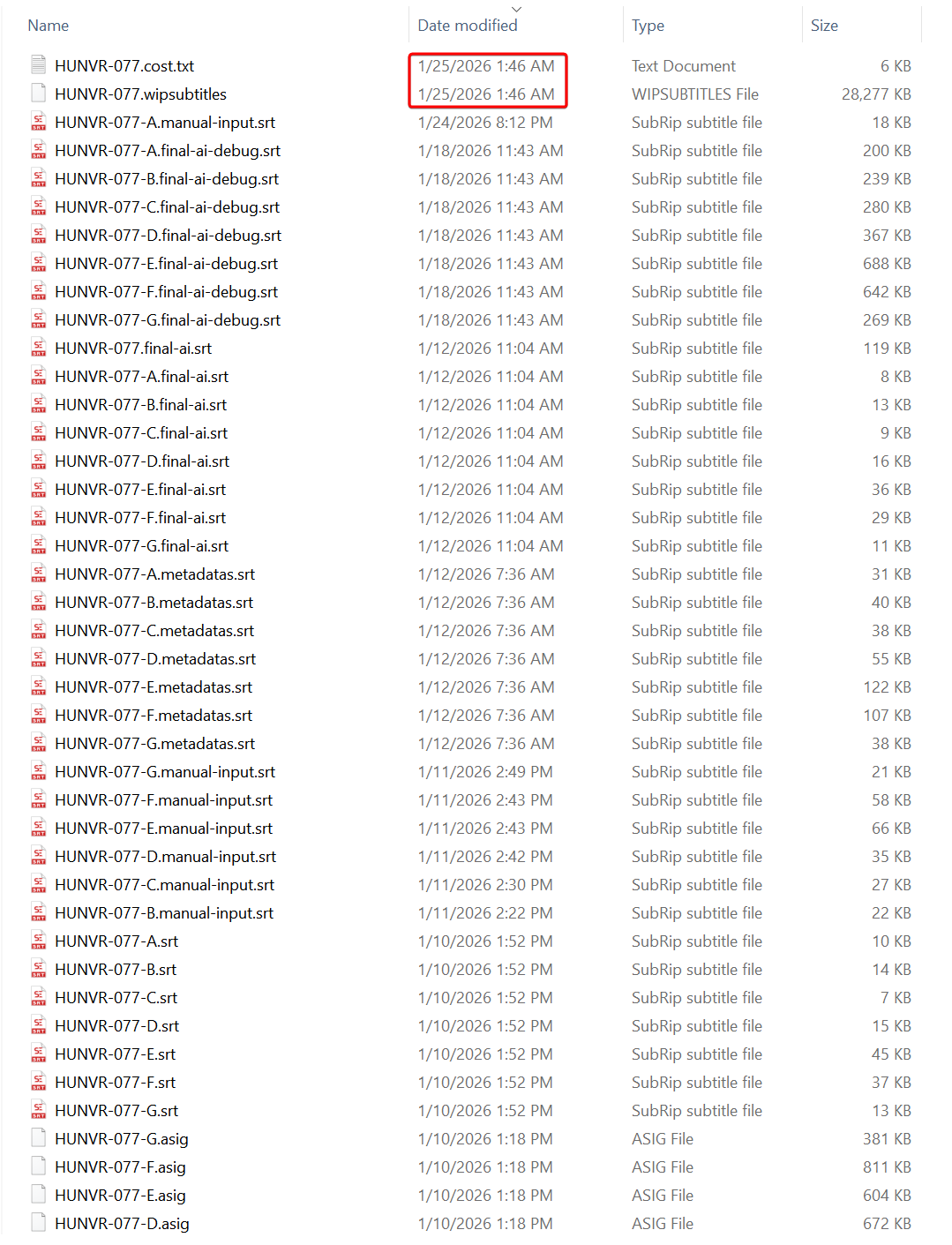
Wondering if it’s something to do with the noted processes below running too early? Having trouble tying back to the docs now. I also don’t want to mess up my project files.
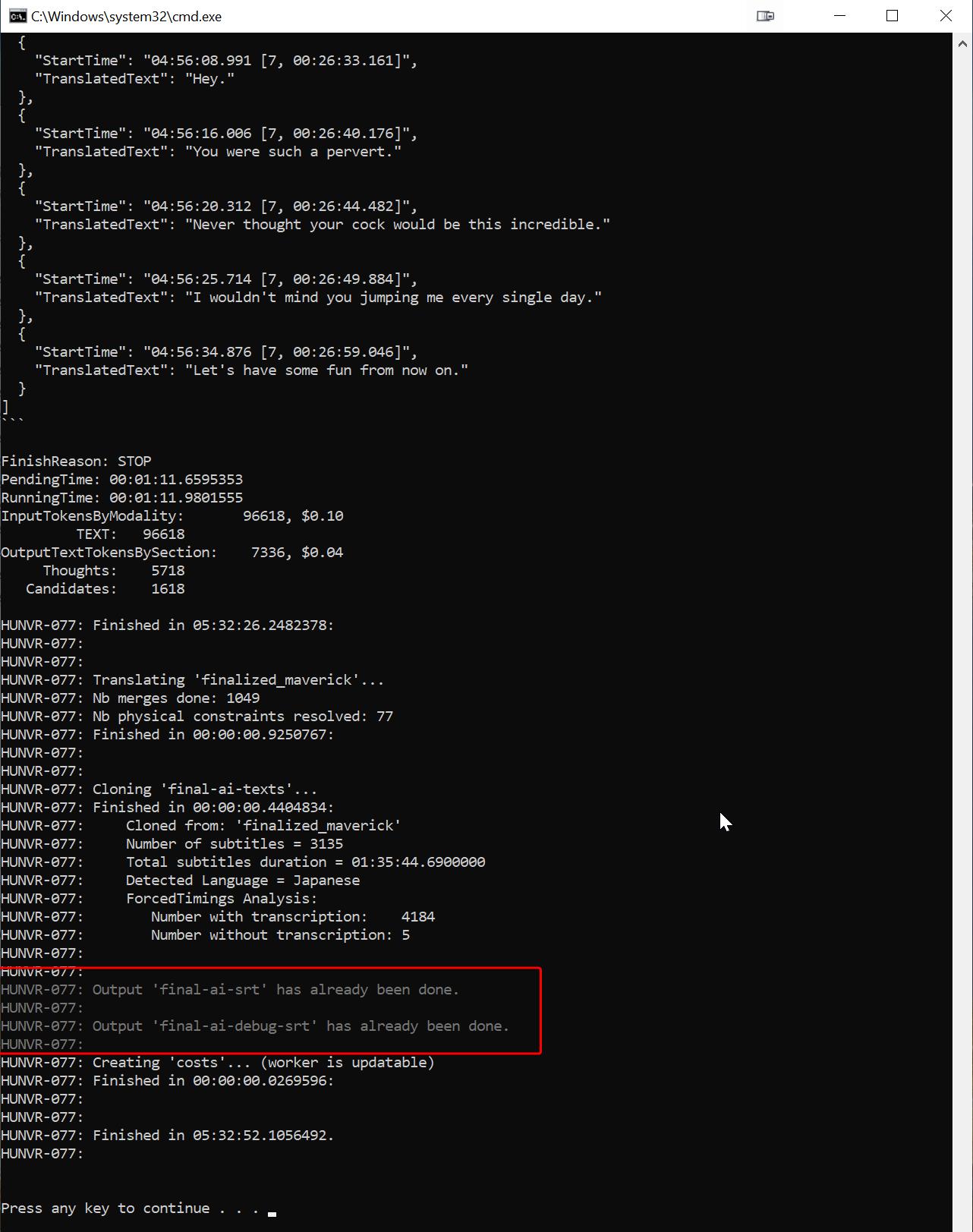
Ok, yes, you just need to delete all the .final-ai.srt files that were already generated, then rerun the application.
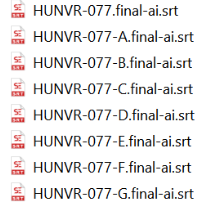
1 Like
That worked! Thank you for the support and the awesome tool!
Saw your comment on the original upload - thanks!
Hey @Zalunda, thanks for creating this tool. I’ve been trying it out quite a bit these past couple days, but I’m a little confused by the instructions on the Github Wiki starting around step 4. It says the tool will run multiple workers to create multiple translation versions and at the end use an arbitrer to put it all together. However when I run the tool, I believe it stops once it finishes doing singlevad-ai-refined.
When I looked through the GitHub release log, I noticed you actually seemed to have gotten rid of the arbitrer a while ago. That led me to assume that the final-ai.srt is now considered the final product based on your latest message in this thread. But the issue is that the final-ai.srt seems to be created well before the other workers finish running. And even when I delete them at the end and re-run the tool one last time to re-create them, I’m not sure if there’s a difference between the files. Is this normal? It seems that the singlevad-ai-refined and all the visual analysis stuff was not even utilized to improve the subtitles.