Currently multiple scripts per axis is not supported, but I want to add it some day.
You could set the dms match to selected only, and select the script you want to use in XBVR web ui, but that is very cumbersome.
I dont know the full context of that comment, but if you are creating a script in realtime then obviously having a 1s buffer will smooth things out as you are not creating points at current position.
Thank you for the quick response. Can you explain the difference between “MatchAllUseFirst” “MatchAllOverwrite” and “MatchSelectedOnly”? It seems like you are suggesting using the MatchSelectedOnly, I suppose MatchAllUseFirst just uses the first one in the list that XBVR sends via its API, but I don’t understand the overwrite option (what is it overwriting exactly?)
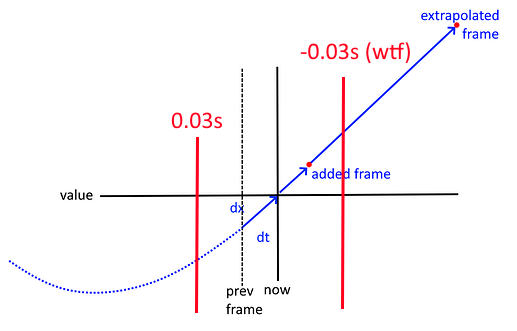
I’ve recommended to add 2-frame buffer (in the past, so there are always frames to use) to reduce jitter
Someone posted that that didn’t help, but adding a minus-2-frame buffer (in the future, where there are no frames yet so I extrapolate a point 1s in the future as if the speed is constant) gelped
I was like WTF
I’ve tried it
It helped
If you hover over the “?” it will show you a short description.
MatchAllUseFirst matches all scripts attached to the XBVR scene, and for each axis uses first one that matches, MatchAllOverwrite uses the last one that matches.
So if you have 3 pitch scripts a.pitch.funscript, b.pitch.funscript, c.pitch.funscript, MatchAllUseFirst will select a.pitch.funscript, MatchAllOverwrite will select c.pitch.funscript.
You can make it match b.pitch.funscript if you use MatchSelectedOnly and if you select it in XBVR web ui. Tho you will have to select scripts for all scenes.
Hey.
I have a quick question. Is it possible to “key-bind” the output range? i use the funscript player with VR glasses, and had to remove the glasses every time i wanted to lower, raise the stroke length, and it would be easier to just bind it to, lets say the numpad or something like that. If you understand the question?
Yes, open application settings at the top of the window and select shortcuts tab, capture numpad buttons and add a “button press” shortcut. Then expand actions tab and search for “range”, you can either set or offset the range minimum/maximum/middle/size, after assigning the action you can configure the set or offset value.
This is annoying (ik I can workaround but I fail sometimes)
2025-01-18 04:21:07.7233|ERROR|Stylet.BootstrapperBase|Unhandled exception|System.IndexOutOfRangeException: Index was outside the bounds of the array.
   at MultiFunPlayer.UI.Controls.KeyframesHeatmap.UpdateRange(Span`1 buckets)
   at MultiFunPlayer.UI.Controls.KeyframesHeatmap.Refresh()
   at MultiFunPlayer.Common.ObservableConcurrentDictionary`2.<>c__DisplayClass12_0.<NotifyObserversOfChange>b__0(Object _)
   at System.Windows.Threading.ExceptionWrapper.InternalRealCall(Delegate callback, Object args, Int32 numArgs)
   at System.Windows.Threading.ExceptionWrapper.TryCatchWhen(Object source, Delegate callback, Object args, Int32 numArgs, Delegate catchHandler)
2025-01-18 04:21:07.7233|FATAL|MultiFunPlayer|System.IndexOutOfRangeException: Index was outside the bounds of the array.
   at MultiFunPlayer.UI.Controls.KeyframesHeatmap.UpdateRange(Span`1 buckets)
   at MultiFunPlayer.UI.Controls.KeyframesHeatmap.Refresh()
   at MultiFunPlayer.Common.ObservableConcurrentDictionary`2.<>c__DisplayClass12_0.<NotifyObserversOfChange>b__0(Object _)
   at System.Windows.Threading.ExceptionWrapper.InternalRealCall(Delegate callback, Object args, Int32 numArgs)
   at System.Windows.Threading.ExceptionWrapper.TryCatchWhen(Object source, Delegate callback, Object args, Int32 numArgs, Delegate catchHandler)
   at System.Windows.Threading.DispatcherOperation.InvokeImpl()
   at MS.Internal.CulturePreservingExecutionContext.CallbackWrapper(Object obj)
   at System.Threading.ExecutionContext.RunInternal(ExecutionContext executionContext, ContextCallback callback, Object state)
Caused by negative keyframes or whatever
Could you please crash when I try to enter the invalid state by pushing bad keyframe or whatever
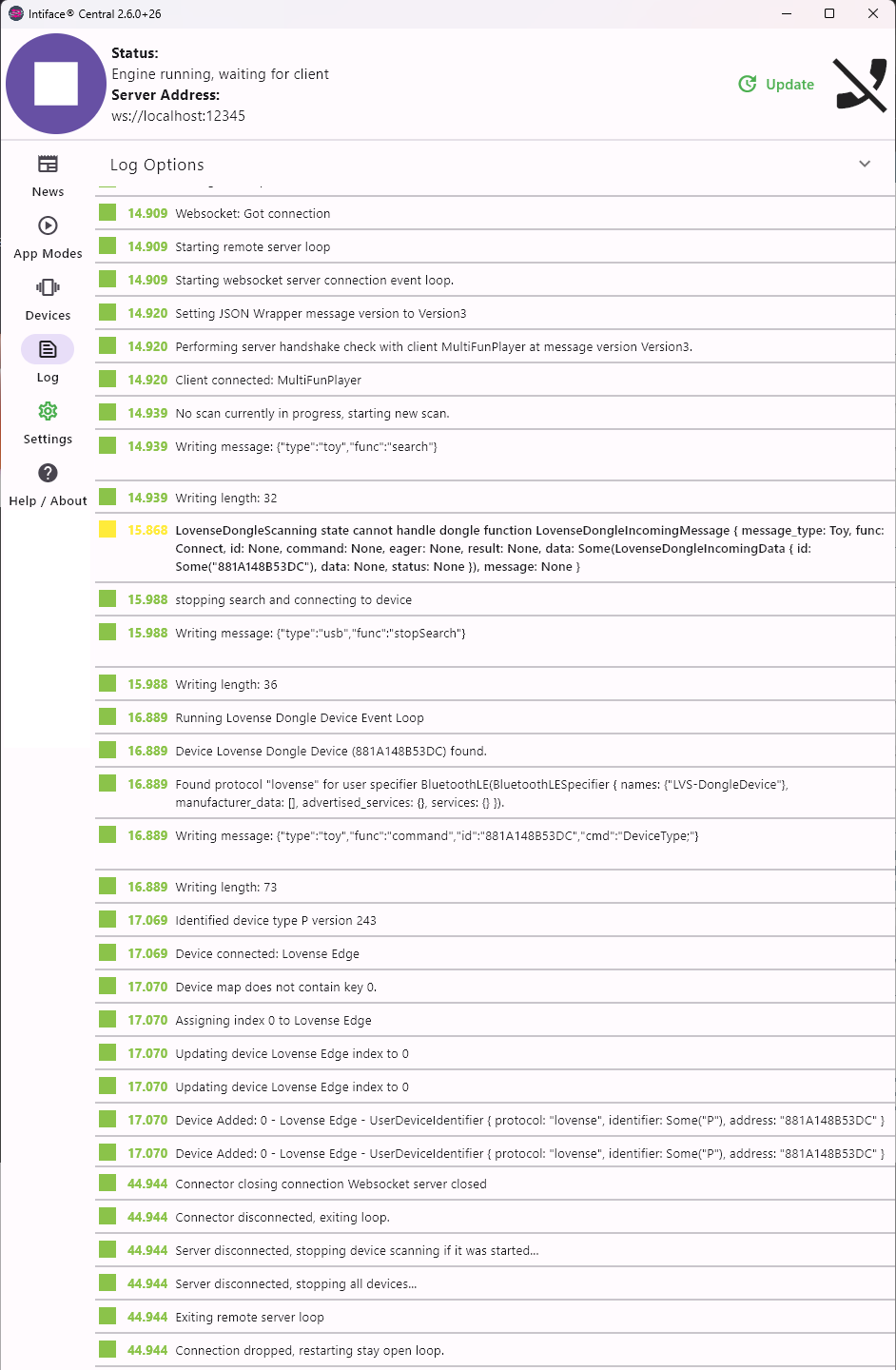
I’m having an issue where MFP won’t connect properly to Intiface using a Lovense Edge.
When I search for devices in Intiface to check, it finds the Edge no problem. Since I read in some thread that searching within Intiface and MFP clashes, I close everything, restart the toy, replug the Bluetooth dongle.
When I start Intiface again and start the engine, the light on the dongle becomes static. Next I start MFP. I managed to add V0 and V1 axes by cloning the TCode 0.2 device. When I connect to the Buttplug output, the light on the toy goes to static, so it does connect somehow. However, no output from the toy and after ~20-30 seconds the Buttplug output in MFP disconnects.
Thanks, but I mainly use it to connect to Handy via BT when their servers are acting up and there’s a thread somewhere around that advises against updating.
If you want to call it that then sure, the updates will be released on github eventually. Bugfixes still take time to implement, bugs probably take more time than features.
And I would not call buttplug support not existent, the bug is caused by one of the messages sent from intiface, and it is pretty rare. I could not reproduce this message on my PC, it should be sent mainly on android.
If you really want you can recompile MFP with the updated library, or maybe download latest Buttplug.NET dll and try replacing it, but not sure if MFP will start.
Being a SW developer myself I tend to agree. However, since a bugfix already exists, merging it into the free branch should be easy.
I’ll try what you suggested or just use an older version of MFP to see whether that works.