Thank you for the quick reply, I really appreciate it. Does such a plugin exist already or would it have to be created?
I’m assuming it would have to be created, sounds like you have a very niche setup.
Ok I see if I can find a workaround. Maybe I can run a local script that forwards websocket messages to MQTT…
I would not have thought of MQTT as quite so niche, given that its very prominently featured by xtoys and can be used to control all sorts of mains powered toys (like magic wands) and smart home devices.
If you want to write a script then might as well write a plugin, they are pretty simple and just C#/wpf. Here are some samples MultiFunPlayer Sample Plugins · GitHub
You would probably want to add a reference to some MQTT library dll.
Something like this (for latest MFP):
//#r "MQTTnet.dll"

public class Plugin : PluginBase
{
    protected override void OnInitialize()
    {
        //Initialize MQTT

        StartTask(async token => await PolledUpdateAsync(DeviceAxis.Parse("L0"), () => !token.IsCancellationRequested,
            async (axis, value, duration) => {
                //Send MQTT message
                await Task.CompletedTask;
            }, token));
    }

    protected override void OnDispose()
    {
        //Cleanup MQTT
    }
}
Problem with supporting MQTT is that the message format will be different for each device so there would need to be some way to define the message format, probably per axis. If buttplug does not support something I would call it niche.
Hi, is it possible to export a funscript file after setting up the autolink axis and limits?
I’m not sure what you are trying to do, what do you mean by export?
I use MFP to automatically derive three separate axis to use with Restim for the Pulse scripts, all from the main funscript. I’d like to be able to use your axis link features to generate these as funscripts. I know your current implementation probably does all this on the fly and doesn’t pre compute so I am not sure how feasible it would be to implement an ability to do so and export it as a funscript.
There is “File” output which you can use to save funscripts on multiple axes at the same time, but the output will probably require some postprocessing to sync it to video. It acts like device so instead of sending commands via serial/udp it saves them to funscripts, that means if you have auto-home, speed-limit etc. setup it will also be reflected in the output funscript.
Do you have info on what Runner or other bottle configuration you used to run it?
I’ve switched through a couple of runners
included the c++ 2019 runtime
.Net 8.0 runtime
But it still wont launch.
No idea, I just clicked stuff until it worked. I remember that checking vc++ and .net didnt do anything and i had to copy the dlls to MFP folder manually, maybe self contained version will run. Also try checking logs it might be crashing because it cant fina a dll.
Where is this file output option?
Bottom right plus button
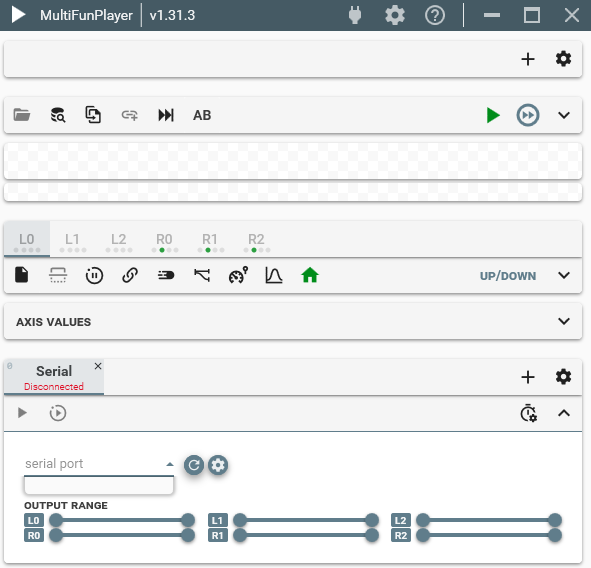
It does appear but you have no serial devices attached. Try refreshing with the button to the right, if that does not help then you might have to switch the cable and/or usb port.
SR1 2.00 is working fine with XTP and Signal Monitor, but no ports, including the relevant one, are visible in the dropdown menu.
Did you try refreshing the serial ports manually with the refresh button?
If you did then attach latest log file where you try to refresh the ports, maybe there is an error while searching for ports although that would be the first time I’ve heard it happening.
Also can you attach a screenshot from windows device manager, with the COM ports list?
application.20250621.2.txt (1.1 KB)
The logging function doesn’t seem to be working properly, and the situation is the same with other versions
It’s getting late, so I’ll come back tomorrow. Please don’t wait for my response.
Assuming you refreshed the ports in MFP then there was no error otherwise it would have been in the logs.
Can you open windows PowerShell and run Get-CimInstance -Namespace '\\.\ROOT\cimv2' -ClassName Win32_PnPEntity | Where-Object { $_.Name -match '\(COM\d+\)' } | Select-Object -Property Name, DeviceId, then post the output.
I fixed it by entering this into the CMD for now
net stop winmgmt
winmgmt /resetrepository
net start winmgmt