Seems to be something with .NET itself, whenever I open it there’s a notification to repair it. Then it doesn’t repair, then I open MFP and it tells me to install .NET, so I don’t even know.
I never seen .net require a repair so can’t help here. You could try uninstalling and reinstalling.
Also the self-contained version of MFP does not require .net installed so it should work for you.
Hi, I’m not sure if this is a bug. I don’t have it completely clear, but there’s something strange: when I’m connected via WEB and I move the browser window (Windows 11) of MFP to one side (to split the desktop into 2 — it also happens with 3 or 4), the video script stops syncing if I change scenes on the page I’m viewing. This does not happen when the window is maximized, only in this split-screen mode.
I’m not sure whether this is related to the browser page (local server) or to MFP itself. However, I don’t see any reason why it should be caused by the local server, since that only serves to pick and play videos, simply adding the name to fetch the script.
I could not reproduce this, I tested with FapTap and it all works correctly when split.
What is hosting the videos/scripts? What do you mean by stops syncing?
I would probably need you to DM me trace logs so I can see what is actually happening.
Hoping someone can help here. I can’t get DeoVR on my Quest 3 to play any scripts anymore. I’m running the SelfContained patreon 1.33.9 version and have tried both DeoVR 15.1 as well as reverting back to 14.6. MFP shows that it is able to connect (green connected) to DeoVR over 23554, but when playing a video, the script preview not only doesn’t show the heatmap, but doesn’t show the white line that marks the progress within the video.
I’m using XBVR as the repository if that matters. Even if it wasn’t able to pull a script, I would expect the white line to move across the progress indicator.
If I use VLC on the same Windows machine, MFP connects and plays as expected, it is just the DeoVR connection to MFP that is the issue.
The Quest 3, XBVR server, and my Windows machine are all on the same network segment. In my Windows firewall, I have allowed all inbound and outbound connections from the IP address of the Quest 3 headset as well as the XBVR server. I’ve cycled remote connections in DeoVR, restarted MFP and the Quest 3 100’s of times, released and renewed IP’s over and over again and just can’t get it to connect anymore. Any help to get this working again would be appreciated.
I’ve turned on trace logging, and here is what I believe is the relevant parts of the application log. In the middle of all the “keep-alive” messages, I’ve tried to play several scripted videos.
2025-09-27 08:58:57.4962|DEBUG|MultiFunPlayer.UI.Controls.ViewModels.ScriptViewModel|Resetting sync [Axes: L0, L1, V0, C0, P0, P1, P2, P3]
2025-09-27 08:58:58.0692|DEBUG|MultiFunPlayer.UI.Controls.ViewModels.ScriptViewModel|Resetting sync [Axes: C0]
2025-09-27 08:58:58.0692|DEBUG|MultiFunPlayer.UI.Controls.ViewModels.ScriptViewModel|Resetting sync [Axes: P0]
2025-09-27 08:58:58.0817|DEBUG|MultiFunPlayer.UI.Controls.ViewModels.ScriptViewModel|Resetting sync [Axes: P1]
2025-09-27 08:58:58.0817|DEBUG|MultiFunPlayer.UI.Controls.ViewModels.ScriptViewModel|Resetting sync [Axes: P3]
2025-09-27 08:58:58.6083|DEBUG|MultiFunPlayer|Bootstrapper OnLaunch
2025-09-27 09:00:13.9435|INFO|MultiFunPlayer.MediaSource.ViewModels.DeoVRMediaSource|Connecting to DeoVR at “192.168.242.202:23554” [Type: Manual]
2025-09-27 09:00:14.1198|DEBUG|MultiFunPlayer.Input.DeoVR.DeoVRInputProcessor|Waiting for incoming TCP connection [Endpoint: 0.0.0.0:38882]
2025-09-27 09:00:15.1193|TRACE|MultiFunPlayer.MediaSource.ViewModels.DeoVRMediaSource|Sending keep-alive to “DeoVR”
2025-09-27 09:00:16.1207|TRACE|MultiFunPlayer.MediaSource.ViewModels.DeoVRMediaSource|Sending keep-alive to “DeoVR”
2025-09-27 09:00:17.1208|TRACE|MultiFunPlayer.MediaSource.ViewModels.DeoVRMediaSource|Sending keep-alive to “DeoVR”
2025-09-27 09:00:18.1212|TRACE|MultiFunPlayer.MediaSource.ViewModels.DeoVRMediaSource|Sending keep-alive to “DeoVR”
2025-09-27 09:00:19.1143|TRACE|MultiFunPlayer.MediaSource.ViewModels.DeoVRMediaSource|Sending keep-alive to “DeoVR”
2025-09-27 09:00:20.1213|TRACE|MultiFunPlayer.MediaSource.ViewModels.DeoVRMediaSource|Sending keep-alive to “DeoVR”
2025-09-27 09:00:21.1199|TRACE|MultiFunPlayer.MediaSource.ViewModels.DeoVRMediaSource|Sending keep-alive to “DeoVR”
2025-09-27 09:00:22.1223|TRACE|MultiFunPlayer.MediaSource.ViewModels.DeoVRMediaSource|Sending keep-alive to “DeoVR”
2025-09-27 09:00:23.1224|TRACE|MultiFunPlayer.MediaSource.ViewModels.DeoVRMediaSource|Sending keep-alive to “DeoVR”
2025-09-27 09:00:24.1233|TRACE|MultiFunPlayer.MediaSource.ViewModels.DeoVRMediaSource|Sending keep-alive to “DeoVR”
2025-09-27 09:00:25.1235|TRACE|MultiFunPlayer.MediaSource.ViewModels.DeoVRMediaSource|Sending keep-alive to “DeoVR”
For DeoVR+XBVR you should not need any firewall changes.
If that is really the only logs from DeoVRMediaSource then it seems like DeoVR does not send playback information to MFP.
When did it stop working? It’s possible they disabled remote control for some reason like they did with Haptics Connect. Are you logged-in in DeoVR? If yes does you account have SLR subscription or did you buy a script with that account?
You can always try using HereSphere as it also supports XBVR/stash.
Thanks for your reply! It seemed to stop working around the time SLR went to 15.1 and messed with MFP.
I am logged into SLR, but wasn’t aware of logging into DeoVR, so I’ll try that. I do have an SLR sub with scripts and can’t get it to connect anymore either. That is why I went back to DeoVR 14.6, but still no go. I can’t get MFP to connect to HereSphere on my Quest 3 at all. I need to try and find documentation on how to configure it, because I haven’t found it on my own. Gonna start digging into my XBVR server to see if there is something there. Running 0.4.33 in a docker container and it was working previously.
SLR support was fixed in MFP 1.33.9.
If you are using older MFP maybe try setting SLR username and password to empty so it does not try to log-in. It’s possible that it stops working when you try to use Haptics Connect.
You need to enable timecode server in HereSphere settings.
It’s not XBVR problem, its just that DeoVR does not send any playback information according to your logs.
I seem to be back working now. I restarted my docker host and container, cleared the script repositories in MFP for XBVR and SLR completely and restarted MFP. Reconfigured the script repositories in MFP and restarted MFP again, and now things are working again as expected. Even SLR! Hopefully everything will continue to work in this state for a while.
I’ve got HereSphere working as a backup now! Thanks for letting me know about the timecode server setting!
Hi there. quick question about the MultiFunPlayer. If the script is perfectly synced, and i have connected via usb cable. have you found a sweet spot for the offset setting? i have it around -10, but i think it is a little behind the movement. Maybe its because i use the pchip interpolation. anyone who have found the perfect sync setting?
I just updated to 1.33.9 but I’m not having much luck, is there any trick to it?
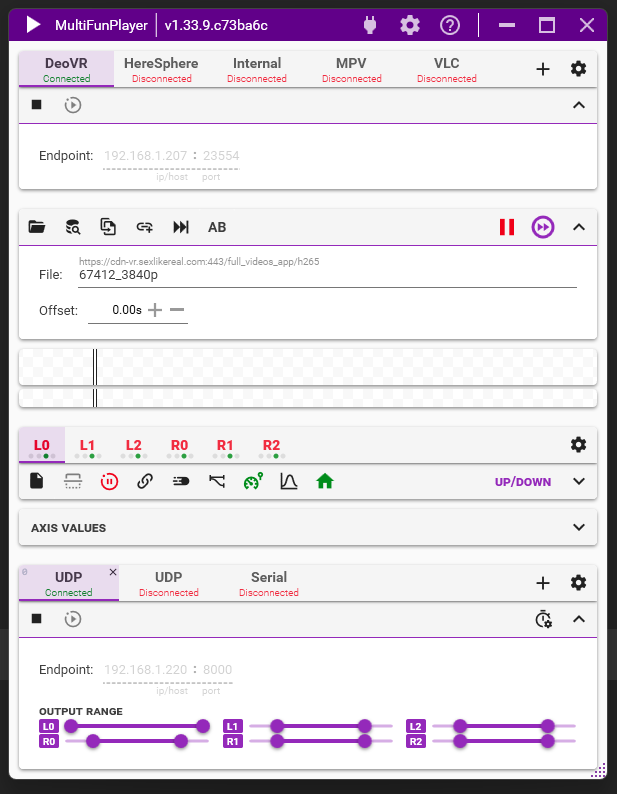
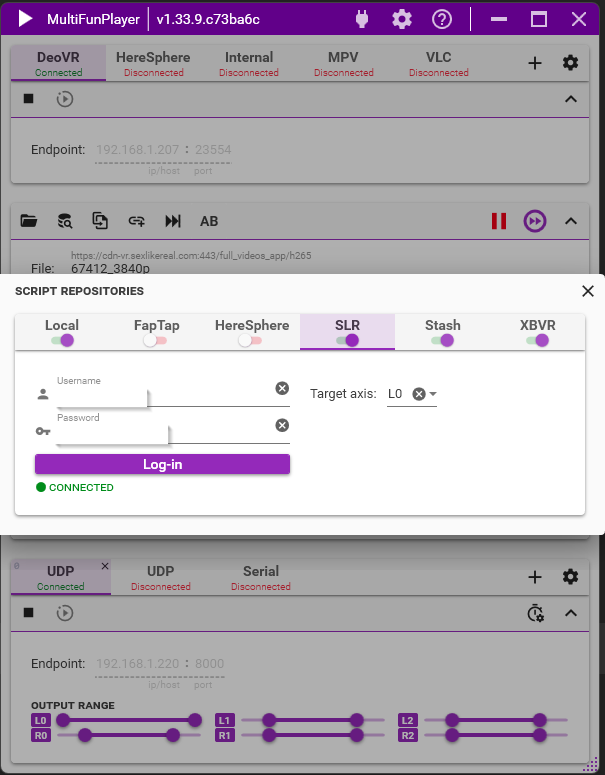
I’ve enabled the new SLR repository and sign into it, DeoVR is connected, Haptics connect is enabled in DeoVR, but when I play a video of SLR no script loads.
Here are some screenshots if you can see something wrong (yes I know all the axis are being bypassed while I was taking the screenshot).
This is initial implementation so there are some drawbacks compared to Haptics Connect:
It currently does not support script switching, the repository only selects the latest user made script and falls back to latest ai script if it cannot find one. The script switching will come in later MFP versions but it requires big internal changes.
Heatmap in MFP will load in chunks, but there is a full one visible in DeoVR.
Only stroke axis works for multi-axis scripts (SLR limitation)
DeoVR haptics toggle gestures don’t work since they require Haptics Connect
Scripts stored on VR headset will not be detected by MFP since they require Haptics Connect
If you had problems with SLR scripts not working on Quest due to firewall/VPN when using the old way then this fixes all of those issues.
Changelog:
Block plugins from accessing secure script resources
Add ability to toggle InPrivate mode in Web source
Add ability to export/import (copy/paste) shortcuts and shortcut actions (#195)
In previous versions script heat was always normalized, meaning the fastest section of the script was always red no matter how fast that section is, this version disables normalization by default and adds ability to enable/disable it. With normalization disabled script sections are only marked red if they are at or above 500 units/s.
Fix MPC source not responding correctly to play state changes causing no motion from scripts
Fix MPC source not resetting state when media file is closed
Fix XBVR/Stash not working in some cases due to endpoint check not resolving host names
Fix possible deadlock by compiling plugins only after the window is loaded
Fix missing maximize button in Web window
Fix main window padding when maximized
Limit number of heatmap preview updates caused by DynamicKeyframeCollection
1.33.5
Fix possible crash when using null to target all axes
Fix duplicate axis clear/reload actions
Fix Script::SkipGap action ignoring target axis
Fix Axis::Script::Reload and Axis::LinkAxis::Set actions not blocking until script reload is finished
Fire PostScriptSearchMessage before applying the scripts to allow plugins to modify the result
1.33.4
Support script invert and media playback speed when using PolledUpdate
Add ability to disable assigned shortcut actions without having to remove them
Add ability to search for local scripts from plugins
Add ability to load scripts from shortcuts actions
Improve randomness of random motion generation
Improve performance of heatmap generation
Change default Serial and UDP output settings to improve smoothness by adding some “additional elapsed time”
Fallback to default device when selected device has no axes
Remove CreateView from plugins and only load view from .xaml files
Fix Buttplug output PolledUpdate ignoring axis settings Enabled state
Fix broken interpolation preview
Fix exception when trying to schedule shortcut actions after disposing
Fix crash when disposing a plugin with registered actions
Fix crash when plugin throws exception during initializing or disposing
Fix crash when selected device is not found
Fix Axis::InvertValue actions migration
Fix cloned items in UI when using “move up”/“move down” buttons
Fix ability to set device axis name longer than 2 characters
1.33.3
Fix TCode commands sent without new line when using additional elapsed time
Disable Control-flow Enforcement Technology (CET) Shadow Stack, it was enabled by default in .net 9 but causes crashes on some systems
1.33.2
Additional patreon only changelog:
Fix FapTap repository not loading scripts for some videos
Changelog:
Add ability to stretch TCode move duration, can help with micro stutters caused by jitter
So, the last build available on Github is almost a year old now (v1.31.3). But i see this is still getting constant updates on Patreon (v1.33.10). Is this intentional? Every update post keeps saying this is a “timed” exclusive but how long does “timed” mean in this case?
I haven’t used the tool in a long while, just now came back to update it since i got a new machine and i noticed this. Is the new business model to hide all development from the public? Or is there a separate place to download from now? I’m not sure I understand.
 .
.