I’ve just deployed a fix for your case — the final action of some chapters was the same as the first action of the next chapter.
I also fixed another issue that could occur during script reading that making some actions not reeded.
2 Likes
I played around with the app the past two days and I am very impressed by the functionality, especially the option to change speed and amplitude on the fly opens so many possibilities. Great work.
There are two things that came up while testing it out.
- I wish there was a page where you could just have an overview of all patterns and click on them to play them individually. I created like 20 patterns I wanted to try out and basically had to move them all to a playlist, set the loop to a very high number and then scroll in the rather compact playlist panel to find the others. I also tried to create a playlist for each pattern, which quickly filled up the screen since the playlist panel as a rather large minimal size. Just a page that shows all the panel previews that are in the sidebar that can be clicked and played would be great.
- When playing vibrato patterns, the chart got out of sync very quickly and the handy would not stop even when clicking the stop button. It required me to unplug the handy and then set it up again which is quite awkward to do in the middle of things.
I assume this is because the frequency of actions is too high and might be the pattern’s/Handys fault. I am still not entirely sure on technical limitations. I work with 400ms max speed, 40mm min speed and 60ms minimal interval (all in OFS) but I feel like sometimes the handy can’t keep up.
Also, I keep having issues with Intiface and Firmware v4. Sometimes it just wont find the Handy.
I set legacy bluetooth via the Handy Onboarding app, then search for devices in Intiface and sometimes it will instantly find it and everything works perfectly.
Sometimes it won’t and earlier today I was just not able to fix it. Restarted all programs and the handy multiple times. Switched modes, Started/Stopped Intiface, reset device configuration but it just wouldn’t connect.
- I wish there was a page where you could just have an overview of all patterns and click on them to play them individually
That shouldn’t be too difficult to implement. I’ll take a look at it.
- When playing vibrato patterns, the chart got out of sync very quickly
Yes, that’s a limitation of using Bluetooth. I’ve added some settings to adjust for device limitations, but I’m still not fully satisfied with them.
I’ll probably add a frequency limit or a way to override vibrato sequences — I’m still exploring the best approach.
For your issue with Intiface and v4, try to etablish connection with the Handy very close to your bluetooth card, I have the same issue with my headset and I have to put it on my desktop case…
I’m still in v3 so I will update and make some tests
2 Likes
Indeed, the connection doesn’t work with V4, I have to switch the Bluetooth connection to legacy mode through HandyOnboarding.
However, the responsiveness of the Handy feels lower  , so it might be an issue with the V4 firmware, or maybe Intiface needs to update its Bluetooth protocol.
In the meantime, this message indicates that V4 is still in beta, so we’ll probably have to wait for the final release.

You can try using legacy Bluetooth mode and let me know how it works for you, or you can downgrade to V3 using this link: Handyverse
Well, I have to say this Bluetooth issue is pushing me to make the app work with the HSSP protocol, so it will work like FapTap or Handyverse.
With this solution, there will be no more Bluetooth need, and vibrato sequences will be back!
However, the latency sync issue will return, and I expect some “breaks” when switching playlists or overriding sequences, but I’ll experiment with this approach and keep you updated.
1 Like
I can definitely tell the difference between bluetooth and wi-fi apps. The delay in responsiveness is very noticeable. The seemingly seamless transitions between patterns in your app is amazing and something that I haven’t found elsewere.I am also using Syncopathy to play videos (Desktop app also uses bluetooth, but a direct connection to the handy without intiface) and the lack of delay makes it also great.
Too bad both connection types have their issues.
And yeah, I have been using legacy bluetooth for your app. I tried downgrading back do v3 in the past but the instructions did not work. If it connects, it works fine, but sometimes it’s a struggle.
For now, I will try to adjust vibrato patterns. It’s not the end of the world, it’s not like I can’t live without them,
Wow, I’m glad someone else brought up the performance issues with vibrato / high freq actions. I for sure have them with intiface + bt + fw v4 (legacy bt mode).
I didn’t bring it up partially because all I do is complain in this thread, and I felt bad about requesting so much. I was considering trying another possibly more performant device like funsr1.
But since we are on the subject, yes, my current setup leaves something to be desired.
To be clear, this vibrato-buffer issue is when a script with (I assume) too many actions per second fills up the Handy’s buffer (or is it intiface’s?). Idk where the buffer is, but it can fill up with quite a lot of actions, and presumably handy cannot play that back in realtime, so the actions accumulate. It can take quite a long time to clear out like 30s or more, wtf lol. While it’s trying to catch up, handy will do the buffered actions, and it will not respond to pausing or anything else. I guess it would be interesting to disconnect bt or quit intiface when it’s in this state. That would probably give a better guess for where the buffer is, not that it even really matters since it solves nothing. This test also would not even show where the bottleneck is…
On the bright side, I really love how fw4 can be configured to just start up in your desired mode (legacy bt in this case). That’s the main reason I haven’t switched back to fw3 – fewer things to do to just start using it. Also, it is possible that the bt in fw4 is more performant than v3, but I am not sure if any of those hypothetical gains are realized with legacy mode and the current intiface code.
Also, subjectively, I think the “feel” of fw4 is worse than fw3. I preferred the motion smoothing in v3, but that’s a documented and conscious design change on their part. I hope they eventually implement an option to restore that v3-like motion tuning in v4.
But v4 is the future, so I see two main options. I do not know which is more promising.
One is to implement “wifi” in fw4 like @Glavious is considering. The latency would have sucked ass in v3, but from my understanding, changing scripts is very fast in v4 now. If setting scripts and seeking around is not much worse than the current situation (legacy bt + intiface), then that is great assuming it solves the vibrato-buffer issue. I would test this out myself by manually loading a problem script in wifi mode in whichever player, but I’m traveling out of the country now.
The other option is to implement fw4 new bluetooth in intiface. I know nothing about that group, so idk if they would be willing to accept a PR given the unfinished state of the v4 bt API. we should first test on syncopathy (a player that implemented the new bt) or similar to validate that fw4’s new bt solves the issue on handy1 or at least provides some tangible benefit. It occurred to me that handy1 may or may not actually take advantage of fw4 bt compared to handy2pro for various reasons.
The vibrato-buffer issue mainly comes from Bluetooth limitations.
To put it simply: commands are sent to the device one by one, exactly when each action is reached during playback. There’s no buffering, as soon as the Handy receives a command, it executes it immediately.
If actions are too close together, the Bluetooth bandwidth becomes overloaded, causing unexpected delays between them. That’s why some other applications limit the maximum number of commands per second.
With the Wi-Fi & HSSP protocol, things work differently : we send the entire playlist (script) to the Handyverse service, which then uploads it to your device’s internal buffer. From that point, playback timing can be fine-tuned with latency adjustments and since the Handy knows all the actions to play, vibrato or fast sequences are no longer an issue.
I’m currently working on the Wi-Fi connector, and I can confirm that (with firmware v4) it’s looking very promising. I just need to handle a few edge cases, but I believe we’ll soon be able to fully use this mode and leave Bluetooth behind.
My tests with firmware v3 show that sending scripts to the Handy takes something like 4× longer, especially with large scripts. Latency can also be tricky to manage depending on your network connection.
1 Like
also if you want feel free to use Script Hosting For The Handy Devices [Self Hosting]
I made it when working on my Mac app, one of the reasons is I did not want to rely on a third-party for script hosting because I don’t know of their uptime and it’s a point of failure beyond my control.
Was just reading this reply and your use case is exactly the case where I put this out there in the first place.
Interesting stuff you’re bring here!
If I understand correctly, script hosting is only required when using the V3 API.
For now, I’m working with V2 exactly because of that. My first tests are good enough to tell me I don’t really need more than what V2 offers, but maybe I’m missing something.
In the long run, though, I agree it’ll probably be necessary to rely on some hosting service once the V2 API gets deprecated or dead. Plus there is this HSP stream protocol provided by the V3 that are calling me.
Thanks for sharing this 
1 Like
Both V2 and V3 APIs, as of writing this, work the same for accepting a script.
From what I understand, V2 and V3 HSSP endpoint both expect a publicly accessible script?
OhDoki provides their script hosting API, at the moment this self hosting approach also complies with the two main constraints that I see:
- a valid CSV of at,position points and a trailing line break (function here)
- publicly accessible URL to the script
Thanks for the details!
Just to clarify my point: I’m currently using the method setScriptFromData(...) from @ohdoki/handy-sdk@2.3.4 and it works without providing any public URL.
So in my case the script is sent directly as data, not hosted.
That’s why I said V2 was enough for me for now. I understand that the HSSP endpoint (both v2 and v3 style) is usually used with a publicly accessible script URL — and that makes sense for hosted workflows and bigger scripts.
But for script generation on the fly (what I’m doing in my web app), the “send raw script” flow still works with the current SDK, and I haven’t had any issues with bigger scripts either.
I agree that in the long term we’ll probably have to rely on hosting when the older v2-style flow is deprecated.
Ah, the SDK is conveniently handling the upload to their script hosting server, then provides the uploaded script to the Handy API server.
Here’s the documentation for setScriptFromData.
Excerpt:
Uploads the script to the server and prepares Handy for video sync by providing the device with an URL from which the script can be downloaded. This method will put your Handy on HSSP mode if it is not already
Oh, I haven’t used the SDK before myself, this is a convenient method, it uploads the script so it can be publicly accessed, and then download the uploaded script to the device.
To be honest, self-hosting the script hosting part is a niche thing anyway.
OhDoki have their script hosting API, the open source project above is to run your own script hosting API if it makes sense to your situation. It made sense for my situation to self-host this step for a couple reasons that are described in the main post about it.
edit:
I think it would help to separate two key concepts. From what I understand, OhDoki has a script uploading server (I think scripts passthrough a simple API that stores scripts on, I think, AWS S3), and the Handy API servers.
1 Like
Ok guys, I’ve done some updates to make it work with the “standard” connection.
I moved the connection options to the top toolbar, and added an extra parameter on the “The Handy” chip to set latency if needed. From my tests, latency isn’t always required but it depend on your connection speed.

All the features still work as before.
Because vibrato is back, I also added another segment override for slow parts, so you can either add a bit of vibrato, or just step it to avoid device limitations.

As you can see on the device emulator, extra commands are injected on slow segments 
@Stardust07 I didn’t forget your request about a page with all patterns:
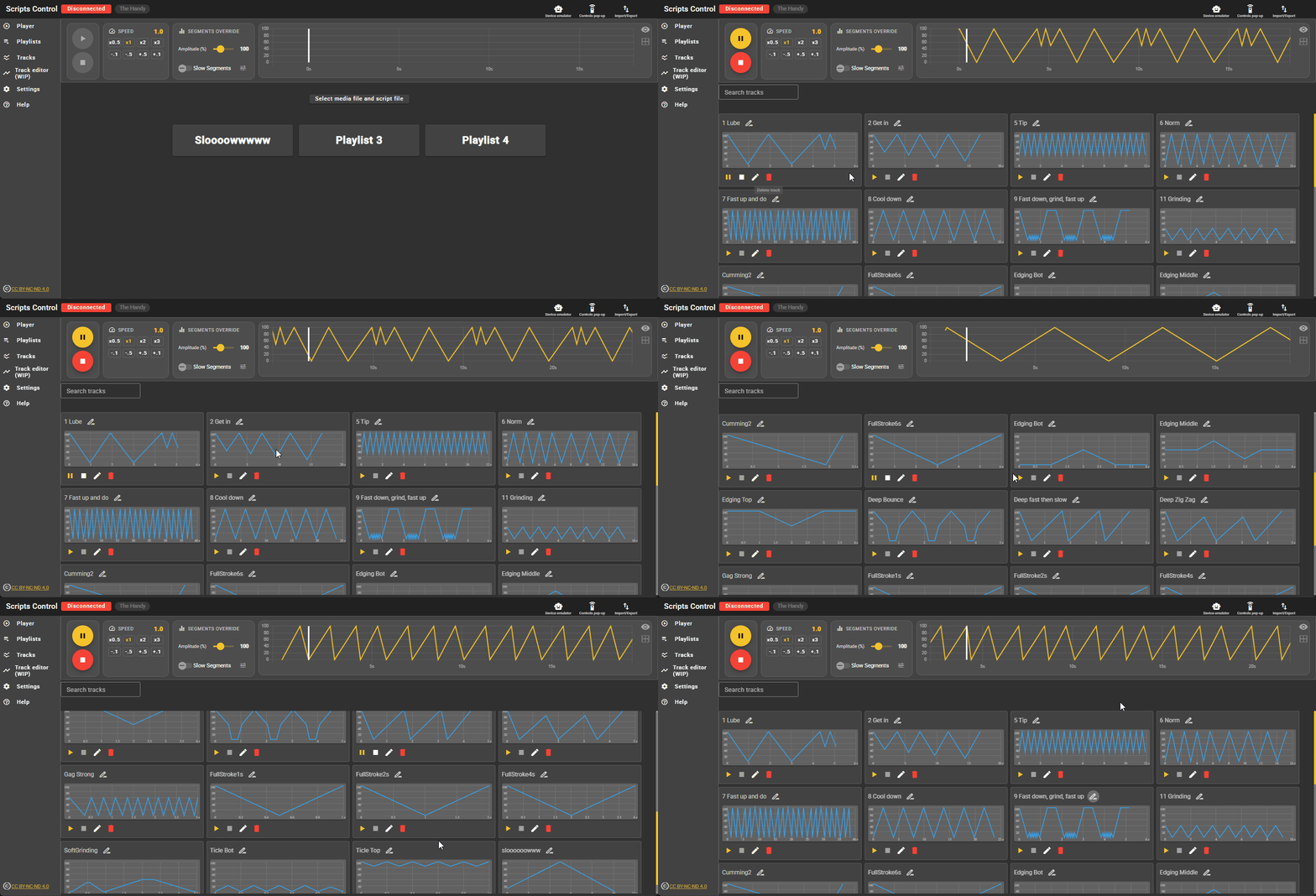
The only issue I still have with this setup is occasional device timeouts when changing/modifying the track. Not sure yet why this is happening…
I’ll let you play with it and tell me what breaks 
2 Likes
I’ve been working on the track editor and finally ended up with something pretty satisfying for now.
It now supports multi-point selection, copy/paste, undo/redo, and you can play the current track directly so you can test your track on the fly with your Handy connected 

1 Like
I was testing with a deepthroat video and noticed that vibratos were always missing around the throat zone 
So, I’ve reworked the UI for segment overrides and added a vibrato mode so you can now define a specific range where a vibrato will be applied.

I also added some limits because I actually managed to make my Handy overheat and go to error mode with some insane vibrato tests 
But I think the current setup should be more than good enough!
1 Like
Amazing, thank you so much for the feature, I’ll try it out as soon as I get to it.
Sad to see this getting not more traction/feedback. It’s about time I properly thank you for this great app. It has been my go-to edging tool for a while now.
It works super well, except for some minor things:
- script getting stuck/stopping when changing speed sometimes
- scripts don’t loop perfectly, even when starting and ending position is the same.
Regardless, this tool is a blessing. Much love.
Hey there! To be perfectly honest, this app was more of an experimental project, a sandbox for testing different things (no domain name, no polished interface, no SEO, and issues in the motion engine).
As you already know, I’m focusing more on theedgy.app, which offers better on-the-fly script editing and a more refined interface. Also, shape-based pattern generation isn’t giving me the results I want. That’s why theedgy includes a curve-based editor.
Thank you so much for followinf script controll. It will remain only for anyone that came to the thread 
1 Like
Note that some Scripts Control features are planned for TheEdgy, such as the addition of vibrato patterns, a better shape editor, etc.