I’ve been experimenting with COMFYUI in my free time, trying to create my own custom videos/scenes and whatnot. The only problem I keep running into is finding a proper workflow that can generate consistent characters and scenes.
I have a pretty thorough understanding of how most of it works, and I’ve generated some impressive images/videos with great detail. My main issue is maintaining consistency across generations. I was wondering if anyone in the community has developed any workflows or could steer me in the right direction.
Let’s say hypothetically I have this Azula for example (where did her nipples go) and I want her to maintain a similar look/aesthetic, but edit the scene ever so slightly maintain backgrounds, etc, what would I need to accomplish this?
Perhaps the background thing would need to be generated separately and the character imprinted into the background? I’ve worked in animation and am well versed in video editing, so I’m no stranger to how its done by hand, but telling the computer to remain consistent is rather cumbersome.
I’ve had some luck altering the seeds of the images incrementally, but I think there is a more efficient way to accomplish this using specific nodes working together.
If anyone has any tips or knowledge on this, please share.
Hard to give specific advice without knowing what you do and don’t know about, but you didn’t mention inpainting which I think would be the go-to solution here. It’ll leave most of the image alone while re-generating within your specified area.
Also, using a LoRA might make more consistent generations although I’m not sure if the scene has moved past those in recent times.
What you want is a LORA. It’s like a layer of calculations that sit on top of a base model and affect the weights. There are tons online that you can download and experiment with.
It takes a few steps and some work but your best approach is to train your own custom LORA. You’d essentially build a dataset of images, tag them, train the lora, then reference it as a node in ComfyUI.
In cases like say you want to make an AI generated version of a celebrity, you’d pick a bunch of images off the internet but you can generate them using a text prompt then pick through for the ones that are closest to what you’re after, then once those calculations are baked in using the LORA you can remove the part of the prompt that it’s trained on and prompt more specifically for the other details like scenery.
Not as easy as you’d hope it would be but that’s how it’s done.
When looking around real quick I saw some mentions of how accurate recent models have gotten, so I was unsure if LoRA usage is still “necessary”.
I was just unsure as I hadn’t looked into it very deeply in recent times. My impression since leaving that reply has become that yes, people still do use LoRAs.
“My main issue is maintaining consistency across generations. I was wondering if anyone in the community has developed any workflows or could steer me in the right direction.”
Are you trying to generate the clips in sequence while still maintaining a consistent image? (trying to make a longer video)
What is your workflow right now? I2V or T2V.
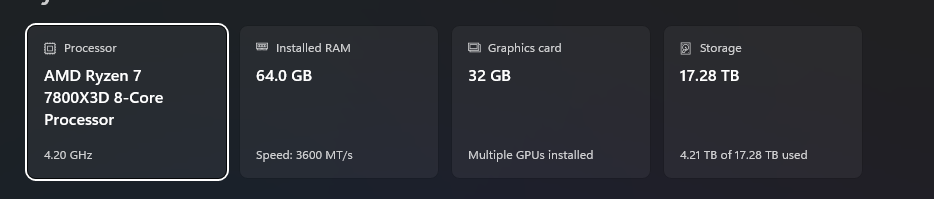
I just started dabbling in local LLM and ComfyUI+Flux was suggested to me for image generation.. I will soon increase my VRAM to 32GB but I hope to continue to increase that as I continue with my local LLM journey, but I was wondering what your setup is that got you to this point?
Atm, I’m going through tutorials and mastering image generation, creating workflows, and what not. Due to my line of work, during the summer I have a lot of time off.
I pretty much have a beginner foundation going with image generation and this PC can output tons of images relatively quickly. I2V or Image to video is another beast I have to tackle. I’ve generated some videos awhile back when I was practicing with LORAS and video generation. I upscale the videos in post using topaz.
I’m slowing down a bit and watching tutorials to gain a grasp on how nodes work. You’ll have a lot of workflows that have all the nodes connected already, but without an understanding of how they all work its pretty pointless.
My only regret is buying an AMD GPU for this shit. It just makes everything harder, but I do have an NVIDIA based PC as my gaming rig which I offload somethings onto.
Awesome! Thanks for the info. I’m not far off. I have a dedicated Core Ultra 9 285k, 64 GB DDR5-6000, RTX 4080 Super for my LLM right now, and I ordered a Nvidia v100 SXM2 16GB used AI card which should be here on the 6th and the heatsink will be here on the 8th and the PCIe adapter board will be here on the 5th, so I can throw that in for pooling the RAM for Ollama. Should give me 32GB to work with, right now qwen2.5-coder:14B and qwen3:30b-a3b both work decent (qwen2.5-coder:14B works very fast for what I have currently and is surprising). I have qwen3.6:35b-a3b installed but it doesn’t work as well because of 16GB VRAM limitation.
I plan on finishing the ComfyUI+Flux install tonight… I have been having issues with the workflow… my VAE Decoder to the Save Image is giving me a weird data output error that I’m still trying to nail down.
Maybe it is a VRAM limitation issue. Maybe user error and I set up my workflow incorrectly… never messed with that before so highly probable.
Seeing your outputs from 32GB of VRAM being very good gives me relief that I can get really good output from 32GB VRAM!
Any advice on workflow setup?
Do you run straight Linux?
I have Windows 11 on the system because it is dual role as my wife’s gaming pc (she doesn’t do a whole lot of gaming but occasionally will) so I use WSL2 for my LLM install.
Rig would probably work better if I just dual boot and have a dedicated Linux boot partition for AI stuff.
I will definitely start watching the tutorial video you linked!