Linear Actuator (dildo) Script File Simulator
I wrote an html file that loads the .txt file (usually a dildo position and timing data), to visualize what a sex or fuck machine (linear actuator) would look like for anal sex
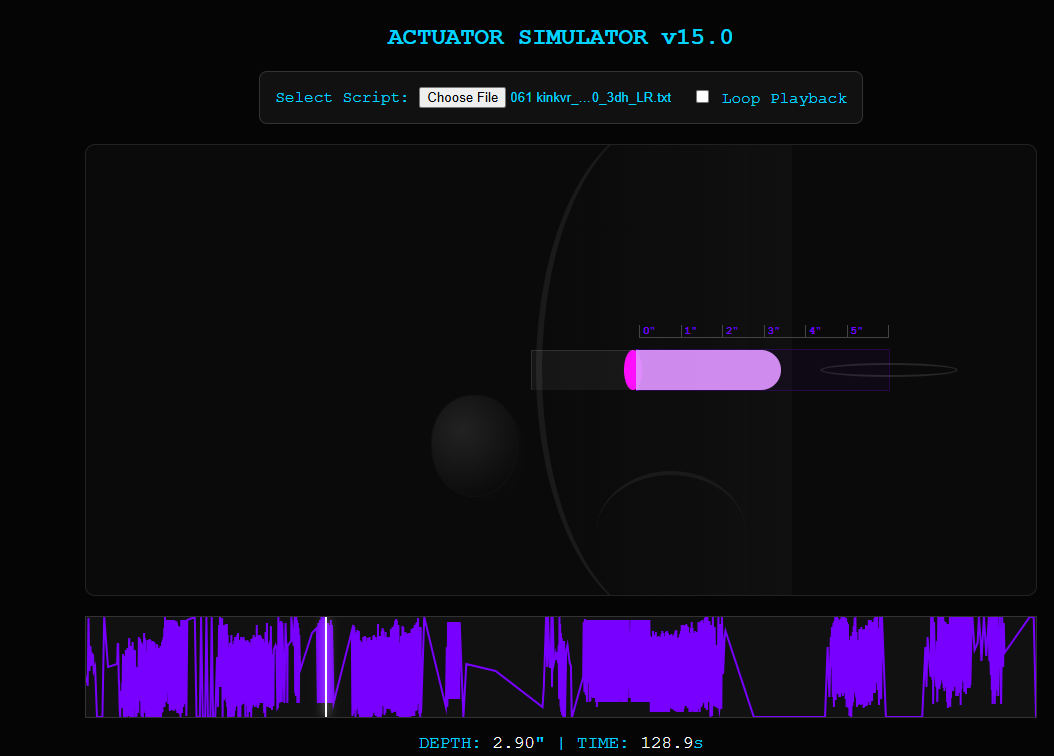
<!DOCTYPE html>
<html lang="en">
<head>
    <meta charset="UTF-8">
    <title>Actuator Sim v15.0 - Dynamic Shading</title>
    <style>
        body { font-family: 'Courier New', monospace; background: #050505; color: #00d4ff; display: flex; flex-direction: column; align-items: center; padding: 20px; }
        #controls { margin-bottom: 20px; background: #111; padding: 15px; border-radius: 8px; border: 1px solid #333; display: flex; gap: 20px; align-items: center; }

        #stage {
            width: 950px; height: 450px; background: #0a0a0a; border: 1px solid #222;
            position: relative; display: flex; align-items: center; overflow: hidden; border-radius: 10px;
        }

        /* Impact Shake */
        @keyframes shake {
            0% { transform: translate(1px, 1px); }
            20% { transform: translate(-2px, 0px); }
            100% { transform: translate(0px, 0px); }
        }
        .impact-shake { animation: shake 0.15s; }

        /* ANATOMY & TARGET */
        #target-area { position: absolute; left: 550px; width: 400px; height: 100%; display: flex; align-items: center; }
        #buttock-silhouette {
            position: absolute; left: -100px; width: 250px; height: 500px;
            border-radius: 100% 0 0 100%; border-left: 6px solid #1a1a1a;
            background: linear-gradient(to left, rgba(30,30,30,0.3), transparent);
        }
        #thigh-line {
            position: absolute; left: -40px; bottom: 0; width: 150px; height: 120px;
            border-top: 4px solid #1a1a1a; border-radius: 50% 50% 0 0;
        }
        #anus-marker {
            position: absolute; left: -12px; top: 50%; transform: translateY(-50%);
            width: 18px; height: 26px; background: #000; border-radius: 50%; z-index: 5;
            transition: height 0.1s ease, background-color 0.1s ease;
        }
        #rectum {
            width: 250px; height: 40px; background: rgba(120, 0, 255, 0.05);
            border: 1px solid rgba(120, 0, 255, 0.2); border-left: 3px solid #7800ff;
            position: relative;
        }

        #impact-ring {
            position: absolute; right: 0; top: 50%; transform: translate(50%, -50%);
            width: 10px; height: 10px; border: 2px solid #fff; border-radius: 50%; opacity: 0;
            pointer-events: none; z-index: 15;
        }
        @keyframes pulse-ring { 0% { width: 10px; opacity: 1; } 100% { width: 150px; opacity: 0; } }
        .active-ring { animation: pulse-ring 0.3s ease-out; }

        #gauge {
            position: absolute; top: -25px; left: 0; width: 250px; display: flex;
            border-bottom: 1px solid #444; color: #7800ff; font-weight: bold; font-size: 11px;
        }
        .inch { flex: 1; border-left: 1px solid #444; padding-left: 3px; }

        /* MACHINE & DILDO */
        #machine-unit { position: absolute; left: 300px; top: 50%; margin-top: -20px; display: flex; align-items: center; z-index: 10; }
        #scrotum { position: absolute; left: -100px; top: 45px; width: 80px; height: 120px; transform-origin: top center; }
        .ball { position: absolute; width: 85px; height: 100px; background: radial-gradient(circle at 35% 35%, #222, #050505); border-radius: 48% 48% 52% 52%; border: 1px solid #111; }
        .t-back { transform: translate(12px, 8px) scale(0.9); opacity: 0.3; }

        #dildo-container { width: 250px; height: 40px; position: relative; overflow: hidden; border-radius: 0 20px 20px 0; }
        #dildo { width: 100%; height: 100%; background: rgba(255,255,255,0.05); border: 1px solid rgba(255,255,255,0.1); }

        /* SHADING (ONLY INSIDE PORTION) */
        #insertion-shade {
            position: absolute; right: 0; top: 0; height: 100%; width: 0;
            z-index: 11; overflow: hidden; display: flex;
        }
        #depth-layer { width: 100%; height: 100%; transition: background-color 0.2s; }
        #speed-layer {
            position: absolute; width: 100%; height: 100%;
            mix-blend-mode: screen; background: #ff00ff; opacity: 0;
        }

        #heatmap-container { width: 950px; height: 100px; background: #111; margin-top: 20px; position: relative; border: 1px solid #333; overflow: hidden; }
        #heatmap-canvas { width: 100%; height: 100%; }
        #timeline-cursor { position: absolute; top: 0; left: 0; width: 2px; height: 100%; background: #fff; box-shadow: 0 0 10px #fff; z-index: 20; }

        #stats { margin-top: 15px; font-size: 1.1rem; }
        .val { color: #fff; }
    </style>
</head>
<body>

    <h2>ACTUATOR SIMULATOR v15.0</h2>

    <div id="controls">
        <div><label>Select Script: </label><input type="file" id="file-input" accept=".txt,.funscript"></div>
        <div><input type="checkbox" id="loop-toggle"> <label for="loop-toggle">Loop Playback</label></div>
    </div>

    <div id="stage">
        <div id="target-area">
            <div id="buttock-silhouette"></div>
            <div id="thigh-line"></div>
            <div id="anus-marker"></div>
            <div id="rectum">
                <div id="impact-ring"></div>
                <div id="gauge">
                    <div class="inch">0"</div><div class="inch">1"</div><div class="inch">2"</div><div class="inch">3"</div><div class="inch">4"</div><div class="inch" style="border-right: 1px solid #444;">5"</div>
                </div>
            </div>
        </div>
        <div id="machine-unit">
            <div id="scrotum"><div class="ball t-back"></div><div class="ball t-front"></div></div>
            <div id="dildo-container">
                <div id="dildo"></div>
                <div id="insertion-shade">
                    <div id="depth-layer"></div>
                    <div id="speed-layer"></div>
                </div>
            </div>
        </div>
    </div>

    <div id="heatmap-container"><canvas id="heatmap-canvas"></canvas><div id="timeline-cursor"></div></div>

    <div id="stats">DEPTH: <span id="depth-val" class="val">0.00</span>" | TIME: <span id="time-val" class="val">0.0</span>s</div>

    <script>
        const fileInput = document.getElementById('file-input'), loopToggle = document.getElementById('loop-toggle');
        const stage = document.getElementById('stage'), unit = document.getElementById('machine-unit'), pivot = document.getElementById('scrotum');
        const ring = document.getElementById('impact-ring'), anus = document.getElementById('anus-marker'), shade = document.getElementById('insertion-shade');
        const depthLayer = document.getElementById('depth-layer'), speedLayer = document.getElementById('speed-layer');
        const canvas = document.getElementById('heatmap-canvas'), ctx = canvas.getContext('2d'), cursor = document.getElementById('timeline-cursor');

        let scriptActions = [], startTime = 0, isPlaying = false, posX = 0, lastPosX = 0, angle = 0, angleVel = 0;
        const startX = 300;

        function animate(timestamp) {
            if (isPlaying && scriptActions.length > 0) {
                let elapsed = timestamp - startTime;
                const duration = scriptActions[scriptActions.length - 1].at - scriptActions[0].at;

                if (elapsed >= duration) {
                    if (loopToggle.checked) { startTime = timestamp; elapsed = 0; }
                    else { isPlaying = false; }
                }

                const currentPos = interpolatePosition(elapsed);
                posX = (currentPos / 100) * 250;
                unit.style.left = (startX + posX) + "px";

                let vel = Math.abs(posX - lastPosX);
                lastPosX = posX;

                // Impact Detection
                if (currentPos > 98 && vel > 4) triggerImpact();

                // Ball Physics (Trailing)
                angleVel += (posX - lastPosX) * 0.45; angleVel -= angle * 0.05; angleVel *= 0.92; angle += angleVel;
                pivot.style.transform = `rotate(${Math.max(Math.min(angle, 40), -40)}deg)`;

                // SHADING LOGIC (Only inside > 0")
                shade.style.width = Math.max(0, posX) + "px";

                // Depth (Blue Palette)
                if (currentPos <= 33) depthLayer.style.backgroundColor = "rgba(100, 0, 255, 0.4)";
                else if (currentPos <= 66) depthLayer.style.backgroundColor = "rgba(0, 100, 255, 0.5)";
                else depthLayer.style.backgroundColor = "rgba(0, 255, 255, 0.6)";

                // Speed (Hot Pink overlay)
                let speedIntensity = Math.min(vel * 0.2, 0.8);
                speedLayer.style.opacity = speedIntensity;

                // Anus Updates
                anus.style.height = currentPos > 3 ? "40px" : "26px";
                anus.style.backgroundColor = currentPos === 0 ? "#000" : (speedIntensity > 0.4 ? "#ff00ff" : "#00d4ff");

                document.getElementById('depth-val').innerText = ((currentPos / 100) * 5).toFixed(2);
                document.getElementById('time-val').innerText = (elapsed / 1000).toFixed(1);
                cursor.style.left = Math.min((elapsed / duration) * 100, 100) + "%";
            }
            requestAnimationFrame(animate);
        }

        function triggerImpact() {
            if (stage.classList.contains('impact-shake')) return;
            stage.classList.add('impact-shake'); ring.classList.add('active-ring');
            setTimeout(() => { stage.classList.remove('impact-shake'); ring.classList.remove('active-ring'); }, 300);
        }

        function interpolatePosition(t) {
            const actions = scriptActions; const target = t + actions[0].at;
            if (target <= actions[0].at) return actions[0].pos;
            if (target >= actions[actions.length-1].at) return actions[actions.length-1].pos;
            for (let i = 0; i < actions.length - 1; i++) {
                if (target >= actions[i].at && target <= actions[i+1].at) {
                    return actions[i].pos + (actions[i+1].pos - actions[i].pos) * ((target - actions[i].at) / (actions[i+1].at - actions[i].at));
                }
            }
            return 0;
        }

        fileInput.addEventListener('change', (e) => {
            const reader = new FileReader();
            reader.onload = (ev) => {
                scriptActions = JSON.parse(ev.target.result).actions;
                drawHeatmap(scriptActions);
                startTime = performance.now();
                isPlaying = true;
            };
            reader.readAsText(e.target.files[0]);
        });

        function drawHeatmap(actions) {
            canvas.width = 950; canvas.height = 100;
            ctx.clearRect(0, 0, 950, 100); ctx.strokeStyle = '#7800ff'; ctx.lineWidth = 2; ctx.beginPath();
            const duration = actions[actions.length-1].at - actions[0].at;
            actions.forEach((a, i) => {
                const x = ((a.at - actions[0].at) / duration) * 950;
                const y = 100 - a.pos;
                if(i === 0) ctx.moveTo(x, y); else ctx.lineTo(x, y);
            });
            ctx.stroke();
        }

        requestAnimationFrame(animate);
    </script>
</body>
</html>
 )
)