FunPlayer v2.0.0 - macOS funscript player - TCode, The Handy, Intiface, AutoBlow AI Ultra, VacuGlide 2 - VLC, IINA

When available, yes I’ll load a video with several scripts linked - I just don’t remember all the axis coding, just the names. L0 = plain stroke funscript, the others would be *.pitch.funscript, *.roll.funscript, *vib1.funscript, etc.

This site has a “single script” dl option, where the funscript axes are all rolled into one .funscript file - but it isn’t something that works reliably for me, so I DL each individual axis.

In MFP for the PC, I have to load the video in VLC, then load the main (stroke) script, then each script for each axis (sometimes it will locate them if I played it already) before I can run it. Whereas with XTP, I can just load the one video as it pulls everything with matching names from the folder and sets up the axes automatically, like how FP will find the script for matched video. But XTP won’t connect with Initface to run dual vibe…

Basically yeah - FP getting multi-axis support would be the high value desire, even without being able to map vibrator/initface-action scripts. That part is the cherry on top, and I can’t imagine it’s easy to code in.

Initial setup with MFP is confusing and super-detailed without much local help, have to wade through a dozen pages of a couple topics and piece together from what other people had issues with. I sat down to play a couple weeks back when I had an hour or two, and spent the whole time just setting the damn thing up and getting it synced wth VLC and Initface, then mapping out script destinations and limits/ranges. By the time I got it working as desired, my partner came home and I had to shut down to go be responsible.
1 Like

thanks for the detailed reply! Itll be helpful when I’m working on this feature.

everyone, feel free to chime-in by the way, if you have any ideas / feedback / critique / advice about this multi axis feature

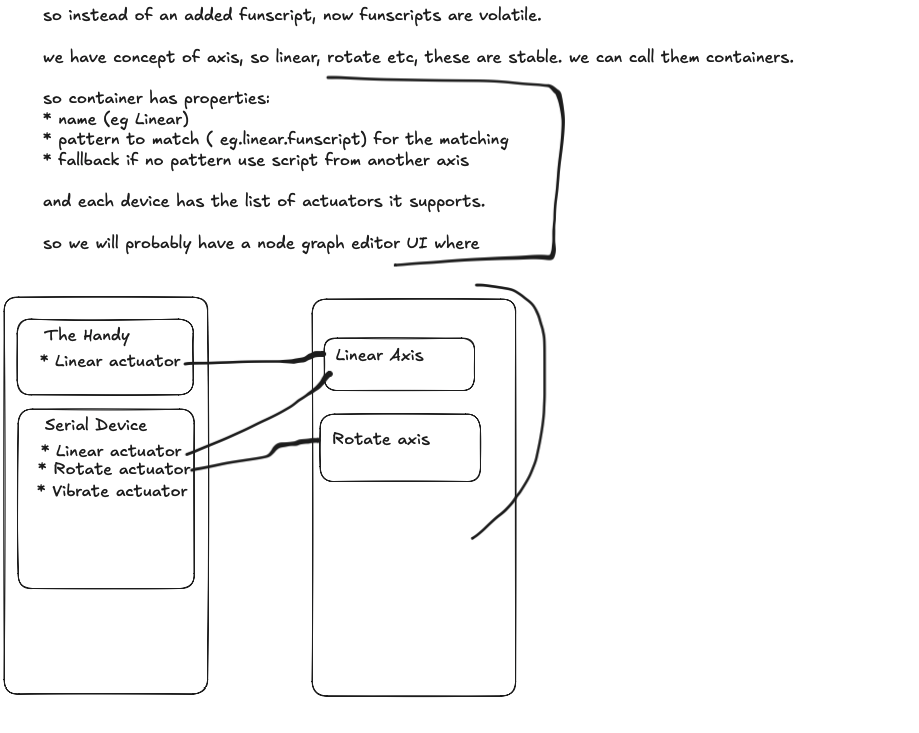
@toyboyacct what I’ve had in mind for a while for multi axis support would be a node graph editor.

I had sketches from months ago where I say there are two main things to separate: A device and a “script profile”.

Because .funscript files themselves are different for each video by name, I think there needs to be a stable container, that is why there is this concept of a “script profile” that can be configured to match certain patterns and optionally fallback to another profile.

To represent all this information to a person, a visual approach probably easier to consume and I think a node graph editor is a good representation of this.

This is what I have that is working in isolation. It is not at all implemented in FunPlayer just yet, it’s still its own isolated package.

The next step would be to wire this into FunPlayer and all the plumbing between this and FunPlayer and the changes for FunPlayer to actually run multiple engines, one for each profile. Right now in FunPlayer, there is single script support, a funscript is loaded and a concept called an engine is responsible for sending commands when due.

Going to multi axis support involves dealing with that as well and also more UI for multi axis devices to select what capabilities the device has and other things I haven’t encountered or thought of yet.

So in isolation right now, it does look promising, but still can’t sing finished shipped feature in FunPlayer.

Let me know what you think. Did you have different ideas to what is a better approach? Or things I’m overlooking in general? Anything that you can see when imagining actually practically using this?

also, back then when I had wrote these ideas in sketch, the app wasn’t ready yet, still didnt even have auto script matching which I wanted as a prerequisite to have that ability of even auto loading a file from a users folder.

Now the app is more feature complete so working towards multi axis makes sense.

2 Likes

I have tested it and works far better than Scriptplayer on the Mac! I have now officially ditched it for Funplayer!

I have some ideas that would be nice to have:

  • A playlist feature for funscripts only. Loading multiple files without a video and play it straight to the device (without video)
  • See heatmap even when playing videos with external player
  • A notification or feedback that the player has loaded the matched funscript when using an external player with matching funscript feature on.

Thank you!!

1 Like

Your suggestions are very sensible and useful. Will add them to the general list of things to do.

I’m happy to hear FunPlayer is doing its job as a Mac native funscript player for you :slight_smile:

I’ve been loving the player, thanks for creating it. It’s nice to have one that works well on Mac! My only suggestion would be to add a “Stroke Range” slider to partner up with the “Offset Slider” that you already have. Allowing us to control the high and low point. Basically just like the one you see while connected to old.handyfeeling.com. Being able to adjust the range on the fly with the mouse is extremely helpful. Especially when the hands free setup is covering the Handy buttons. Just thought I’d throw that idea out there. :slight_smile:

Anyway, thanks again for the player! Very thankful to have one that works on Intel Macs.

1 Like

thanks for the suggestion. I’ve also had similar requests in the past on Discord as well.

My rationale dating back to the first launch of FunPlayer was to keep it simple. Those that use the handy can go on the website and adjust it, and I would loop back once users start complaining about it :slight_smile:

Well that time has come, after a couple users have now voiced this, the next release will include a dedicated new panel called Playback Adjustments that will contain the global offset delay and the stroke length adjustment per device.

Also, this is not limited to The Handy via WiFi.

Devices that have their source of truth somewhere like The Handy’s API will write to that directly.

But devices like T-Code serial devices and those added by Intiface, FunPlayer will clamp the values before sending it to the device.

1 Like

Out of curiosity do you use VLC or IINA as your external media player of choice?

Because a part of me wants to just improve the IINA plugin with a notification. FunPlayer would just send a ping to IINA whenever a script auto loads or fails to auto load.

That way you don’t even have to look back at FunPlayer.

1 Like

I estimate that the next release to be given to Apple for review for FunPlayer will be a timeline within the next seven days.
Now in the final testing and checks stage.

Will post the changelist for the next update soon.

2 Likes

First of all: Thank you! Sorry for the delay in my response. It’s so fire that you already cooked up an update with that suggestion. I’m so hyped for the update to drop! (I’m sure you’ve already finished the upcoming update, but being able to have the Offset and Stroke Length on a very small, minimally obstructive pop-out could be fire too.)

I don’t usually have lots of time to set new things up, but tonight I finally set up the external player with IINA. It seems to be working so far. I had no idea what I was missing with BOTH external player and the auto folder search. Your ping idea would be sweet too.

IINA vs. VLC:

  • IINA has been my go to lately. I am on an Intel Mac, and sometimes I notice IINA lag a bit more than VLC does when watching super high res videos. VLC seems more stable for me sometimes, but I prefer IINA for the realtime color grading/overall user experience. More IINA stuff could be great. :slight_smile:

FunPlayer Suggestions
(both of these were random thoughts/ideas. FunPlayer is already so great and the new update is gonna be so fireeee)

    1. Device specific Limiter toggles/checkboxes in the settings. I usually download scripts and then manually limit them for the Handy v1 before use. It’s really not even a problem, but the idea for limiter toggles popped into my head (idk how easy or difficult or dumb this sounds lol)
    1. Allow direct “drag and drop” into the video and funscript slots inside the FunPlayer itself. However, this suggestion might not even matter now that I got the external player set up. Being able to open a video in IINA and have FunPlayer auto sync is insanely dope. :fire:

Now I just need to figure out a system to deal with my plethora of Multi-Version scripts. I have a ton of slightly edited scripts with slightly different names, so there are times that the correct script name loads but not the version I want. My names are like: “example.funscript” + “LIMIT example.funscript” + “HALF example.funscript”

I think that’s more of a me problem though lol. I’ll figure out a system for myself. :man_mage:

I greatly appreciate your detailed info and dedication! I respect the heck out of you for your technical ability, I can’t even imagine what takes to do stuff like this. Thanks for taking the time to hook us all up. Sorry for all the words lol

1 Like

Thank you for providing a player that works with MacOS and Safari.

I have one request which I think someone has already asked.
I’m still on Handy 1 and have had it for years now. I only ever used Funscript.io player as it always worked and I generally only used scripts, never video and scripts. However, Funscripts.io stopped working for me several weeks ago, scripts no longer upload to the server message. So I have no script player now.

Would you consider a future update that would allow users to only use a script only? and could you make it show the color waveform (sorry I don’t know the correct word for it) of the script as it plays like Funscript.io use to do. Thanks

1 Like

Hey! Yeah this feature has been completed, it will be available in the next release.

The next release has been handed over to Apple for approval about 2 days ago, waiting to hear back from them.

Apple needs to approve any new updates.

The color waveform is knows as the heatmap. We call it the funscript heatmap.

1 Like

Hey, thanks for the reply, appreciate the kind words!

  • Yeah, I agree, IINA is better UX-wise, but VLC smoother esp for very demanding files
  • When you say limiter toggles; do you mean limiting the funscript “intensity” per device eg Handy and another at a different intensity?
  • Drag and drop is a reasonable feature to ask for, I will look into it.
  • About your multi-version script naming, at this stage FunPlayer is still orientated around a single funscript. The next major upgrade in future would be going to multi-axis support. There is a concept of a profile. A profile has file patterns it should try to match to and a fallback. A device’s motor can be wired to a profile. For example, The Handy has 1 motor, it can be wired to a script profile called “Linear”. A vibrator has a motor for vibration, it can be wired to a new profile that the user creates called Vibrate profile with the rule to match v0.funscript or v1.funscript or fallback.
  • When such a system is released for multi-axis, your concern seems to be about fuzzy matching and preferences when loading scripts, so that would be a sub-detail that can be looked at for the pattern matching, later on.

A couple users have recommended the same as you about the slider adjustments.

In the new update, currently under review with Apple, it is exactly what you asked for, a new panel called Playback Adjustments that has the global offset slider and per device slider adjustment. It can also be opened by a hotkey. Because, obviously users may be a hand down so hot key and easy adjustments is something that is only logical.

Also, I will note down the idea about improving the plugin for IINA for example, it has been asked before for some sort of ping mechanism, either from FunPlayer, or in IINA, when FunPlayer auto matches, so the person would know without looking at FunPlayer, I’ll revisit.

1 Like

There has been a slight delay in the App Review process, Apple has noted one item that should be corrected, it has been corrected and resubmitted for review.

Fingers crossed the update is available before the weekend but we’ll see what happens.

Do you mean limiting the slider range? If so, that will be available in the new update via a new panel called playback adjustments.

If not, please clarify.

Thanks!

new update is out. Pro upgrade info & changelist below.


FunPlayer v1.8.2 adds a Pro upgrade for exclusive features.

Pro gives access to features that extend the capabilities of FunPlayer and helps fund development.

  • It is a one-time payment for a lifetime license.
    • To be clear: It is not a subscription. It is a one-off payment for a license.
  • It helps fund development.
    • A lot of time and energy has went into the development of FunPlayer.
    • Pro allows me to continue ongoing motivation, bring more features that users (both free and Pro) want to see, without compromising the base promise for the general public of being a funscript player for Mac.

v1.8.2 1st April 2026

  • Added: The Handy via Bluetooth (PRO) - support for connecting to The Handy directly via Bluetooth.
  • Added: Timeline frame previews (PRO) - Customize the amount of video image thumbnails to generate.
  • Added: Funscript Player. Load a funscript and enjoy — videos no longer required.
  • Added: TCode via UDP. You can now add a TCode device via USB serial or UDP.
  • Added: Playback Adjustments Panel. Adjust global offset and per‑device slider ranges; configure the hotkey in Settings.
  • Updated: https://docs.funplayer.app to reflect changes in this update.

@SeaofGreen funscript only playback capability added
@Ligriff69 dedicated panel for offset and slider length, see the docs for the new Playback Adjustments feature

3 Likes

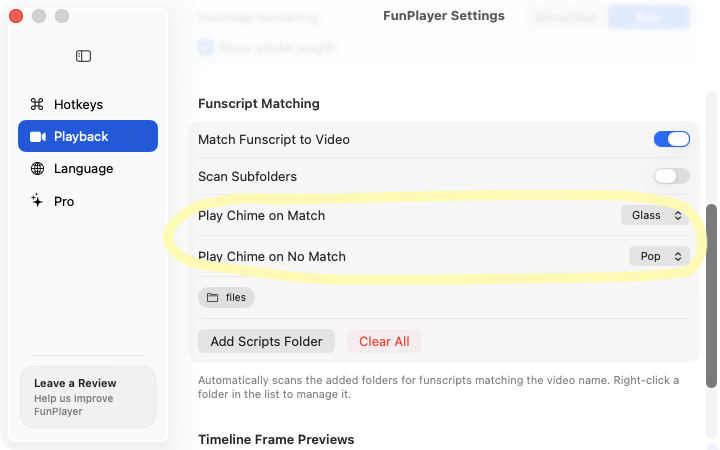
in the next update, you will be able to set a chime for match success and non-success.
if FunPlayer finds a matching script, can play a chime and if not can also play a chime.

Thank you for providing an option to just play a script without a video.

Would it be possible in a future update for those that want to just play a script can you make an option to allow the heat map to be larger, like an inch larger. If a person just want to use a script they wouldn’t need the space where a video would be, maybe like pop out the heat map so it’s larger to view or a check box to view as script only and it would be full screen heat map.

Would it also be possible with the heat map to also have the guidance line that shows its going up and down (sorry I don’t know what they call it) like the marker that follows the script as the Handy goes up and down following the script (not on top of the heat map but right above it in it’s own space.

1 Like

When you say guidance line, do you mean something like on the far-left in this picture?

MainChartControls
This picture is from a software called Scripts Control - Scripts Control by @Glavious by the way for anyone curious.

Maybe I wasn’t explaining it correctly. No not that yellow bar on the left. Actually the graph on the right.

When I load a script in your app (using a Mac laptop) my script is all compressed together so I can’t see any definition the heatmap just shows the color and it’s all pressed together. I also tried to double click the script while it’s playing to see if it would maximize the script so I could see it like the one you posted above but it won’t do that. So in other words I can’t see the peaks or the highs and lows and where they are within the script because it’s just all compressed. It’s the same if it’s a 10 min script or a 1 hr script. I’d like it to do what you are showing above in that blue script but be able to maximize the script to see the high and lows and where they fall within the script. I hope that makes sense.

1 Like