MiraPlay AiO v1.7.5 Update — Device Bridge for MiraPlay Web + VR Gaze Menu
Hi guys,
I’ve just released MiraPlay AiO v1.7.5.
This update focuses on two main areas:
- Improving the connection workflow between MiraPlay Web and MiraBot, especially in VR browser environments
- Improving the VR video playback experience when using MiraPlay AiO with a phone VR headset
What’s new?
1. Device Bridge for MiraPlay Web
Some browsers may restrict or block direct connections to local devices. This can be especially noticeable when using browser-based apps in Quest Browser or other immersive VR browser environments.
To make this workflow easier, we added a new feature called Device Bridge.
With Device Bridge enabled, MiraPlay Web can connect to MiraBot through MiraPlay AiO, instead of relying on a direct browser-to-device connection.
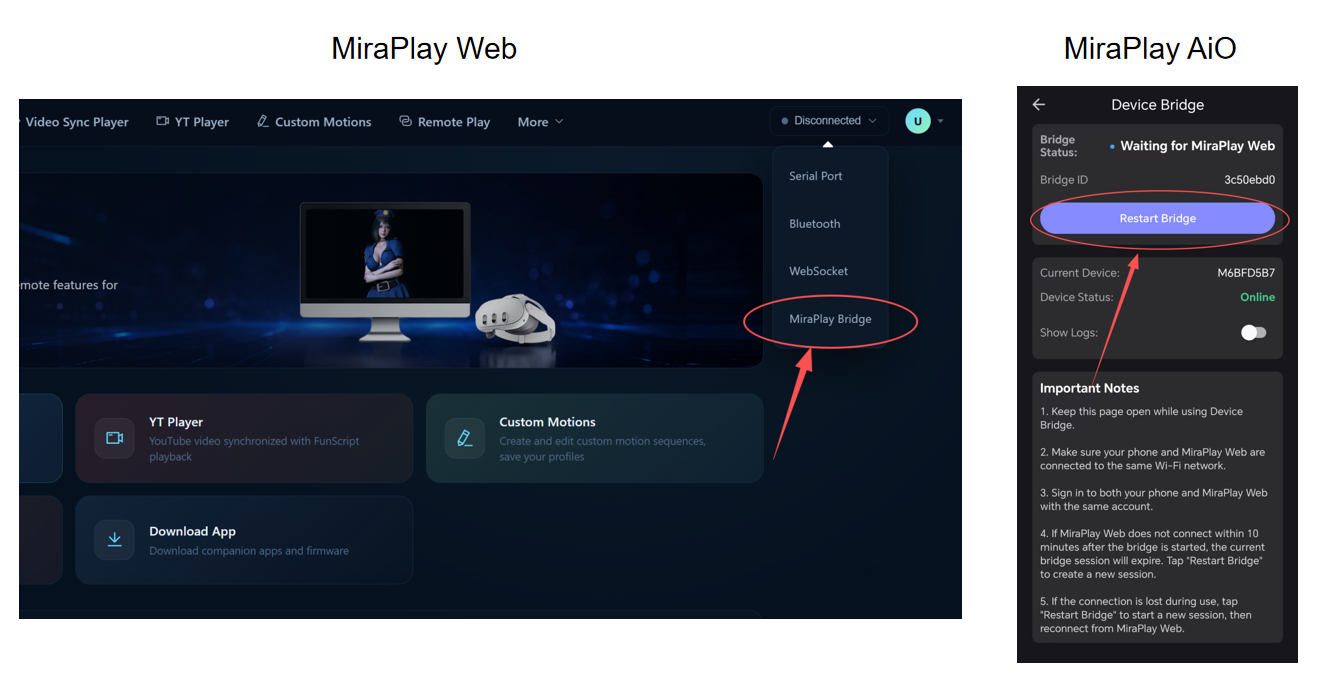
The basic workflow is:
MiraPlay Web → MiraPlay AiO Device Bridge → MiraBot
To use Device Bridge:
- Use the same account for MiraPlay Web and MiraPlay AiO. The bridge connection will be handled automatically.
- Both devices must be on the same Wi-Fi network
- Device Bridge must be enabled in MiraPlay AiO
- MiraBot must be connected through MiraPlay AiO
For more information about MiraPlay Web, please refer to this thread
2. VR video zoom controls
Zoom in / zoom out controls have been added to the VR playback modes in the VR Video Player.
You can now adjust the video scale during playback, making it easier to fine-tune the viewing size based on the video format, headset display, and personal preference.
3. VR Gaze Menu
A new VR Gaze Menu has been added for easier control while wearing a VR headset.
When using a phone VR headset, normal touch controls are not always easy to access. With the new VR Gaze Menu, you can control playback without taking the phone out of the headset.
The menu can be shown or hidden by nodding twice in a row.
The VR Gaze Menu currently supports:
- Reset View
- Play / Pause
- Playback progress control
- Video zoom in / zoom out
- IPD adjustment
This should make VR playback smoother and more comfortable, especially for phone-based VR setups.
Demo Video
4. Firmware version display
Firmware version information is now shown in Device Information.
You can now quickly check the firmware version installed on your MiraBot device without using a separate tool.
OSR / TCode Device Compatibility
As mentioned before, MiraPlay Web and MiraPlay AiO are currently open and free for all TCode device users.
However, since third-party devices may vary in firmware, hardware, and implementation, we cannot guarantee full compatibility with every device.
If you encounter any issues while using MiraPlay with your device, please feel free to send us feedback. We will do our best to improve compatibility where possible.