Thanks for the detailed feedback — really appreciate you taking the time to try different ways and figure it out.
Good to hear you were able to get in eventually. The Google login flow shouldn’t normally behave like that, so we’ll take a closer look at it on our side.
Thanks again for reporting it, and please let me know if you run into anything else while using the app.
got it to work with the app. for some reason it wouldnt accept my google account info but using a 3rd party address worked.
Tried it again today with my OSR2+Twist and noticed that I could either get stroke + pitch + roll, or twist + pitch + roll, but not all 4 together. I was hoping to use it alongside a game that doesnt have toy integration, and just do my own.
Hi, thanks for testing and reporting this.
First, could you check whether Multi-Axis Assist is enabled? When this mode is active, the stroke axis will stay still, so that might explain what you’re seeing.
In normal playback all four axes should be able to work together, so it might depend on the exact setup or workflow being used.
If possible, could you send me a short video via DM showing what you’re doing? It would also help if you could include your phone model and OS version.
If there is indeed an issue, we’ll pass it to the dev team and get it fixed as soon as possible.
I’m using a Galaxy S25 Ultra, and I tried with and without multi-axis, on x4 mode
finally and unfortunately my sr6 died on me. I’d rather not name the seller, but the build quality was really disappointing. I’m considering the Mirabot S6 now, from the photos and reviews it looks like a much more solid build. before I pull the trigger, just wanted to check a couple things about Miraplay aio: if I connect the S6 to the app, it’ll automatically be recognized as a free user, right? also, are there any new features coming soon? I’m actually quite looking forward to future updates. Thanks!
Thanks for your interest in MiraBot and MiraPlay AiO, and really sorry to hear about your SR6, that’s always frustrating.
Regarding your questions:
- Yes. once your MiraBot S6 is connected to MiraPlay AiO, it will be automatically recognized and you’ll have full access to all features at no additional cost. There’s no separate “free vs paid” limitation for device users.
- We actually have new features coming very soon, expected within the next 1–2 weeks. Beyond that, we’re continuously developing MiraPlay AiO, with ongoing feature updates planned on a roughly monthly basis.
If you have any other questions while deciding, feel free to ask
Hello! Are there any plans to add a type of room browser for “public” Live control rooms for remote play?
Hey, great question 
Yes, we do have plans to introduce something like a public/shared platform for remote play rooms. It’s a feature we’re definitely interested in building.
That said, it involves quite a few considerations (stability, moderation, privacy, etc.), so we want to take a bit more time to get it right before sharing a concrete plan.
It’s something on our roadmap though, and shouldn’t be too far off, pls feel free to keep an eye on updates
1 Like
I’ve tried to flash my OSR SR6 into the MiraBot Firmware, it couldn’t get recognized by SLR/ DEOVR
Yeah, this is expected..
SLR / DeoVR currently don’t support direct connection with OSR-type devices, so they won’t be recognized even with any OSR or MiraBot firmware.
As far as we know, there’s no official API or method for direct integration at the moment. Most users still use a PC-based setup (e.g. via MFP) as a workaround.
If anything changes, we’ll definitely share it
1 Like
How can my device get flashed with your MiraBot firmware on the OSR device?
You can refer to the blog guide for firmware flashing instructions.
If your current firmware already supports Wi-Fi, then MiraPlay AiO can connect to your device directly, so flashing to MiraBot firmware may not be necessary.
Hi guys,
I’ve just released MiraPlay AiO v1.7.3, with a major upgrade to Online Play.
I’ve already added Online Play to the Core Features section in the main post, but I wanted to make a separate reply here because this update changes the experience quite a bit.
What’s new?
1. Standalone Funscript player
The old fixed motion mode has been replaced with a dedicated Funscript player.
You can use it alongside browser content, or just run it on its own as a standalone script player.
This is not synced playback like Video Sync — the goal here is a lighter, faster, and more flexible way to play scripts while opening online content at the same time.

2. Built-in downloader with auto organization
Online Play now includes a built-in downloader.
- Downloaded Funscripts are organized automatically
- Matching multi-axis files with the same filename are grouped together as one set
- No more manual sorting or axis matching just to get started
So in many cases, the workflow is now simply:
download → open → play

3. Motion Recording script support
Online Play now also supports multi-axis scripts recorded with Motion Recording in Gesture Sync.
This is the part I’m most excited about.
Instead of only relying on pre-made scripts, you can now record your own motion, save it, and replay it anytime inside Online Play.
What makes Online Play different?
Compared with the player inside Video Sync, Online Play is designed more around freedom and convenience.
It gives you an easy way to grab scripts from places like EroScripts, open them quickly, and start playing them without needing a PC or going through a complicated setup. You can also let matching online video or audio run alongside it.
But the part that really changes the experience is combining it with Motion Recording.
You can quickly create your own multi-axis script for a short clip — for example something from RedGIFs — and then play it back right away in Online Play.
So the workflow becomes:
record → save → open the clip online → replay your custom script
No PC, no complicated workflow, and no need to prepare a full traditional sync setup just to enjoy short-form content.
That’s the direction I wanted Online Play to move toward — something lighter, faster, and easier to enjoy in everyday use.
Demo
If you want to see how this workflow looks in practice, please check the demo below.

A quick update on what’s next for MiraPlay AiO
I also wanted to share a quick look at what we’re currently working on for MiraPlay AiO.
The recent Online Play update is only one part of the direction we’re moving in. Over the next couple of months, we’ll continue improving both playback flexibility and motion creation tools, with the goal of making MiraPlay more practical, more creative, and more enjoyable for everyday use.
Here’s the current roadmap:
1. T-Valve control improvements
Target: late April
Right now, T-Valve can automatically open and close based on Stroke-axis up/down movement.
The next step is to make it much more flexible by adding:
- manual open / close control
- support for recording those manual actions as scripts
- export as dedicated files such as
.valve.funscript
The idea here is to give users more direct control, while also making T-Valve actions reusable as part of a script workflow instead of staying limited to real-time response only.
2. MiraPlay Web major upgrade
Target: May
We’re also planning a major step forward for MiraPlay Web, including:
- A rebuilt UI for a cleaner and more professional experience
- BLE / WebSocket wireless connection support, in addition to wired connection
- VR headset playback mode, including support for devices like Quest
- browser-based VR + Funscript playback workflow
The goal is to make MiraPlay Web more than a lightweight companion tool. We want it to become a much more capable platform, with smoother access across phones, PCs, and VR headsets.
3. A new standalone module — Motion Studio
Target: May to June
We’re also working on a new standalone module called Motion Studio.
The idea is to let users:
- design their own loopable motion patterns
- save them as dedicated motion script files
- build scene-based sequences by chaining multiple motions together
The main goal is to make longer script creation much easier, even without building everything manually from scratch.
In other words, instead of starting from an empty timeline every time, Motion Studio is meant to give users a faster and more approachable way to create reusable motion content.
Closing
That’s the direction we’re currently pushing MiraPlay toward:
- more flexible control
- easier script creation
- better wireless access
- and a smoother overall playback experience across different use cases
Some details may still change as development continues, but I wanted to share the roadmap early so you can see where things are going.
I’ll keep posting updates here as progress moves forward.
MiraPlay AiO v1.7.4 is here — T-Valve control just got a major upgrade
Hi guys,
I’ve just released MiraPlay AiO v1.7.4, focused mainly on improving T-Valve control.
Previously, T-Valve open/close behavior was driven only by Stroke-based auto movement, with no way to adjust the closing range, control it manually, or record it as a script.
With v1.7.4, T-Valve is now much more flexible.
What’s new?
1. Auto + Manual control in Gesture Sync
T-Valve now has its own Control Bar, similar to the Lube workflow.
- In Auto Mode, valve movement is still calculated from Stroke position, but now you can use the Control Bar to set the maximum closing level
- In Manual Mode, the valve is controlled entirely by the Control Bar, so you can change pressure freely or hold it at a fixed state
2. Valve action recording
When you use Motion Recording in Manual Mode, T-Valve actions are now saved as:
filename.valve.funscript
This makes valve motion reusable in playback, and also usable in other compatible script players.
3. New T-Valve options in Video Sync Player and Online Play
I also added T-Valve settings to the Script Settings screen in both Video Sync Player and Online Play.
You can now switch between:
- Auto
- Script
- None
So T-Valve can now be automatically controlled, played from a script, or disabled depending on the content.
Why this update matters
The goal of this update was to make T-Valve a much more complete part of the motion workflow — not just a simple automatic add-on.
Now it can be:
- adjusted more precisely
- controlled manually
- recorded as a script
- reused later in playback
Demo
I’ve also prepared a demo video below if you want to see how the new T-Valve workflow works in practice.
3 Likes
MiraPlay AiO v1.7.5 Update — Device Bridge for MiraPlay Web + VR Gaze Menu
Hi guys,
I’ve just released MiraPlay AiO v1.7.5.
This update focuses on two main areas:
- Improving the connection workflow between MiraPlay Web and MiraBot, especially in VR browser environments
- Improving the VR video playback experience when using MiraPlay AiO with a phone VR headset
What’s new?
1. Device Bridge for MiraPlay Web
Some browsers may restrict or block direct connections to local devices. This can be especially noticeable when using browser-based apps in Quest Browser or other immersive VR browser environments.
To make this workflow easier, we added a new feature called Device Bridge.
With Device Bridge enabled, MiraPlay Web can connect to MiraBot through MiraPlay AiO, instead of relying on a direct browser-to-device connection.
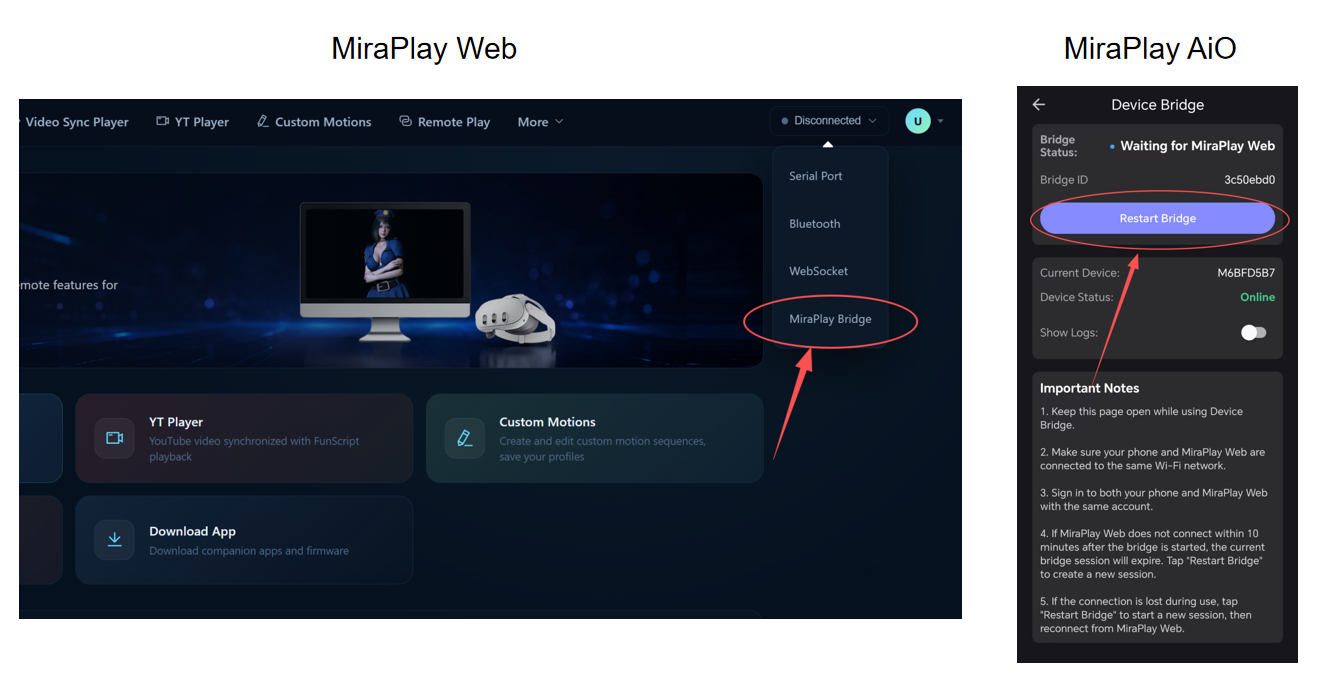
The basic workflow is:
MiraPlay Web → MiraPlay AiO Device Bridge → MiraBot
To use Device Bridge:
- Use the same account for MiraPlay Web and MiraPlay AiO. The bridge connection will be handled automatically.
- Both devices must be on the same Wi-Fi network
- Device Bridge must be enabled in MiraPlay AiO
- MiraBot must be connected through MiraPlay AiO
For more information about MiraPlay Web, please refer to this thread
2. VR video zoom controls
Zoom in / zoom out controls have been added to the VR playback modes in the VR Video Player.
You can now adjust the video scale during playback, making it easier to fine-tune the viewing size based on the video format, headset display, and personal preference.
3. VR Gaze Menu
A new VR Gaze Menu has been added for easier control while wearing a VR headset.
When using a phone VR headset, normal touch controls are not always easy to access. With the new VR Gaze Menu, you can control playback without taking the phone out of the headset.
The menu can be shown or hidden by nodding twice in a row.
The VR Gaze Menu currently supports:
- Reset View
- Play / Pause
- Playback progress control
- Video zoom in / zoom out
- IPD adjustment
This should make VR playback smoother and more comfortable, especially for phone-based VR setups.
Demo Video
4. Firmware version display
Firmware version information is now shown in Device Information.
You can now quickly check the firmware version installed on your MiraBot device without using a separate tool.
OSR / TCode Device Compatibility
As mentioned before, MiraPlay Web and MiraPlay AiO are currently open and free for all TCode device users.
However, since third-party devices may vary in firmware, hardware, and implementation, we cannot guarantee full compatibility with every device.
If you encounter any issues while using MiraPlay with your device, please feel free to send us feedback. We will do our best to improve compatibility where possible.
This thing requires you to register an account before you can use it. I spent a long time trying to log in but couldn’t get in. I don’t recommend using it.
I’m sorry you had such a frustrating experience. Logging in should not have taken that much time.
If possible, please send me a DM with a few screenshots of what happens during login, along with any error message you see. I’ll do my best to identify the problem and help you get it working.
We’re also currently working on a major update to MiraPlay AiO, and version 2.0 is planned for release within the next few weeks.
However, I’d still like to resolve the login issue you experienced with the current version.
The screen has been constantly showing the red text indicating “Logging in…”. That’s all. I guess it might be accessing the app through a VPN.