I was a little inspired by Funscript Flow. I tried to create a script that captures the movement on the screen in real time and sends the measured values via serial port or TCP. The main reason why it is realtime is the ability to use it with a web browser and streamed video. I would be happy to hear your comments.
This is a really cool idea! I tried running it with a FUNSR1 through serial port, it connected to the com port successfully but I got no response from the device 
1 Like
My program sends a signal in this format:
VXXXXX
for example
V01270
V04130
V06483
V09999
…
“V” means VIBRATE signal.
Try to change the “V” character in these 2 lines:
zero = “V00000\n”.encode()
encoded_value = f"V{int(value * 100):05d}\n"
| Name | Friendly name | Funscript names |
|---|---|---|
| L0 | Up/Down | stroke, L0, up, raw |
| L1 | Forward/Backward | surge, L1, forward |
| L2 | Left/Right | sway, L2, left |
| R0 | Twist | twist, R0, yaw |
| R1 | Roll | roll, R1 |
| R2 | Pitch | pitch, R2 |
| V0 | Vibrate | vib, V0 |
| V1 | Pump | pump, VI |
| A0 | Valve | valve, A0 |
| A1 | Suction | suck, A1 |
| A2 | Lube | lube, A2 |
1 Like
Changing it from V to L worked 
Its a bit rough with up and down movement but I’ll keep messing around with it before I give any real comments
I assume the region selection is for tracking the movement of an object on screen instead a whole window?
1 Like
Seems cool! Want to try it out when I get time on the pc
Just set up the environment and ran it without problem.
I think it is tracking the object I’ve selected? The toy moves but the motion is very rough tho, I don’t think it’s in a usable state…
Could be a nice concept for certain games that cannot be modded for device linking.
I assume the region selection is for tracking the movement of an object on screen instead a whole window?
Yes, exactly.
By the way, you can also use the “R” key to select the region.
This is just an attempt to implement my idea.
99 percent of the code was written by ChatGPT, partly inspired by the open source FunscriptFlow.
I would be happy to see real programmers modify this code.
2 Likes
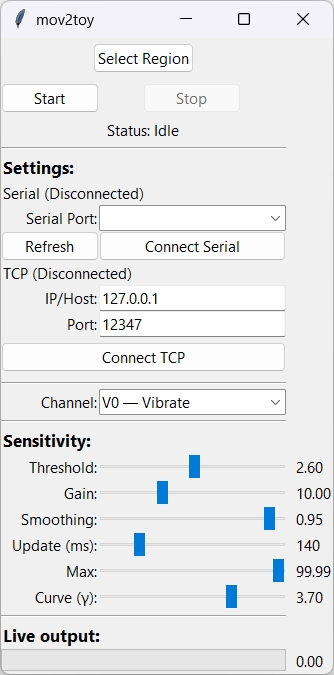
Here is the new version.
Added channel selection.
Detection window selection can be done by pressing the F10 key.
mov2toy.py
import tkinter as tk
from tkinter import ttk
import socket
import threading
import time
import cv2
import numpy as np
import mss
import pyautogui
import serial
import serial.tools.list_ports
import keyboard


class RegionSelector(tk.Toplevel):
    def __init__(self, master, callback):
        super().__init__(master)
        self.callback = callback
        self.start_x = None
        self.start_y = None
        self.rect_id = None
        self.canvas = tk.Canvas(self, cursor="cross", bg="gray")
        self.canvas.pack(fill="both", expand=True)
        self.attributes("-fullscreen", True)
        self.attributes("-alpha", 0.3)
        self.attributes("-topmost", True)
        self.bind("<Escape>", lambda e: self.destroy())
        self.canvas.bind("<ButtonPress-1>", self.on_start)
        self.canvas.bind("<B1-Motion>", self.on_drag)
        self.canvas.bind("<ButtonRelease-1>", self.on_release)

    def on_start(self, event):
        self.start_x = self.canvas.canvasx(event.x)
        self.start_y = self.canvas.canvasy(event.y)
        self.rect_id = self.canvas.create_rectangle(self.start_x, self.start_y, self.start_x, self.start_y, outline="red", width=2)

    def on_drag(self, event):
        cur_x = self.canvas.canvasx(event.x)
        cur_y = self.canvas.canvasy(event.y)
        self.canvas.coords(self.rect_id, self.start_x, self.start_y, cur_x, cur_y)

    def on_release(self, event):
        end_x = self.canvas.canvasx(event.x)
        end_y = self.canvas.canvasy(event.y)
        left = int(min(self.start_x, end_x))
        top = int(min(self.start_y, end_y))
        width = int(abs(end_x - self.start_x))
        height = int(abs(end_y - self.start_y))
        if width > 0 and height > 0:
            self.callback({"left": left, "top": top, "width": width, "height": height})
        self.destroy()


class mov2toy:
    def __init__(self, root):
        self.root = root
        self.root.title("mov2toy")

        self.running = False
        self.sock = None
        self.serial_conn = None
        self.capture_region = None

        # ===== GUI Layout =====
        self.select_region_button = ttk.Button(root, text="Select Region", command=self.select_region)
        self.select_region_button.grid(row=0, column=0, columnspan=2, pady=5)

        self.start_button = ttk.Button(root, text="Start", command=self.start_client)
        self.start_button.grid(row=1, column=0, pady=5)
        self.stop_button = ttk.Button(root, text="Stop", command=self.stop_client, state="disabled")
        self.stop_button.grid(row=1, column=1, pady=5)

        self.status_var = tk.StringVar(value="Status: Idle")
        self.status_label = ttk.Label(root, textvariable=self.status_var)
        self.status_label.grid(row=2, column=0, columnspan=2)

        ttk.Separator(root, orient='horizontal').grid(row=3, column=0, columnspan=2, sticky='ew', pady=5)
        settings_label = ttk.Label(root, text="Settings:", font=("Segoe UI", 10, "bold"))
        settings_label.grid(row=4, column=0, columnspan=2)

        # --- Serial settings
        self.serial_status = ttk.Label(root, text="Serial (Disconnected)")
        self.serial_status.grid(row=5, column=0, columnspan=2)
        self.serial_label = ttk.Label(root, text="Serial Port:")
        self.serial_label.grid(row=6, column=0, sticky="e")
        self.serial_combo = ttk.Combobox(root, values=self.get_serial_ports(), state="readonly")
        if self.serial_combo["values"]:
            self.serial_combo.current(0)
        self.serial_combo.grid(row=6, column=1)
        self.refresh_button = ttk.Button(root, text="Refresh", command=self.refresh_serial_ports)
        self.refresh_button.grid(row=7, column=0)
        self.connect_serial_button = ttk.Button(root, text="Connect Serial", command=self.toggle_serial_connection)
        self.connect_serial_button.grid(row=7, column=1)

        # --- TCP settings
        self.tcp_status = ttk.Label(root, text="TCP (Disconnected)")
        self.tcp_status.grid(row=8, column=0, columnspan=2)
        self.ip_label = ttk.Label(root, text="IP/Host:")
        self.ip_label.grid(row=9, column=0, sticky="e")
        self.ip_entry = ttk.Entry(root)
        self.ip_entry.insert(0, "127.0.0.1")
        self.ip_entry.grid(row=9, column=1)
        self.port_label = ttk.Label(root, text="Port:")
        self.port_label.grid(row=10, column=0, sticky="e")
        self.port_entry = ttk.Entry(root)
        self.port_entry.insert(0, "12347")
        self.port_entry.grid(row=10, column=1)

        self.connect_tcp_button = ttk.Button(root, text="Connect TCP", command=self.toggle_tcp_connection)
        self.connect_tcp_button.grid(row=11, column=0, columnspan=2, pady=5)

        # --- Channel selection (NEW)
        ttk.Separator(root, orient='horizontal').grid(row=12, column=0, columnspan=2, sticky='ew', pady=5)
        self.channel_label = ttk.Label(root, text="Channel:")
        self.channel_label.grid(row=13, column=0, sticky="e")

        # kód -> (friendly name, aliases)
        self.channel_info = {
            "L0": ("Up/Down", ["stroke", "L0", "up", "raw"]),
            "L1": ("Forward/Backward", ["surge", "L1", "forward"]),
            "L2": ("Left/Right", ["sway", "L2", "left"]),
            "R0": ("Twist", ["twist", "R0", "yaw"]),
            "R1": ("Roll", ["roll", "R1"]),
            "R2": ("Pitch", ["pitch", "R2"]),
            "V0": ("Vibrate", ["vib", "V0"]),
            "V1": ("Pump", ["pump", "VI"]),  # pozn.: dle tabulky "VI" zřejmě překlep k "V1"
            "A0": ("Valve", ["valve", "A0"]),
            "A1": ("Suction", ["suck", "A1"]),
            "A2": ("Lube", ["lube", "A2"]),
        }
        self._channel_order = ["L0", "L1", "L2", "R0", "R1", "R2", "V0", "V1", "A0", "A1", "A2"]
        channel_display_values = [f"{code} — {self.channel_info[code][0]}" for code in self._channel_order]

        self.channel_var = tk.StringVar(value="V0")
        self.channel_combo = ttk.Combobox(root, values=channel_display_values, state="readonly")
        # předvyber V0 – Vibrate
        default_display = f"V0 — {self.channel_info['V0'][0]}"
        try:
            self.channel_combo.set(default_display)
        except Exception:
            pass
        self.channel_combo.grid(row=13, column=1, sticky="ew")

        # Global hotkey for Select Region
        keyboard.add_hotkey('f10', lambda: self.select_region())

    # ===== Helpers =====
    def _selected_channel_code(self) -> str:
        """
        Vrátí kód kanálu (např. 'V0') podle aktuální volby v comboboxu.
        Pokud by něco selhalo, vrátí 'V0'.
        """
        sel = self.channel_combo.get().strip()
        if not sel:
            return "V0"
        # očekáváme formát "CODE — Friendly"
        code = sel.split(" ")[0].strip()
        if code in self.channel_info:
            return code
        # fallback: obsahuje-li přímo kód
        return "V0"

    def _encode_value_frame(self, channel_code: str, value_0_100: float) -> str:
        clamped = max(0.0, min(99.99, float(value_0_100)))
        # Pro setiny *100, a jako 5 číslic s nulováním zleva
        value_str = f"{int(round(clamped * 100)):04d}"
        return f"{channel_code}{value_str}\n"

    def send_zero_value(self):
        channel = self._selected_channel_code()
        zero_frame = self._encode_value_frame(channel, 0.0).encode()
        if self.sock:
            try:
                self.sock.sendall(zero_frame)
            except:
                pass
        if self.serial_conn and self.serial_conn.is_open:
            try:
                self.serial_conn.write(zero_frame)
            except:
                pass

    def get_serial_ports(self):
        return [port.device for port in serial.tools.list_ports.comports()]

    def refresh_serial_ports(self):
        self.serial_combo.set("")
        ports = self.get_serial_ports()
        self.serial_combo["values"] = ports
        if ports:
            self.serial_combo.current(0)
            self.connect_serial_button.config(state="normal")
        else:
            self.connect_serial_button.config(state="disabled")

    def toggle_serial_connection(self):
        print("[DEBUG] Toggling serial connection...")
        if self.serial_conn and self.serial_conn.is_open:
            print("[DEBUG] Closing existing serial connection")
            self.serial_conn.close()
            self.serial_status.config(text="Serial (Disconnected)")
            self.connect_serial_button.config(text="Connect Serial")
        else:
            port = self.serial_combo.get()
            print(f"[DEBUG] Attempting to open serial port: {port}")
            try:
                self.serial_conn = serial.Serial(port, baudrate=115200, timeout=1)
                print("[DEBUG] Serial port opened successfully")
                self.serial_status.config(text=f"Serial (Connected: {port})")
                self.connect_serial_button.config(text="Disconnect Serial")
            except Exception as e:
                print(f"[ERROR] Failed to open serial port: {e}")
                self.serial_status.config(text=f"Serial (Error: {e})")

    def select_region(self):
        if self.running:
            self.send_zero_value()
            self.running = False
            self.start_button.config(state="normal")
            self.stop_button.config(state="disabled")
            self.status_label.config(text="Paused for region update")
        RegionSelector(self.root, self.set_capture_region)

    def set_capture_region(self, region):
        self.capture_region = region
        self.start_client()

    def toggle_tcp_connection(self):
        print("[DEBUG] Toggling TCP connection...")
        if self.sock:
            print("[DEBUG] Closing existing TCP socket")
            try:
                self.sock.close()
            except Exception as e:
                print(f"[ERROR] Failed to close TCP socket: {e}")
            self.sock = None
            self.tcp_status.config(text="TCP (Disconnected)")
            self.connect_tcp_button.config(text="Connect TCP")
        else:
            host = self.ip_entry.get()
            port = int(self.port_entry.get())
            print(f"[DEBUG] Attempting to connect to TCP {host}:{port}")

            def try_connect():
                sock = socket.socket(socket.AF_INET, socket.SOCK_STREAM)
                try:
                    sock.connect((host, port))
                    self.sock = sock
                    self.tcp_status.config(text=f"TCP (Connected: {host}:{port})")
                    self.connect_tcp_button.config(text="Disconnect TCP")
                    print("[DEBUG] TCP connection established")
                except Exception as e:
                    sock.close()
                    print(f"[ERROR] TCP connection failed: {e}")

            threading.Thread(target=try_connect, daemon=True).start()

    def start_client(self):
        if self.running:
            return
        self.running = True
        self.start_button.config(state="disabled")
        self.stop_button.config(state="normal")
        threading.Thread(target=self.capture_loop, daemon=True).start()

    def _restart_client(self):
        self.stop_client()
        time.sleep(0.2)
        self.start_client()

    def stop_client(self):
        self.send_zero_value()
        self.running = False
        self.start_button.config(state="normal")
        self.stop_button.config(state="disabled")
        self.status_label.config(text="Status: Stopped")

    def capture_loop(self):
        cycle_times = []
        with mss.mss() as sct:
            monitor = self.capture_region if self.capture_region else sct.monitors[1]
            prev_gray = None

            while self.running:
                start_time = time.time()
                img = np.array(sct.grab(monitor))
                gray = cv2.cvtColor(img, cv2.COLOR_BGR2GRAY)

                if prev_gray is not None:
                    flow = cv2.calcOpticalFlowFarneback(prev_gray, gray, None,
                                                        pyr_scale=0.5, levels=3, winsize=15,
                                                        iterations=3, poly_n=5, poly_sigma=1.2, flags=0)
                    magnitude = np.linalg.norm(flow, axis=2)
                    # divergence
                    div = np.gradient(flow[..., 0], axis=0) + np.gradient(flow[..., 1], axis=1)
                    y, x = np.unravel_index(np.argmax(np.abs(div)), div.shape)
                    motion_value = abs(div[y, x])
                    value = min(99.999, max(0, (motion_value / 10) * 100))

                    if not self.running:
                        break

                    # >>> Rámec s vybraným kanálem <<<
                    channel = self._selected_channel_code()
                    encoded_value = self._encode_value_frame(channel, value)

                    try:
                        if self.sock:
                            self.sock.sendall(encoded_value.encode())
                        if self.serial_conn and self.serial_conn.is_open:
                            self.serial_conn.write(encoded_value.encode())
                    except Exception:
                        self.status_label.config(text=f"Disconnected")
                        self.stop_client()
                        break

                    delta = time.time() - start_time
                    # cíluj ~200 ms periodu
                    if delta < 0.2:
                        time.sleep(0.2 - delta)
                    elapsed = (time.time() - start_time) * 1000
                    cycle_times.append(elapsed)
                    if len(cycle_times) > 10:
                        cycle_times.pop(0)
                    avg_time = sum(cycle_times) / len(cycle_times) if cycle_times else 0
                    if avg_time > 0:
                        freq = int(60000 / avg_time)
                        self.status_var.set(f"Status: Running | {freq} cpm")
                prev_gray = gray


def main():
    root = tk.Tk()
    app = mov2toy(root)

    def on_close():
        keyboard.unhook_all_hotkeys()
        root.destroy()

    root.protocol("WM_DELETE_WINDOW", on_close)
    root.mainloop()


if __name__ == '__main__':
    main()
Could You reupload please?
Just paste the entire code above into Notepad and save it as a file named “mov2toy.py”.
To save a Notepad file as a file type other than .txt, go to “File” > “Save As,” select “All Files” from the “Save as type” dropdown, and then type your desired file name followed by the correct extension
1 Like
gofile link no longer works.
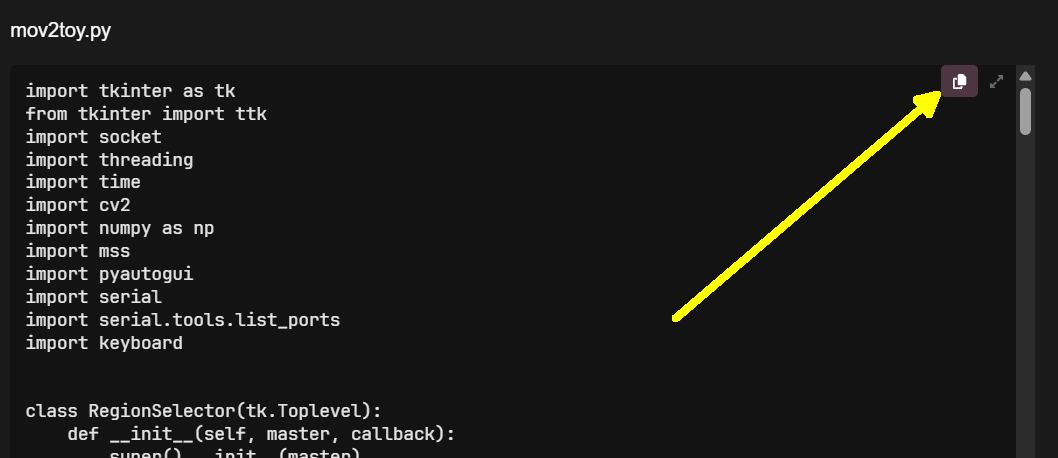
Just paste the entire code above into Notepad (Ctrl+V) and save it as a file named “mov2toy.py”.
To save a Notepad file as a file type other than .txt, go to “File” > “Save As,” select “All Files” from the “Save as type” dropdown, and then type your desired file name followed by the correct extension
the link no longer works
2 Likes