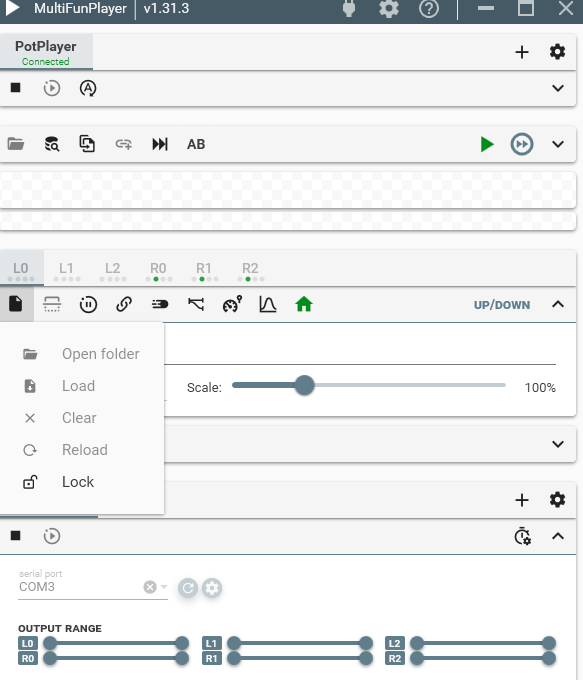
You have to click the connect button manually if you have auto-connect disabled.
HereSphere and DeoVR require remote control to be enabled in their settings.
OFS requires websocket server to be enabled in its settings.
VLC requires enabling http server and setting up a password in its settings, you can find a guide somewhere in this post or on EroScripts.
MPC requires web server to be enabled in its settings.
Easiest is if you add mpv and just press connect, MFP will download newest portable release of mpv for you. But mpv has very simple UI.
HereSphere and DeoVR can be on your quest but you need to find the IP address the quest and enter it into the “Endpoint” field in MFP.
Depending on where are you playing the video files from you might also have to add a script library (button on left side above heatmap) so that MFP can match scripts.
I’ve had some strange behaviour from MFP but I’m a relative newbie so maybe I’m missing a setting somewhere.
I’m running the latest Patreon MFP version, but the same thing happens with a 2 year old version.
I’ve defined 6 axis L0, R1, R2, L3, L6, L9, each with their own separate funscript file.
Looking at the heatmaps in MFP, L0, R1, R2 and L9 appear to be correct. L3 is identical to L0 although the scripts are completely different. L6 is very, very similar to L0, although again the content is completely different.
The correct script names are shown in MFP.
The file size of the L0 script is 5 times that of L3, so I’m pretty sure the content is different.
Very new to MFP and interactive stuff, im trying to get it working but all the load file botht video and scripts are grayed out, i tried search for it but no result, i have .net runtime and vc++. Dragging the script file works but how an i supposed to sync and play the video. Any help would be appriciated.
You play the video in PotPlayer, the script gets loaded automatically. There is a bug in 1.31.3 where you have to start PotPlayer manually before connecting or the video/script wont be detected in MFP.
Hmmm, spent a while documenting the problem with screenshots, double-checked that it looked correct in OFS and XTP, restarted computer, suddenly all looks fine in MFP. Maybe a cache somewhere expired ?!
Sorry to bother you, but can’t promise I won’t do it again in the future
Hi all,
I’m quite new to the world of haptics, and still finding my way around the various software options and have a couple of questions im hoping folk could help with.
My prefered toys are vibrating, rather than the strokers that it seems most scripts are writen for. Most other players have an option to “convert” the acript on the fly from srroker to vibration, either based on spesd or length of stroke wich kind a works sometimes. But with MFP I’ve not figured out how to do that. Is it possible ?
2nd question. In a lot of script archives, there are multiple scripts, some with names of “alpha” and “beta” that i think are for estim, and other names like “frequency” or “volume” in the name.
I guess these are for diffeenet axis, in mfp, but are they also aimed at estim, or can they be combined in some way for toys like the ridge or edge that have 2 vives of a vibe and a.rotation ?
There is no conversion specific for vibes, I dont even know how would such script conversion work.
You could switch your vibe axes to use step interpolation if that counts as conversion, but I’ve used vibes with normal funsripts and it worked fine.
Yes, in MFP you can map each axis (L0/R0 etc.) to one or multiple buttplug device features. So you could map the stroke script to both edge vibes, or map stroke to one and twist to other.
The alpha/beta/frequency/volume scripts wont be automatically loaded by default in MFP as those names are non standard, you will have to open device settings at the top of the window and configure which axes should such scripts be matched to.
Hey, I have been really enjoying MFP since I just got a OSR2+. For reference, I use MFP to access a web source of stash run on a NAS (I also use the stash without MFP for thehandy). I had 2 questions:
Is there a known issue with or fix for playing HVEC videos+scripts using the websource? I have an issue where a set of videos get stuck buffering playing at most a few frames here or there. I compared the working vs non-working videos and scripts and the one differentiator that seems consistent is HVEC encoder. The videos and scripts do play fine in chrome with TheHandy for reference.
Is there an easy way to tell in the MFP controller when an actual script is playing on R1/R2 vs randomizer/link? I am trying to mess around with playing .max.funscript files served by stash. I seem to be able to get around it by manually turning off link and random motion, but I would prefer if I didn’t have to constantly turn that off and on while testing if there is a field or light I am missing.
As an aside, I think I have managed to successfully get Stash to serve max.funscripts, but only if you set it as the primary script and rename without the .max. as it doesn’t seem to be able to grab secondary scripts selected through the SIT plugin. Just trying to refine it before I go through and update all my scripts.
MFP just wraps around windows edge browser, so try using the normal edge browser, if it still does not play hvec then the issue is edge itself or some setting.
The short axis name on the tabs (L0/R0 etc.) and the axis values bar will change color slightly when the script is loaded/playing for an axis.
You could also add a shortcut to toggle on/off those settings to make it easier.
By default MFP will not load .max funscripts, you have to add it to L0 axis funscript names in device settings. You should not use .max unless you for some reason have multi axis and single axis scripts for the same video.
Stash only serves a single script via their api, if there is a plugin that extends that I could add support for it.
Thanks, that helped me test it out. Turns out I just needed to download the HEVC codec for windows (haven’t noticed it before since VLC/Chrome/etc. have it builtin).
Unfortunately, the color changes regardless of whether it is a script or linked. The shortcut option does look promising though, I am trying that out now.
It does seem to load and run .max scripts by default using mpv but only if there isn’t a vidname.funscript in the folder. I assume it is because of the * in the field. Doesn’t matter too much, because I think I am just going to move to remove the .max from the name and use tags/metadata to tell if there are multiple axis in the script.
It is the StashInteractiveTools plugin by @xtc. My understanding is that it still only serves a single script, but it can change the script served in stash to swap between multiple scripts. It does seem to have an issue where it doesn’t change between the scripts if it isn’t connect to TheHandy. That doesn’t matter as long as you set the default script to the multi-axis version though. I think this setup should work for now until the next version of Stash with hopefully enhanced interactive support. Just gotta format all my multi-axis scripts into the single file version.
.alpha.funscript and .beta.funscript files are created by Restim, for use with e-stim devices that are using the difference between the left and right channel to create a sensation. That being said, might be worth a try, especially for something like the Edge-2 which has a pair of motors, and feeling the offset between them. Restim also uses the frequency and volume extensions.
Something that also might be confusing is for a script labeled ‘vibration’, but isn’t specifically for a vibrator, but something to make a Handy or OSR to use very short and fast strokes in places. Some people like it and some don’t.
There’s also scripts for use with vibrating toys. They may show up with V0 or Vn extensions, or even just .funscript.
FWIW: the OSR2/SR6 support adding vibrators that connect to the embedded ESP32, ie, if you wanted to slip a bullet vibe in the sleeve and have it scripted as well.
I’ve noticed that Lovense devices can’t respond as quickly as a stoker can go the full length of travel, and the motor takes time to spin up and down. The practical limit is that it can respond to a bluetooth command every 100-200 ms, and ramp up/down from off to max to off takes 300-500ms.
You may need to open a video and the funscript files in OpenFunScripter (OFS) or another tool and see what you can do to make it
If you’re setting up the template as Yoooi suggests to output to buttplug/intiface, you may also want to have the ‘home’ value at zero, not 50.