Cool, if I have you here, how do I draw a custom curve in the motion provider? I can not find a way to set points?
Double click to add points, double click point to remove.
All editable curves work like that in MFP.
1 Like
@Yoooi ive been having this issue for past few weeks, where if i load a video in SLR, it no longer loads the script from the site automatically. Only way i can get a script to work is downloading the script and loading it manually. How to fix? using v1.33.4.4929310
Try
or
1 Like
worked, thanks 
Hi, not sure if this has been answered or if I’m just doing something wrong. So apologies if it’s a repeated question. But when I try to enable Invert on either pitch or roll. It just makes the pitch or roll script not work anymore. Disabling invert makes the axis work again.
Yea, there was a bug for a very long time with the invert option. You would have to either use very old MFP version, I think v1.25.2, or use 1.32.0 or later from patreon.
Maybe a bit off-topic, I have multiple video files with script files on my PC and would like to play these on my quest 3 while using MFP to control my OSR2+.
How should the setup look like? What player do I need on my Quest and how to load the videos from my PC while making sure MFP knows about it?
Does this work with the DeoVR connection?
Thanks!
MFP does not need to access the video file, only the scripts.
Off the top of my head you can:
- Use DeoVR or HereSphere and copy video files to quest and play them from local storage, requires scripts to be located on your PC and adding a script library in MFP
- Use DeoVR and copy both the video files and script files to quest and play them from local storage, requires logging in to SLR in MFP
- Use DeoVR or HereSphere and on PC use StashApp or XBVR to host videos, requires enabling stash/XBVR repository in MFP
- Use HereSphere and SMB share, in windows share the folder with your videos and add it in HereSphere, requires adding a script library in MFP pointed to the shared folder
- It might be possible to stream VR apps from PC to Quest, in that case you can just run DeoVR or HereSphere on your PC, no configuration required in MFP
I am able to share the video files with an DLNA Server and access these from my DeoVR app on the Quest. Playback works.
MFP is running and connected to DeoVR on the Quest and I added the location of the matching scripts as a library.
MFP recognizes the playback, I am able to control play/pause/skip etc. the progressbars between MFP and DeoVR are synchronized.
Nevertheless, the file seems not to be transmitted correctly. It looks like the latest SLR playback is still active.
Do I need to remove SLR connection or change somewhere in the settings, that I am using local playback and script files?
Which DLNA server? Most DLNA servers dont send correct filenames so MFP wont be able to match the scripts, thats why there are stash and xbvr repositories in MFP.
I dont know what you mean by that.
If you are playing files stored on the Quest with DeoVR then it will send the scripts stored on the quest to MFP (if you are logged in to SLR).
I want to control the axis range with a shortcut, but it’s hard because I can’t find the instructions
I want to make the range -1 (or more) every time I press it
If possible, I think I can adjust it freely with the dial key
L0: 0-100
↓ Press Shortcuts
L0: 0-99
↓ Press Shortcuts
L0: 0-98
↓ Press Shortcuts
L0: 0-97
…
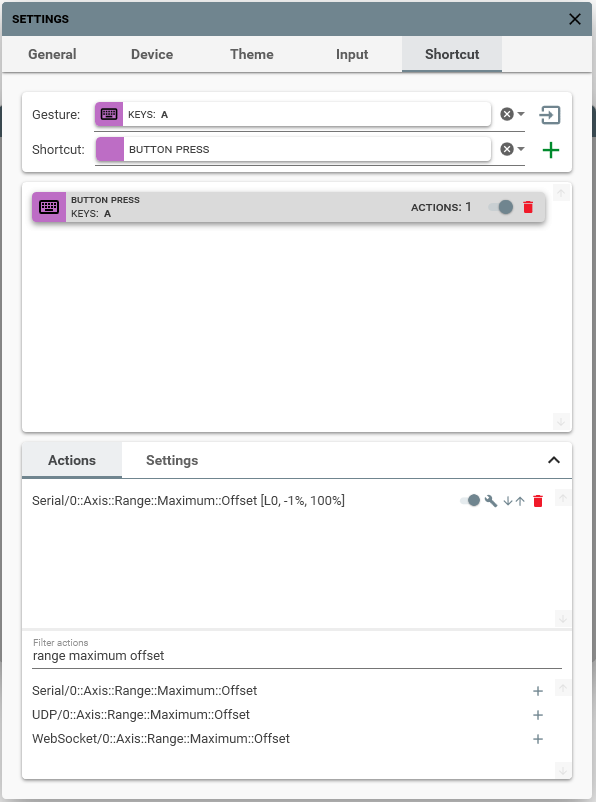
How can I set the shortcut key??
Click settings at the top of the window and go to shortcuts tab, capture your desired key gesture, add “press” shortcut, at the bottom expand the actions tab, filter by “range maximum offset”, assign the action and configure it how you want.
If you switch to the settings tab at the bottom you will be able to enable “repeating” mode so you can just hold the key.
1 Like
It works good thank you
How update system works here actually?
Does patreon version eventually becoming free - but with huge delay after release, or it’s 2 independent version branches that never interfere and getting diff updates?
Patreon version has some features that would not be in the github version, currently its only features that automatically stream/download scripts from a 3rd party like SLR or FapTap.
Additionally updates come to patreon first but the delay for github should not be that huge, I planned to release after 1.40 on patreon but current features I want to add require changes all over the code so it takes a while to get right.
1 Like
great, that features i not needed, just worry about version number
so waiting game it is, ty
Maybe im doing something wrong, but for me MFP is very laggy/jittery compared to scriptplayer. Tried with the same script, both using intiface, MPC, and only the handy connected to intiface. Its like its skipping half the actions, especially noticeable at high speeds. I tried playing around with the settings i could find but none of them seemed to fix it.
Its because scriptplayer uploads the whole script to the handy, while MFP/Intiface sends commands locally over BLE.
You have to switch you buttplug mapping from FixedUpdate to PolledUpdate in MFP and it should behave fine.
But you will lose most of the features of MFP, only the script actions will be sent and some simple features like speed limit/auto-home will work.
1 Like
I’m running into a problem with connect SLR to MFP.
The connection to SLR turns green. I am able to see feedback from DeoVR howver I am not recieving any scripts from SLR.
When I trace log, I am getting a UDP key mismatch, it’s wildly all over the place… any thoughts?
Using DeoVR 15.3 (updated 3 days ago).
Blockquote2025-09-06 15:33:16.1759|TRACE|MultiFunPlayer.MediaSource.ViewModels.DeoVRMediaSource+SlrInteractiveManager|Sending pong to “SLR Interactive” [Key: 2, ReponseType: FunscriptRequest]
2025-09-06 15:33:16.1759|TRACE|MultiFunPlayer.MediaSource.ViewModels.DeoVRMediaSource+SlrInteractiveManager|Waiting for incoming UDP connection [Port: 38887]
2025-09-06 15:33:16.1759|TRACE|MultiFunPlayer.MediaSource.ViewModels.DeoVRMediaSource+SlrInteractiveManager|Received ping from “SLR Interactive” [Key: 0, Endpoint: 192.168.xx.xx:57039]
2025-09-06 15:33:16.1759|TRACE|MultiFunPlayer.MediaSource.ViewModels.DeoVRMediaSource+SlrInteractiveManager|Received key missmatch, resetting [Key: 0, LastSentKey: 2]
2025-09-06 15:33:16.6769|TRACE|MultiFunPlayer.MediaSource.ViewModels.DeoVRMediaSource+SlrInteractiveManager|Sending pong to “SLR Interactive” [Key: 1, ReponseType: FunscriptRequest]
2025-09-06 15:33:16.6769|TRACE|MultiFunPlayer.MediaSource.ViewModels.DeoVRMediaSource+SlrInteractiveManager|Waiting for incoming UDP connection [Port: 38887]
2025-09-06 15:33:16.6769|TRACE|MultiFunPlayer.MediaSource.ViewModels.DeoVRMediaSource+SlrInteractiveManager|Received ping from “SLR Interactive” [Key: 2, Endpoint: 192.168.xx.xx:57039]
2025-09-06 15:33:16.6769|TRACE|MultiFunPlayer.MediaSource.ViewModels.DeoVRMediaSource+SlrInteractiveManager|Received key missmatch, ignoring [Key: 2, LastSentKey: 1]
2025-09-06 15:33:16.6769|TRACE|MultiFunPlayer.MediaSource.ViewModels.DeoVRMediaSource+SlrInteractiveManager|Waiting for incoming UDP connection [Port: 38887]
2025-09-06 15:33:16.6769|TRACE|MultiFunPlayer.MediaSource.ViewModels.DeoVRMediaSource+SlrInteractiveManager|Received ping from “SLR Interactive” [Key: 1, Endpoint: 192.168.xx.xx:57039]
1 Like