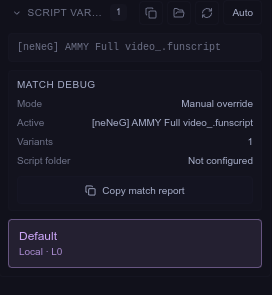
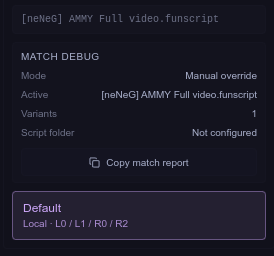
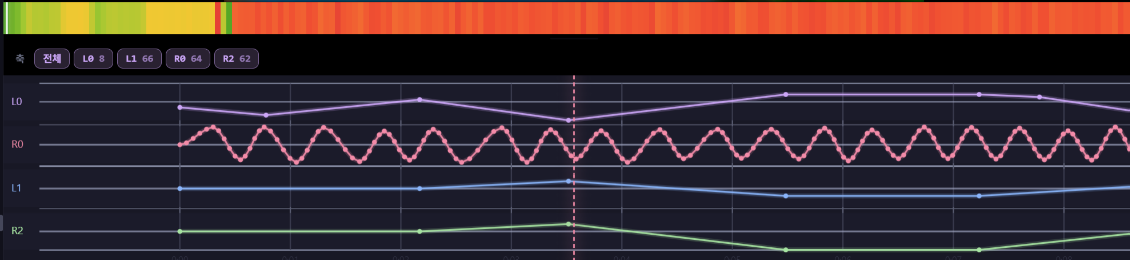
The next version was originally supposed to be v0.2.9, but since I ended up overhauling nearly the entire app, I decided to skip v0.2.9 and go straight to v0.3.0.
The demo screenshots still show v0.2.8 because they were recorded before release, before I updated the version number.
This update includes a redesigned app icon, a new library mode, improved multi-axis timelines, automatic connection for the dedicated remote, more stable Handy synchronization with network diagnostics, improved FunOSR SR1 output with a low-noise option, audio volume boosting, smoother random-script motion, and many other changes.
The biggest addition is the new dedicated library view, which was one of the most frequently requested features. Instead of browsing everything through the file panel, you can now browse your media in a thumbnail grid and quickly find content using search, filters, and sorting.
The Player, Library, and Settings sections have also been consolidated into a workspace sidebar on the left.
To prevent the app from slowing down as the library grows, media duration detection, album-art scanning, and folder scanning now run asynchronously in the background and use caching. Users with large libraries should notice the biggest improvement.
 Library Mode
The demo above shows title and path searching.
The long-awaited media library view mode has finally been added.
The previous interface was still based heavily on the original layout, and honestly, I was no longer satisfied with it. This update simplifies the layout with a vertical tab bar, and the existing panels can now be collapsed by clicking their icons again.
This should make it easier to focus on the actual video playback.
-
Player, Library, and Settings are now integrated into the left workspace sidebar
-
Existing file panels can be collapsed and expanded
-
Search by library title or file path
-
Video and audio filters
-
Script availability and rating filters
-
Adjustable card size
-
Script, subtitle, and multi-axis indicators on thumbnails
-
New app icon and internal branding
-
Redesigned About page and updated descriptions
 The rating feature itself already existed. This update simply makes it possible to use ratings as a library filter.
 Library Performance
The demo above shows sorting by media duration.
The library system has been optimized so that it remains responsive even with a large number of files.
-
Video and audio durations are read in the background and cached
-
Added sorting by media duration
-
Delayed library loading reduces player startup overhead
-
Added cancellation support for thumbnail processing
-
Stops unnecessary album-art searches for items that are no longer visible
-
Folder scanning now runs asynchronously to reduce UI freezes
-
Added album-art and media-duration caching
 Adjustable Library Card Size
The size of the library cards can now be adjusted to match your preferred browsing style.
You can make the cards smaller to display more items on screen at once, or enlarge them for bigger thumbnails and easier visual browsing.
-
Adjustable library card and thumbnail size
-
Smaller cards for higher information density
-
Larger cards for more detailed previews
-
The selected size is applied across the library view
This is especially useful for large libraries, where smaller cards make it easier to browse many items quickly.
 Improved Multi-Axis Timeline
The timeline has been improved so that multi-axis scripts can be viewed more clearly while they are running.
The timeline appears a little too large in the first demo, but its height can be reduced manually.
-
Display two or more axes simultaneously
-
Added an All Axes selection button
-
Double-click an axis button to display only that axis
-
Display the current numeric position of each axis
-
Drag the divider between the video and timeline to adjust timeline height
-
Increased the maximum timeline height from 240px to 360px
-
Improved timeline line colors and speed visualization
Previously, even when a script contained multiple axes, it still felt like you could only inspect them one at a time. Now you can display L0, L1, L2, and R0 together and compare them on the same screen.
 FunOSR · SR1
I have continued testing and using the FunOSR SR1 2.0 Twist unit that was provided to me.
One issue I noticed was that unless you live alone, the noise can make the device difficult to use. The Twist module is especially noticeable late at night, and even without the module, the device can still sound considerably louder than the Handy.
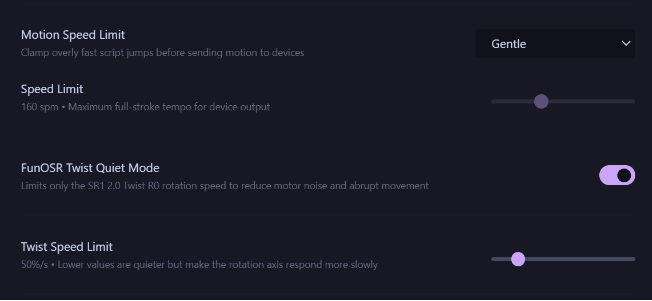
To improve this, I added an option to limit the speed of the Twist module, along with the random-script motion smoothing option described below.
On the SR1 2.0, these changes produced a noticeable reduction in noise.
-
Added real-time testing that lets you move serial axes directly with sliders
-
Added a center button that moves an axis to position 50
-
SR1 Bluetooth COM output is now limited to a maximum of 25Hz and uses TCode interpolation
-
Disabled unnecessary idle keep-alive output over Bluetooth COM
-
Added an SR1 2.0 Twist Low-Noise Mode
-
R0 Twist speed can be limited between 30–160%/s
The SR1 2.0 Twist profile itself was already available in the previous version. This update adds the improved output method using 25Hz TCode interpolation and the new low-noise mode.
The low-noise mode only applies to the R0 Twist axis. It does not affect L0 or other profiles.
 Random-Script Motion Optimization
When using the existing random-script feature with the SR1 2.0, the movement could sometimes feel extremely rough, almost like the mechanism was scraping against a surface.
After comparing it with manually authored scripts, I found that random scripts often contained many small curves and abrupt transitions, causing the device to move too aggressively.
To improve this, I added a motion-smoothing option. I strongly recommend enabling it when using the random-script feature.
Since normal scripts generally do not need this kind of processing, the option only applies to randomly generated motion.
-
Added a Random-Script Motion Optimization option
-
Supports Off / Light / Balanced / Strong
-
Converts linear back-and-forth movement into cosine and S-curve acceleration
-
Preserves the original maximum and minimum positions
-
Preserves the original stroke timing
-
Random pause sections now correctly maintain the current position
-
Applied to both no-script random mode and random gap-filling
Previously, random motion could feel like it was snapping sharply between the top and bottom positions. Acceleration and deceleration are now applied, making the movement feel much more natural.
The movement range and timing remain unchanged, so the overall intensity should not be reduced.
This option does not apply to normal funscripts.
 Handy Stability and Network Diagnostics
A new Handy Network Diagnostics tool has been added to Settings.
It measures median latency, P95 latency, jitter, success rate, and server time offset, making it easier to determine whether synchronization problems are caused by your own connection or by the Handy servers.
In South Korea, latency in the 200ms range is generally normal because of the physical distance to the servers.
If your results are significantly higher than that, or if several of the 12 test attempts show unusually large spikes, there may be an issue with the Handy server or your home internet connection.
 Automatic Dedicated Remote Connection
The dedicated player remote that I previously developed can now reconnect automatically when the player starts.
I originally planned to include this behavior when the remote was first implemented, but forgot about it until I recently found myself needing it again.
-
Automatically connects to the saved remote when the app starts
-
Uses staged automatic retries after disconnection
-
Prevents duplicate connection requests between automatic and manual connection attempts
-
Fixed an issue where a second click was required after the first connection attempt failed
-
Added status polling to verify pairing responses
-
Important BLE commands now use a write method that guarantees a response
-
M5Stick S3 now displays only the A and B buttons that physically exist on the device
-
S3 no longer sends mappings for nonexistent C and PWR buttons
Previously, the remote had to be reconnected manually every time the app was launched. Once saved, it should now reconnect automatically.
 Audio
Audio
-
Added experimental Audio Volume Boost
-
Supports up to 150% volume for audio files
-
A peak limiter is applied above 100%
-
Smoothed volume-slider input
-
Reduced main-process freezes during album-art searches
This is intended for media that was recorded at a very low volume.
A limiter is applied above 100% to reduce clipping and distortion, but this is still an experimental feature and currently only applies to audio files, not videos.
 Automatic Script Matching
-
External script-folder indexes are now merged during the initial folder load
-
Improved cases where the list showed a green script icon, but playback reported No Script
-
Axis information from both local folders and separate script folders is now displayed together
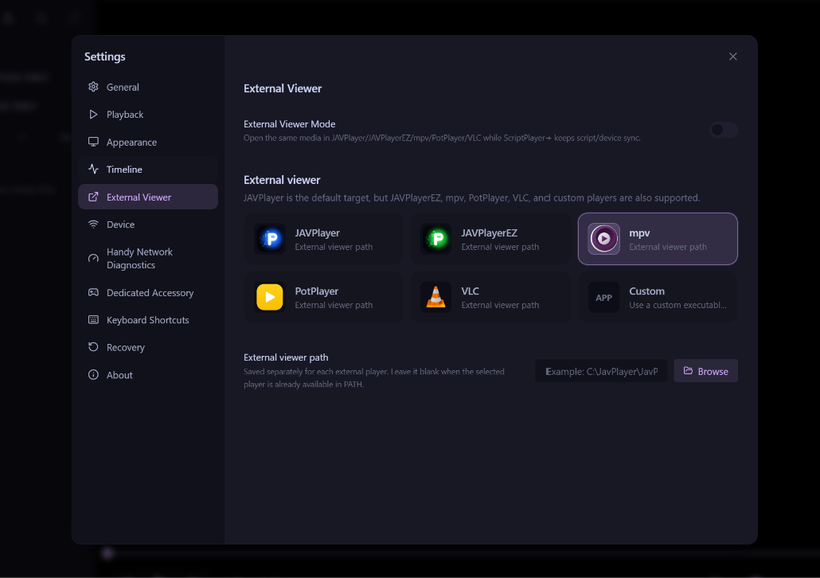
 External Player Icons and App Icon
When the external-player feature was first added, I used the original commercial application icons directly.
To avoid potential copyright issues, the PotPlayer and JAVPlayer icons have now been replaced with newly drawn icons that retain a similar visual concept without directly using the originals.
The mpv and VLC icons remain unchanged because both projects are open source.
The Scriptplayer+ icon has also been redesigned. The previous icon was originally generated quickly with GPT because the app was not initially intended for public distribution.
The new icon now looks much more appropriate for a media player.
The Koeplayer and Scriptplayer+ Android versions are planned for release once my business registration process is complete.
The PC version of Koeplayer is also finished, but I am still deciding whether it should be sold separately or included as a benefit for supporters.
 Download
GitHub
Release
Feedback