Can someone explain how Stash and Heresphere with MFP are working together and how to set it up if all three are running on the same PC?
If they are all on the same PC I think you just enable stash repository in MFP, connect to HereSphere, and in HereSphere browse to http://127.0.0.1:9999/http://localhost:9999.
HereSphere should switch from a web browser view to tiles.
Also make sure to use latest Stash/HereSphere.
OK you need to enter the IP, localhost wont work. Playing a flic wont play it with HS. No Previews a bit rudimentary it is.
Honestly you dont need MFP here. I use Stash+HereSphere and use the Stash-vr docker instance. After setting up the config and running stash-vr I navigate to the url in Heresphere and can play my videos. I use it for both VR and flat videos.
Here is my start-stash-vr script
docker run --rm -it -v "%cd%\hsp":/hsp --name=stash-vr -p 9666:9666 -e HSP_DIR=/hsp/ -e STASH_GRAPHQL_URL=http://192.168.1.136:9999/graphql -e LOG_LEVEL=trace -e STASH_API_KEY=<generate_from_stash_settings> -e FILTERS=3,1,4,5,6,7,8,9,10,12,13 stash-vr
There is also stash-vr-companion which is python.
Oh, yea if you are using older MFP version then the ip/host comparison was broken so you had to use the same ip/host in heresphere and in MFP. This was fixed in later version.
Then I guess the bug is still there. Not using an old version as your patreon.

@xtc so you library is on a NAS? How do you use Stash, you browse it and then? How do you play the movie over Heresphere and MFP from there?
Hmm thats strange, I created code tests specifically to verify that 127.0.0.1 and localhost are treated as the same url.
If you could DM me trace logs with endpoint set to localhost:9999 in MFP, browsing to 127.0.0.1:9999 in HS, and trying to play a video with a script from stash (or whatever setup you had that did not work). I would appreciate it.
But wait, does opening localhost in HS have to do something with you? Its not about playing scripts its about opening the page.
So the idea is to browse in Stash but play in HS, no? Stash cant even play AV1.
I thought that you entered localhost instead of ip in MFP and the scripts didn’t work. Disregard if its some HS issue.
You should browse in HS too.
HS should switch to a tile view like this (its from XBVR but it should look the same):
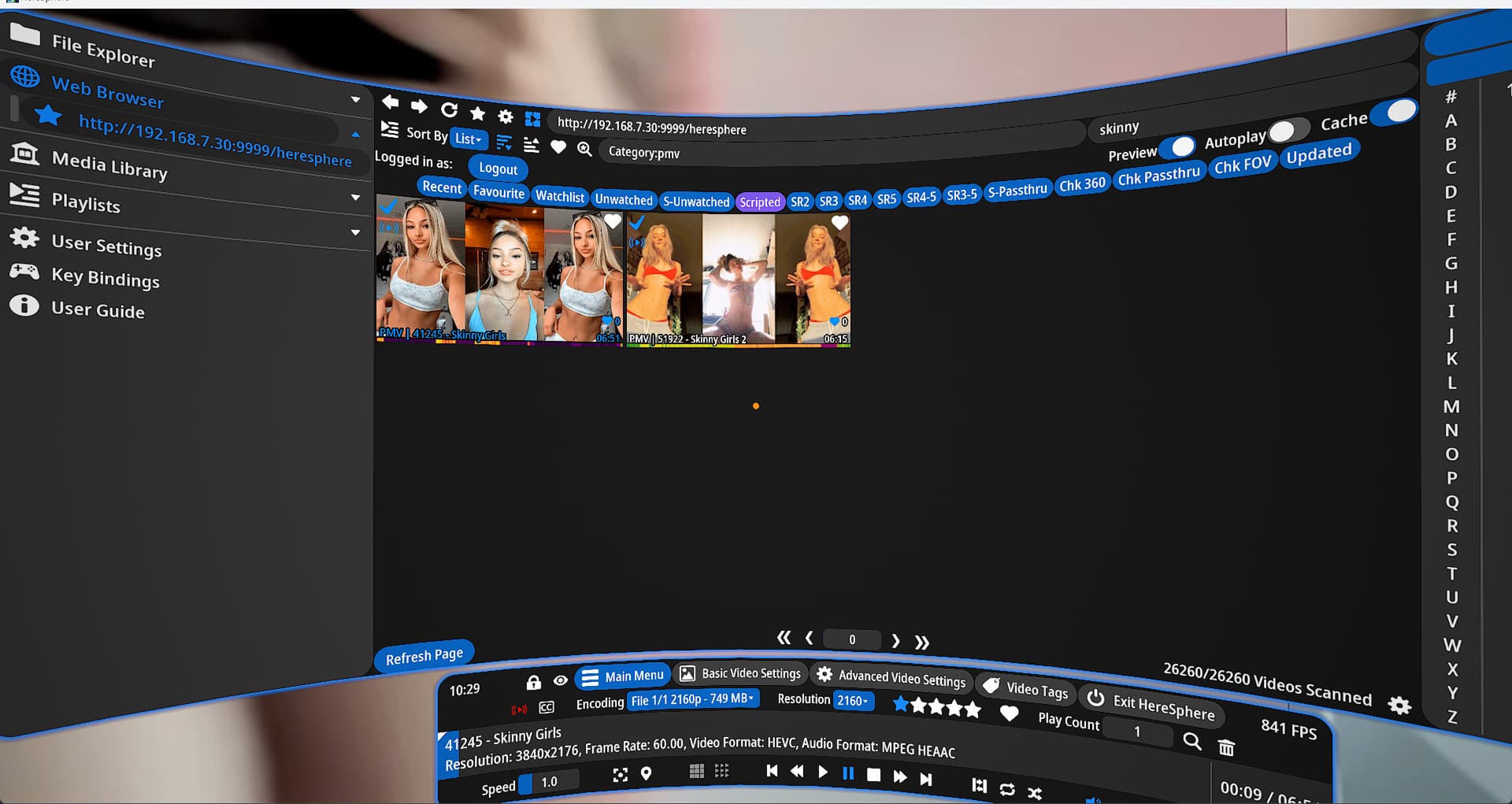
Tho I don’t remember if stash even supports this HS view, you might have to use a plugin like stash-vr-companion.
XBVR for sure supports this natively.
I think XBVR would work better for funscripts/multiaxis/VR. I don’t use either but thats my impression after adding stash/XBVR to MFP.
Yeah I have that view but from there HS should do the playback which is not happening. I really hope the big update that is coming next year will do something in this direction. I mean HS wants to be the Plex of the headsets right? Right @HereSphere ?
So location of stash doesn’t really matter. As you see on my docker command I put the IP of my server (HereSphere is on another PC for VR with psvr2). That’s all you really need. In HereSphere you put in the ip of the stash-vr with ip/herespehere and all your videos should show up. You do NOT connect HereSphere to stashs (Nas) up you connect it to whatever the IP+port is of the docker stash-vr instance.
Stash can play AV1 100%. You need to install a media codec pack maybe to get that support. I have videos in h264,h264 and av1 and they all play in HereSphere (installed codec pack on that PC ) and stash.
My setup is like this
PC 1 - stash server+ stash+vr(this connects to the actually IP of PC1.. no localhost)
PC2 - HereSphere+ psvr2 (put in network IP so http://PC1-ip/heresphere in HereSphere media browser)
OK I see thanks but integration into Heresphere is just showing.and browsing, but no connection to the HS player? I mean there is no plugin in Stash for using Herespehere as the player right?
stash-vr or stash-vr-companion ARE “plugins” that allow you to view AND play stash content. The only difference from normal stash plug-in is that it’s requires outside setup because they both run secondary webserver for HereSphere to run.
I would strongly suggest checking out the two links for both software and give it a try.. or just install docker and use the script I gave you with different values.
But in either of those options you will be able to watch flat AND vr videos inside HereSphere without the need of MFP and just need Stash, HereSphere, a VR headset and one of these stash vr plugin servers running. Hopefully this helps out.
If your HS player isn’t playing your videos then I would look into installing a codec pack.
First go to there settings and try with the Media Foundation render or the direct show. If neither of those work then download the codec pack that HS alerts you about (If I recall when it fails to decide a video it will flash up a uel for you to go download the codec pack).
Now another reason why this may not work us because of your vr device doesn’t support it . You may want to look that up, if that’s the case you will need to use the transcoded stream vs the direct stream that HS/stash serves. You may need to add some extra ffmpeg command line settings within Stash but unfortunately that’s outside my experience so can’t really help there.
OK thanks will check out stash-vr or stash-vr-companion but thought they run on NAS not if you use PC.
Nah you can run them on the PC that you would use to browse stash normally in the browser. Or it can be on your NAS as well just running on another port. They connect via the graphql endpoint vs needing direct access to the video files. So you can run them on any PC you have as long as that has access to your NAS IP you should be good. Good luck