Scripting in Heresphere with the controllers is a unique feature for sure.
♥️ 🆅🅵🆂 STUDIO - All-in-One Desktop App for Managing, Playing & Creating Funscripts (Windows + macOS)
Hello,
Is this working with heresphere quest version directly?
Or it needs PCVR to perform?
Thank you.
Hi!
Currently, vFAPS requires Steam VR to work.
That said…
I’ve had very promising initial success in porting vFAPS’ core functionality to Android using the phone’s gyroscope and accelerometer for multi-axis recording.
Given the Quest 3 is (to massively over simplify things) basically just a big Android phone with some controllers, I fully expect there will eventually be a standalone version for Quest Headsets.
@roa ???
T-Code is the core device protocol…
vFAPS maps funscript axes to T-Code channels (L0 for stroke, L1 for surge, L2 for sway, R0 for twist, R1 for roll, R2 for pitch) and sends commands over serial to OSR2/SR6 devices.
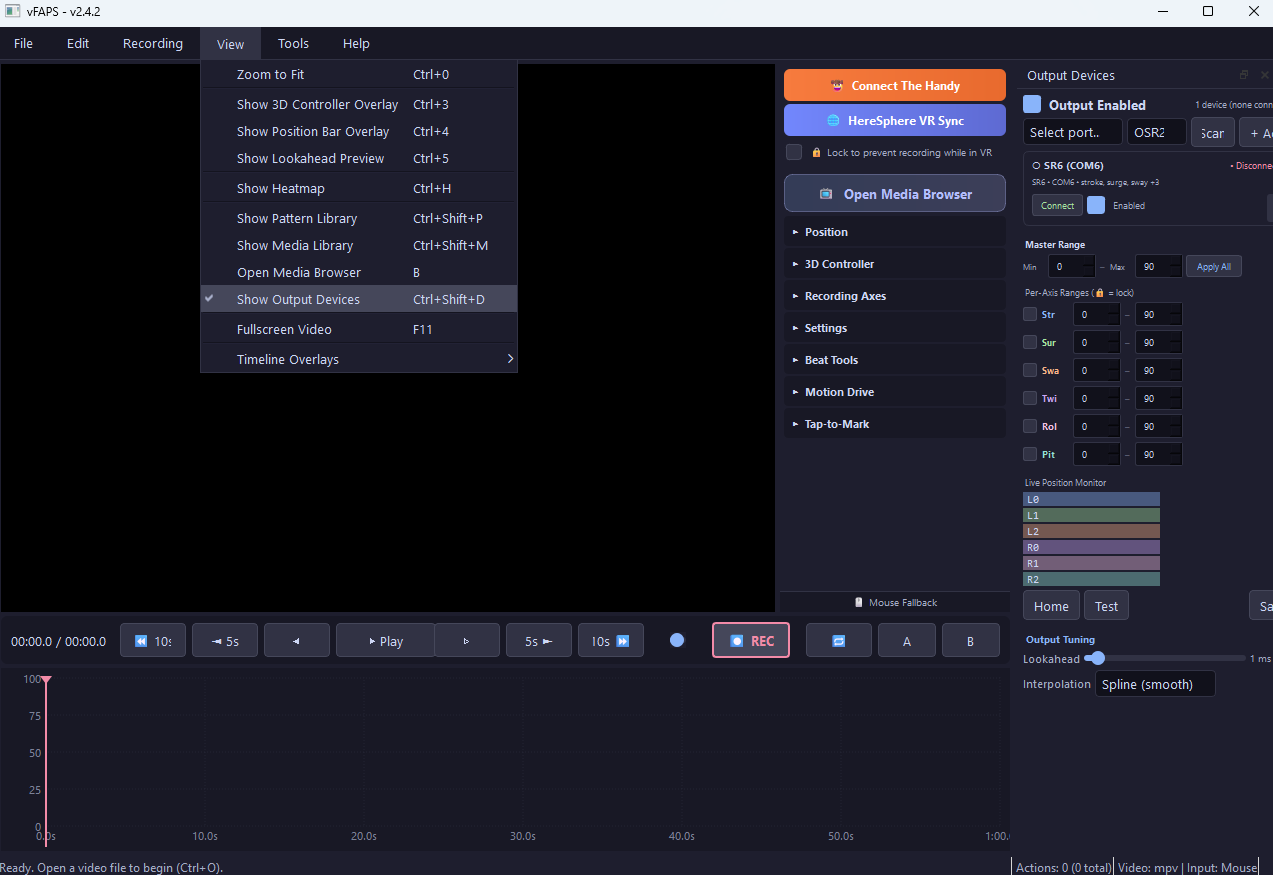
K sorry just installed first time and saw connect to Handy and thought no T-Code device. Fine then will test capabilities and incapabilities later this week.
1 Like
Just added 2.4.2 with a bug fix for Heresphere, curious to get your thoughts on everything and appreciate the support!
<3
Is script protection already in for Heresphere?
Just the lock toggle currently.
Ya wont unlock that one.
Lol, smart. Full script protection will be in the next release.
FAP Store — Creator Early Access Now Open
Hey everyone,
I’ve been building FAP Store, a marketplace built specifically for funscripts. The pitch is simple: creators keep 90% of every sale.
How?
User can purchase pre-load credits, so there are no per-download Stripe fees eating into your margins. One processing fee at top-up, spread across multiple purchases and not $0.30+2.9% on every single sale.
What that looks like on a $3.00 script:
Gumroad: $0.80 (27%) > Creator Nets: $2.20
Patreon: $0.69 (23%) > Creator Nets: $2.31
FAP Store: $0.30 (10%) > Creator Nets: $2.70
This is as low as I can get it without going negative. However, if we’re able to get to scale, there are ways to get that even lower as Stripe is willing to reduce fees after a certain volume.
For users, there are of course all the free funscripts you’re already used to, but now in a single place with 1-click download and simple playback all in the same app.
The FAP Store is functional and in active development with script uploads, downloads, heatmap previews, multi-axis support, creator profiles, script ratings, Stripe Connect payouts, and in-app purchasing from the vFAPS desktop app already working.
Early access creators get a founding badge, featured placement at launch, vanity FAP store page URL, and direct input on the platform.
Signup takes 10 seconds. Just your creator name/handle, email, and current platform:

FAP Store — Creator Early Access
Thank you and happy to answer any questions or take any thoughts/comments/input! =)
Figured I should probably do a bit of “show” with the “tell”, lol.
Store page:

Creator page:

Checkout page:

is there a tutorial somewhere on how to get this set up with the vr controller, and heresphere?
There is indeed. I put a step-by-step guide together a few weeks ago:

Hi all!
Currently working on v3.0 but wanted to give a quick update on what just shipped with vFAPS.
Free to Download
v2.4 is now available as a free public download. This is the most feature-complete free release yet.
Grab it here: vfaps.com/download
Patreon Supporters
v2.8 (Early Access tier) adds a bunch of workflow and editing upgrades:
- Ghost Overlay — see exactly where your next point will land before you commit
- Advanced point editing with multi-select (Shift+click), bulk operations, and point snapping
- Script Version Manager — track and swap between multiple script versions per video
- Multi-script per video linking — associate any .funscript to any video, even without standard naming
- VR frame-by-frame navigation (Grip + Thumbstick)
- Script Protection with safe export mode (auto-timestamped filenames)
v2.9 (Power User tier) goes further with some big new capabilities:
- Dual Video playback — run two videos side-by-side with synced or independent transport
- Remix mode — blends keyframes from two scripts (50/50 within 20ms overlap) for unique combined motion
- Axis Fallback Modes — set idle axes to Random oscillation or auto-loop saved patterns
- Interactive dual-handle range sliders per axis
- Fullscreen overlay with playlist controls and master range slider
- Zoom-independent timeline rendering for smoother performance
And the big one…

 v2.9 includes a native macOS build!
Feature parity with Windows for authoring, playback, output engine, media browser, dual video, remix, with one caveat that VR controller input isn’t available on Mac since SteamVR is Windows-only, so scripting falls back to mouse input (I’m looking into alternative VR input methods for Mac).
Download them here: Patreon.com/vFAPS
ONE MORE THING…
Introducing vFAPS Sync
vFAPS Sync is a Chrome extension that syncs browser video playback (time, speed, play/pause) directly to the vFAPS desktop app and connected hardware (OSR2, SR6, Handy).
Auto-Matching: Automatically searches local libraries and the FAP Store for scripts matching the active video.
Site Adapters: Includes 18 specialized adapters for major studios, tube sites, file hosting sites, and a generic HTML5 video adapter for most other video sites.
Privacy: Operates 100% locally via WebSocket; no cloud servers, accounts, or data collection.
Available now for Patreon Power Users.
Public Release coming soon – the extension is currently in review and pending approval with the Chrome Web Store.
More details here: vfaps.com/sync


Feature and version comparison table: vfaps.com/features
Thanks to everyone for the continued feedback and support!
Happy scripting!
$5 for instructions?!
Might be my PC specs, or the fact that I was using a Quest 2 over wifi vs a hardwired connection, but the program just kept crashing on me when I tried to track anything. I like the idea though.
1 Like
Hmm, sorry about that, I’ve tested on a Quest 3 over link & hardwire but not on a Quest 2.
I’m going to try and borrow a quest 2 from a buddy over the weekend and I’ll see if I can reproduce the results.
If you’re able to message me your PC specs that’d also be helpful and ty for letting me know!