hello! SR1 here, got this exact issue! hopefully it will be fixed soon!
@konglig @Ultari123 Thanks for the detailed reports, both of you. I’m going to dig into this. Will keep you posted.
@UsagiiSan, I’ve already thinking about this point cause I also have a cockring working with Intiface, so multi devices/channels is something I would love to implement, but it’s not the priority at the moment.
3 Likes
Any chance I can convince you to make the ‘short’ patterns in some of the % selectors longer? Some of those patterns are top tier but are far too short, barely have time to feel the pattern expression before it swaps to something else.
It feels like the current duration is like 0.5 to 1s. Could a 2 to 3 second option be possible?
1 Like
@KingCobraKush you can already customize this, just duplicate the original pattern and go to the details of the gesture you like. there’s a slider where you can change how often it’s repeated when its triggered - whit a range for suprise as well! 
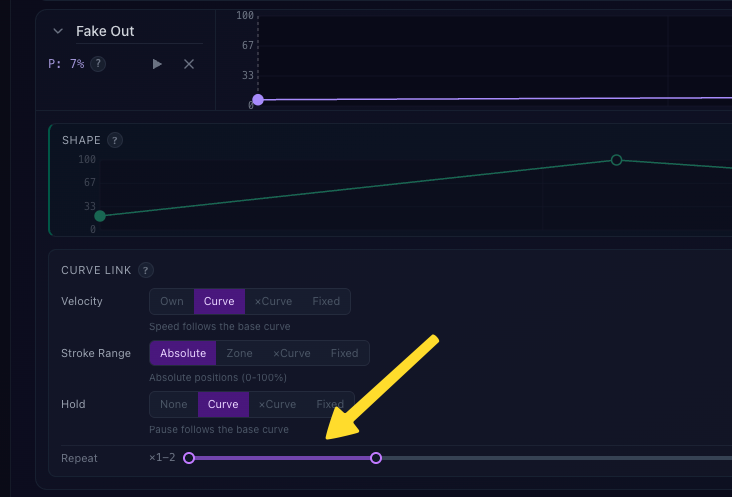
you can also draw the length out in these settings, eg. by changing how the of the patterns velocity behaves compared to the default speed curve:

apart from this of course, @Glavious obviously has a hand for creating satisfying petterns, so i’ll not complain when the amout of them would multiply 
Hi there, a preview build is up at dev.theedgy.app with some technical updates. Would love your feedback before pushing to production.
What’s new:
T-Code devices support (I hope  )
)
@konglig @Ultari123 @kindredsp
You can now connect your favorite T-Code device directly with USB. Intiface is no more mandatory as a bridge. Just click “T-Code” in the connection panel and select your serial port. WebSerial connection are limited by browser compatibility, so it should work with Chrome/Edge…
→ Again I don’t have any device to test with, I have done some tests with this emulator, but it runs under the web page so it can’t confirm that the serial connection will work.
I also set a toggle under the Intiface connection mentioned by @Ultari123 (because of the browser compatibility) with a frequency select, I suppose 20Hz (20 points/seconds) should be enough, but I have seen some projets with a maximum of 50Hz so you can pick from 10 to 50Hz. I can see the Handy receiving sampled commands throttled by the bluetooth connection so I suppose that a serial connection over Intiface will work much better.
I’ll let you guys give a try and tell me if it works.
HSP instead of HDSP
Long story short, this is another protocol to send action to The Handy device, so movements feel smoother/more fluid with it, ibrato patterns should feel snappier/tighter ^^
This requires The Handy to be under firmware 4+, so I have left the HDSP protocol as a fallback if any of you are not up to date.
Physical control
@atxahzen the Handy’s physical buttons are now detected. POWER = pauses/resumes the player (and the device ofc), LEFT/RIGHT adjust arousal level, I’ve also bound stroke range directly to the device, so pushing UP/DONW will sync live with the app. No more ignoring the hardware like previously mentioned.
@Mk_3 there’s now an “Invert direction” toggle for your upside-down setup 
@KingCobraKush saw your feedback about gestures being too short. That needs a deeper rethink of how gesture duration works, it’s on the list but not in this build yet. Will keep you posted.
In the meantime, you can follow some hacks mentioned by @jk79 to extend the duration.
This is a preview build so things might be unstable. The main version at theedgy.app stays unchanged in case of epic failure on preview. Try it out and let me know what works and what doesn’t.
5 Likes
Yess~ I saw that part on the desktop interface, but unspoken context I didn’t really mention was ‘while I was on mobile’, that is entirely my bad 
I also noticed that in ‘custom’ device profile you can set a min and max speed, too, which is awesome.
 finding the T-Code option: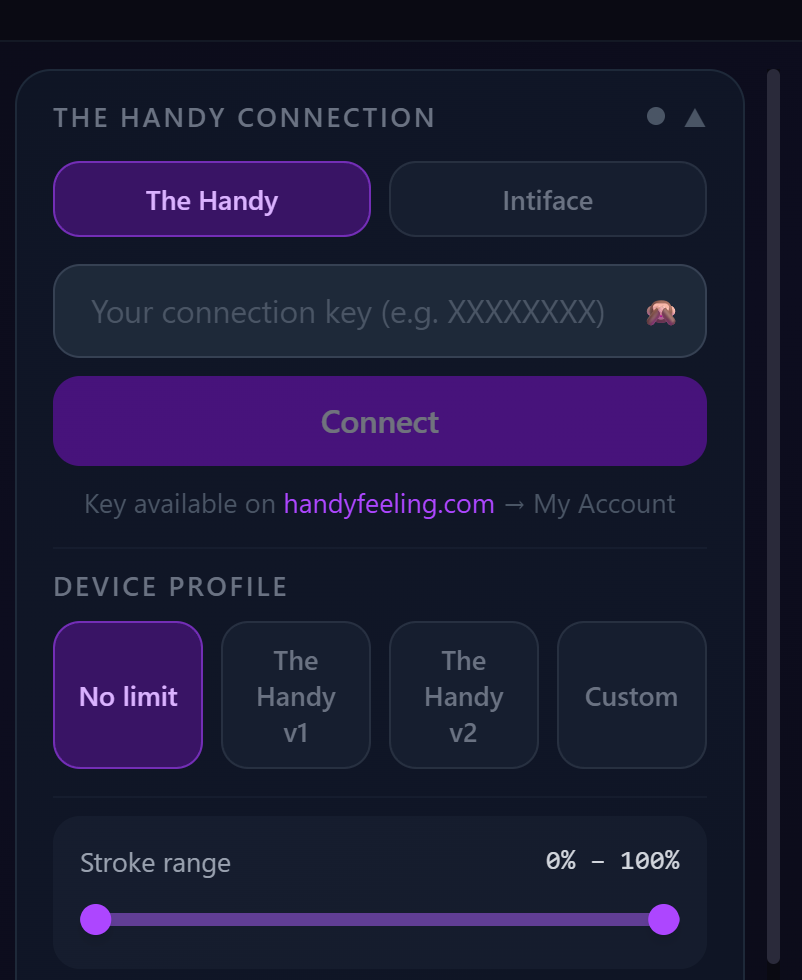
Hi there, as mentioned, it’s available in the preview build at https://dev.theedgy.app ← not the
same URL.
I had to refactor the communication core, so I deployed this preview version to let people fall back
to the stable version in case of “emergency” ^^
Let me know how it goes!
1 Like
I have attempted making my own programs using HSP control and I seem to run into two major issues that I cant seem to figure out. I run into a buffer stream error after so many actions being sent to my device and I have tried to give AI my program to find an efficient way of clearing it without any luck, and my second issue is getting smooth stroking. When stop stop_on_target=true, I always battle a weird delay in actions so stroking feels super unnatural and with that parameter set to false the device just knocks into the ends of the stroke range without properly turning around and going the other direction in time. How have you combatted this issue or what is your method that you are using to send solid and cohesive stroking actions?
Thanks for any advice!
Hey! That’s what made me sweat, I went through the same struggles.
Open your browser console and take a look at the console + network panels
Keep in mind that my implemetation/pipeline still need some improvements, I’ve got some “not so soft” turning point when changing behaviors/arousal level that can break the immersion.
…but changing playback in netflix broke the immersion, right ? 
About your problems, here’s some advice.
Buffer issues: The key (for me) is to always stay ahead of the device. At startup, I send ~300 points before calling /hsp/play. In that way the device has a comfortable buffer from the start. Then I use pause_on_starving: true as a safety net, but the real strategy is preventive refill: the device fires an SSE event hsp_threshold_reached when the buffer reaches a specific point index (you can define this index), and that’s the flag to push the next batch. I try to never let the device starve because, in my tests, I figured out that it’s too late to send next batch, so fresh points are already on the way before starving. Keep your device full ^^
Smooth stroking: Forget stop_on_target entirely => that’s HDSP, not HSP. With HSP you send a timeline of {t, x} points (t = time in ms, x = position 0-100) and the device interpolates between them. No stop/start, no direction commands. A stroke is just:
{t: 0, x: 10} ← bottom
{t: 400, x: 90} ← top
{t: 800, x: 15} ← bottom
The device handles the turn-around ‘smoothly’ by itself. (But I suggest you already know how to handle points)
The other critical piece is time sync call /servertime ~30 times at startup to calculate the offset between your clock and the server’s (that’s the little delay you feel after playing play at the first time. Pass that corrected time in server_time when you call /hsp/play. Without this, your timeline drifts and everything feels off.
In my use case, I want to predict the buffer index of the device to manage a smoother transition when changing arousal (still improvement), and I’m planning a feature to play video with a funscript file so you can adjust the ‘intensity’ of the funscript according to your arousal level.
For the last point, keep in mind that the API as a limitation of 240 req/min (mentionned in V2 documentation) so dont overcall the api.
Again this is my approach, can be improved. For exemple, as I writing this post, I’m not sure about the first 3 batchs and I can see a little desync between device and emulator along a session, that’s means I lose sync in some way when refreshing buffer a lot of time.
Happy to go deeper on any of these if needed!
1 Like
Ok guys, I’m actively working on a better version of the editor for gestures variations.
I want it to give more control, to be more intuitive, but without making you feel like you’re setting up the next rocket to the moon.
So, better than a long text, a simple showcase of where I am.Ok guys, I’m actively working on a better version of the editor for gestures variations.
I want it to give more control, to be more intuitive, but without making you feel like you’re setting up the next rocket to the moon.
So, better than a long text, a simple showcase of where I am.
Not deployed yet, because the variation interpretation core needs some adjustments to be production ready.
But let me know if this simple showcase explains how it works, or if you already have some confusion!
1 Like
That is super helpful and good to know moving forward! This is plenty of information for now
1 Like
I tried the T-code version, it connected without issues. The default presets are really good. Its crazy that no one had thought of this idea sooner.
I think this is great so far. thanks for letting us test!
1 Like
The controls are much better! You even thought to make it easy to access the arousal meter. Which is awesome. From my pov, there’s only one thing left to make the device controls be able to deliver the same experience as the screen - what do you think about using the bottom button to cycle through the personalities (behavior) that are selected on the screen?
Aside from that, I’m still trying to wrap my head around the relationship between the arousal and the weights of the gestures and the shape of the funnel. I think I’ll have to play around with tuning to really get it. Any thoughts on crowd-sourcing (allowing contributions) for gestures/ behaviors?
I don’t have a good idea what I’m seeing, but the adjustability/configurability looks amazing!
Great Work!! If no one has mentioned it yet, I’d like to create a custom one where I can choose my favorite patterns from the existing ones and combine them into a single without having to create each one individually myself.
1 Like
This is SOO amazing. Finally anything I’ve ever wanted for the handy.
Sometimes I’m accidentally changing my arousal when I scroll on the screen.
And it would be very great if the program continues to work when I visit another website.
Yea, having it not lock up when you change tabs/apps on mobile would be huge.
I found one workaround on mobile, though. If you make it ‘picture in picture’ if your phone can handle that, the website keeps syncing and allows motions.
Hey everyone, quick update and catching up on replies!
@rickboooobbyy you’re welcome!
@kindredsp glad to hear T-Code connected without issues and the presets feel good. That’s exactly the kind of feedback I need, thanks for testing!
@atxahzen interesting idea about using a device button to cycle through behaviors. Which button are you referring to exactly? The bottom one on the Handy is actually the WiFi/Bluetooth mode switch, and I’m not 100% sure it fires an event I can capture. If you mean one of the side buttons UP/DOWN or LEFT/RIGHT, those are currently mapped to stroke range adjustments and arrousal levels. Happy to look into it if you can clarify! Maybe a panel to configure mapping with the device
For the arousal/variations/funnel relationship, yeah it’s not the most intuitive thing at first. The short version: arousal controls your base curves (stroke range, velocity/speed and amplitude inside the stroke range, hold), and variations are temporary deviations that kick in based on their probability at the current arousal level. The higher the probability, the more often they trigger.
Playing around with it is honestly the best way to get a feel for it. The new editor should make this clearer.
About crowdsourcing: A community library inside the app will require server side investigations and will require user accounts and so on. For now, the import/export feature lets you share behaviors with others, which is a first step.
@Xmayestix a built-in library/collection of variations/patterns is something I’m considering.
@creamwood @KingCobraKush controlling the app while doing other things on your computer (browser, game, video player) in the background is a use case I’ve thought about too. A standalone version of the app could solve this, it’s on my radar.
General update: v1.3.0 is now live on production (theedgy.app)!
Here’s what’s new:
- T-CODE connectors are now on prod (OSR2, SR6, SSR1, OSSM via Serial/USB,)
- Variation editor has been completely reworked (horizontal layout, shape thumbnails, compact mode, shape preview) try it and tell me how it feels.
- Behavior interpretation changed: the engine core got refactored, so preset behaviors and variations will feeldifferent. Smoother transitions, variation behavior at high arrousal can be very slow (micro movements) with your device. I think it’s a better management for edging purpose. Let me know how it compares!
- Import/Export is now available for custom behaviors (.edgy files but it’s just json inside ).
- Physical button detection on the Handy (safety stop on power button press)
- Stroke inversion toggle for upside-down mounted devices
Full changelog at theedgy.app/changelog
As always, feedback welcome!
3 Likes
Loving the export feature bro.
Thank you for your work and creativity, this interface is truly next level.