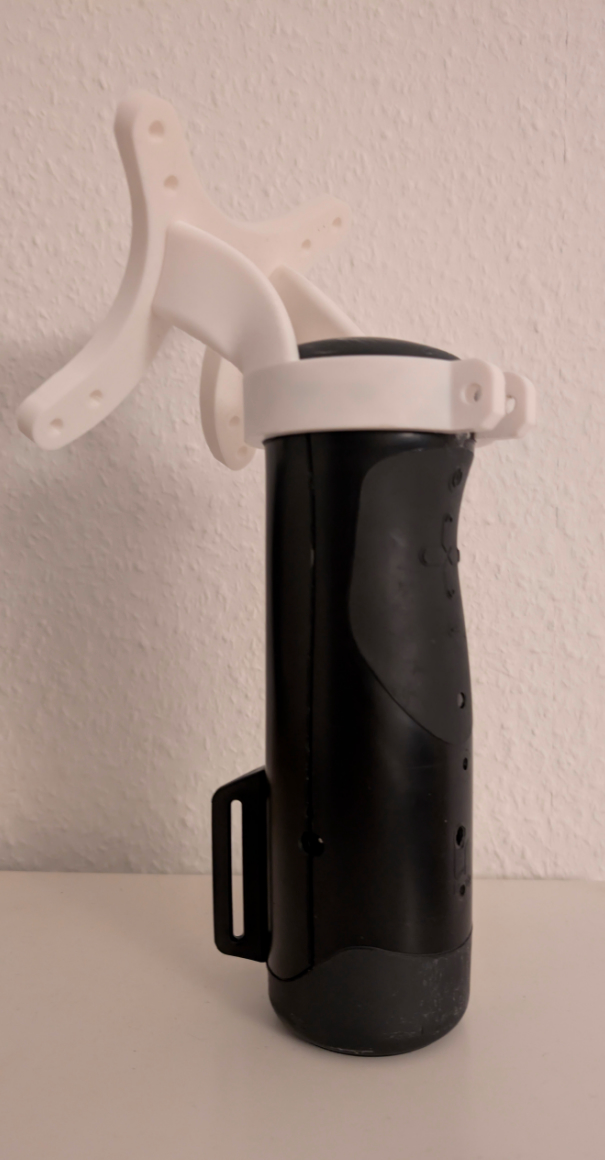
Here’s my take on a VESA mount for the Handy 1.
Print it as a single object or split, since the model contains dowels.
I’ve printed it split, so I can’t vouch for how rigid it would be as a single object. The clamp being flat as depicted is likely recommended.
Notes:
- Slice how you see fit, I usually use the paint supports by angle with 45 degree and a brim.
- There’s no tolerances on the dowels, so it’s friction fit. Tap into place using a hammer.
– You could also slightly sand the dowel part and use a strong epoxy to glue them together.
- The design has enough clearance so that the original and TrueGrip sleeve have enough room on the up stroke if you have the Handy mounted with the buttons facing you i.e the default Handy orientation where the flat bottom touches abdomen.
– To me this is handy since if allows you to locate and orient everything on the fly without having to go into pass-through in VR
Handy 30deg VESA Mount.stl (2.1 MB)
10 Likes
Many thanks. This is just what I was looking for. For some reason I couldnt split the model. Ended up printing it vesa down flat It still barely fit my print bed (running an old creator pro) I did use a couple supports but it printed really nice. So much easier and sturdier than trying to rig up a large hose clamp or something. If you have a paypal or something id happily give a tip.
1 Like
Appreciate the gesture, but I’m mostly in for the love of the game.
The split to object feature I used was in Prusa Slicer. I might have assumed it’s ubiquitous in other slicer tools.
Here’s the model exported into the two pieces in case you need to reprint it.
Handy 30deg VESA Mount - Clamp.stl (1.8 MB)
Handy 30deg VESA Mount - Adapter.stl (337.4 KB)
2 Likes
Just to ask a clarification question, this IS for The Handy 1st generation right? Any chance you could show how it’s supposed to be integrated with the Handy 1st gen image wise?
It clamps around the very top of the Handy, The way its made it sits perfect. Ive been using it for like 2 months and it works mint. Very sturdy, good clamping force, doesnt interfere with the handy movement at all.
1 Like
Yes, this is for gen 1, here’s a pic without the bolt which tightens the clamp.
@Mruno69o thanks for fielding the question and thanks for the longevity report!  The osr2+ has consumed most of my time so long term user feedback for this Handy 1 adapter is invaluable!
1 Like
Thanks for the clarification and image of how it’s supposed to be mounted. Also, I do want to say, I really appreciate the work you put into this mount. Whilst the OSR2+ is a great piece of tech, the Handy 1 is also pretty strong, and you can find it for really cheap deals. Primarily, that’s why I bought my own very recently.
I really do hope that I see more parts that you make for the Handy 1!
1 Like