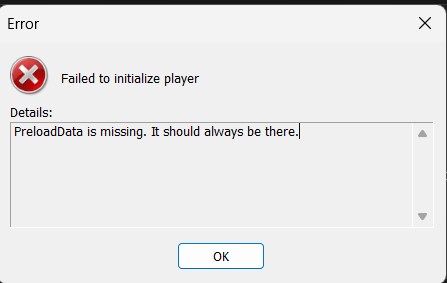
it seems to work over the old one much appreciated!
@to4st next option?
https://discuss.eroscripts.com/t/max-the-elf-hallow-d-een-5-15-all-scenes/293189/9?u=thescriptbunny
Hospital Seduction mod has been updated again to v1.4. This should now work with the latest version. I rushed quite a bit with the testing so there might have been some things missed. Let me know if you run into any issues.
Are you talking about the main post or the vibe script the link is pointing to?
Worked like a charm! Thanks for updating it and sorry i discovered such a quick breakage of the mod.
Im having trouble with the succubus slots mod. EDI connects to the game - but the scripts arent being sent over when scenes play in the slots bonus or events.
please help me :(((
1 Like
i noticed issues with afterschool tag too - its a bit buggy
Is BepInEx generating any logs? There should be a logoutput in the bepinex folder.
Starting a script using “Simulate Game” causes your Handy to react but scripts sent from the game doesn’t? But the player does show the script names it receives from the game?
Just want to clarify because your message is a bit hard to parse.
Issues in the game or with the toy connection / player? Maybe I should look into updating the mod to use Edi instead.
I meant the main post, wrong link.
Yess exactly its like everythings working fine but its like the intiface is not able to send order to my handy pro 2 and says in the log Null prop value/position, cannot render  and i think yeah that would be an amazong upgrade to go with edi (even thought i manage to run funscript player with another game, EDI Launcher seems to work way better than the others) let me know if you can help please
  thank you
And i also tried to change the scripts woth other ones for this game like the longer strokes and no success:( i tried almost anything and its driving me nuts cause it geels like im at one click to make it work but it wont
Not to be rude but aren’t these just the basic instructions given with installing one of the mods?
Im having a reallyhard time with all my funplayers game if someone could tell me more about how it works i would really appreciate it some games doesnt even lauch bepinexe
Hi, I’m trying to experiment with adding multi-axis script support to a game, but I’m not sure what the correct starting point is.
When testing with FunscriptPlayer’s “Play Gallery” button, I noticed that if I place only one script file in a folder, it plays normally, no matter which axis it is. For example:
demo.funscript
or
demo.roll.funscript
But if I place multiple same-base-name scripts together, such as:
demo.funscript
demo.roll.funscript
demo.pitch.funscript
the script group/folder is detected, but my OSR device does not move when I press Play Gallery.
So I wanted to ask: does FunscriptPlayer automatically merge same-base-name multi-axis files when using Play Gallery, or does the game mod need to call/trigger multi-axis scripts in a specific way?
For someone trying to add multi-axis support to a game, should I start by preparing the multi-axis funscript files only, or do I also need to modify the game mod logic so it passes the correct script/code information to FunscriptPlayer?
I’m mainly trying to understand the correct workflow before I spend too much time going in the wrong direction.
issues with the toy connection/ player. sorry should’ve specified. the custom player is connected to my toy and is detecting when the animations are playing and loading the appropriate scripts, but the commands arent sent to the toy themselves
i’m not seeing one when i run the mod
This should be the correct approach. No mod changes are required. If the mod tells the player to play the script “demo” it’ll know to play the multiaxis parts as well.
In appsettings.json, make sure multi axis is enabled:
	"OSRConfiguration": {
		"COMPort": "COM5",
		"EnableMultiAxis": true
	},
MIght also be helpful to disable intiface/buttplug:
	"ConnectionMethod": {
		"Buttplug": false,
		"OSR": true
	},
What toy are you using?
For Succubus Slot? Sounds like BepInEx isn’t starting with the game.
Does the game path have non-roman characters in them? Try removing all other characters and see if it works then.
Unless there’s been changes to the scripts, v2 of the mod has been updated with these scripts already.
Thanks, your suggestion definitely helped. After changing the settings as you recommended, the behavior improved.
I’m using FunscriptPlayer 1.4.4, and my appsettings.json is now configured like this:
    "ConnectionMethod": {
	"Buttplug": false,
	"OSR": true
},
    ...
    //OSR
"OSRConfiguration": {
	"COMPort": "COM3",
	"EnableMultiAxis": true
},
    ...
I also attached the full appsettings.json file for reference.
For testing, I placed these files in a folder under scripts/demo/:
demo.funscript
demo.roll.funscript
demo.pitch.funscript
demo.twist.funscript
In the Simulate Game window, they are detected as “demo/demo”.
After repeated testing, I found that if I place any one script file in the demo folder, it plays normally. If I place any two of the files together, it also works normally, regardless of which two axes they are.
However, when I place three or four same-base-name axis files together, the device does not move at all when playing from Simulate Game.
So in my current test, it seems to work with up to two axis files, but stops working when three or more are present.
I’m not sure if I’m still missing something in my configuration, or if there is a specific way FunscriptPlayer expects more than two axis files to be arranged.
appsettings.json (1.5 KB)
One more question: is there any place where I can check FunscriptPlayer logs or debug output?
Since FunscriptPlayer is already connected to the device through the serial port, I cannot monitor the firmware logs from the same COM port at the same time.
At the moment, I’m not sure whether the issue happens during script detection/merging, command generation, or serial output to the OSR device.
I also tested the same multi-axis script set with other players and did not see the same behavior, so I’m trying to find a way to narrow down where the problem happens in FunscriptPlayer.
Is there any log file, console output, or debug mode I can enable to see what scripts are being loaded and what commands are being sent?