Thanks a lot, really appreciate it!  hope you’ll love the full set!
Thanks so much for the support — really appreciate it!
I saw your order and note, we’ll include the heating rod as a little gift 
Took the plunge from “The Handy” and bought a full set. Looking forward to it!
Hello! Order number is 13940. 
Thanks for taking the plunge — really appreciate the support! 
Welcome aboard, and hope you have a great time with the Full Set!
Thank you so much for the support — really appreciate it!
MiraBot Firmware v1.1 Wi-Fi – Official Release
Following the Wi-Fi beta released two weeks ago, the official version of MiraBot Firmware v1.1 Wi-Fi is now available.
This version provides stable Wi-Fi connectivity and enables UDP-based wireless control with supported software.
What’s New
The Wi-Fi firmware supports:
- Connection to your local Wi-Fi network (2.4GHz or 2.4GHz-compatible)
- Wireless UDP communication with:
- MiraPlay AiO (v1.7+)
- Multifunplayer
- ToySerialController (VaM plugin)
- other compatible software
Compatible Devices
- MiraBot S6
- MiraBot Lite
- MiraBot S2+ (discontinued model)
Requirements
- A stable Wi-Fi network (2.4GHz compatible router)
For Existing MiraBot Users
If your device is currently running the BLE firmware and you would like to switch to the Wi-Fi version, you can flash the new firmware using our web-based flashing tool.
Flashing guide:
How to Restore & Update Your MiraBot Firmware
If you’ve already tested the beta version, this is the finalized stable release.
For New Orders
When placing an order, you can now select your preferred firmware under Wireless Type:
- Bluetooth LE
- Wi-Fi
We will pre-install the selected firmware and thoroughly test the device before shipment.
Important Notice
This firmware is designed for official MiraBot devices only.
Flashing it onto third-party OSR hardware may result in incompatibility with MiraPlay AiO or other features.
As always, feedback is welcome.
Let us know how it performs in your setup.
Man, reading the reviews and the post it got me to put down a order for the SR6 full set.
Even if i missed out on the promo i’m still gonna get it just cause i love trying out new ideas/features other people manage to come up with these devices. 
@Gesmax
Could you please combine both connectivity options into one firmware, if possible?
Also it would be great to have serial port support for Bluetooth. That would allow an additional wireless connection method, for example to connect the device to the serial port to MFP.
Because, atm, when trying to setup up an outgoing COM port via Bluetooth with any of the latest firmwares, I get the following message: The device you selected does not have a serial port service running.
I also had problems connecting via USB. I don’t know if yours is the same issue, but I was not using Chrome. Once I started using chrome, it connected fine. Hope this helps.
I bought the full set and received it early February. It was great, then the lubrication mechanism broke. Then the suction started working intermittently. I contacted the seller and they were very responsive, they had me take a couple of videos and try a couple of troubleshooting steps. Once they were satisfied that the issue could not be fixed on my end, they sent me out replacement pieces for both. It has been working great for the last week or so. Now, the upper right control arm is frozen and will not move vertically. I just sent a new video showing this issue, I will update this post with the response, but if anyone has any ideas - I would love to get it working again. Thanks. (3/1/26 6pm)
*Update 3/2/26 9:30am - The seller contacted me via email within a few hours of my initial email. They emailed me with tests to perform on the machine, questions to answer and a request for videos of the issue. I have replied back just now and I have uploaded videos showing the problem. I hope to hear back from them shortly.
*Update 3/3/26 - The seller responded after seeing the videos and diagnosed a bad servo. They indicate that the will send me a replacement along with instructions on how to replace it.
*Update 3/14/26 - Received replacement servo in the mail on 3/12/26.
Hi!
Thanks for the update, and really sorry you’ve had to deal with these issues. I know that’s not the experience anyone wants.
As you mentioned, when the earlier problems couldn’t be resolved remotely, we sent replacement parts right away, and I’m glad to hear it was working well again after that.
Regarding the upper right arm being stuck — we’ve received your email and video. The support team is reviewing it now and will follow up with you shortly by email so we can get this sorted quickly.
Just to add a bit of context for others reading: occasionally, long-distance shipping can put unexpected stress on mechanical components. We’ve already made improvements to packaging over time, and when something does happen, we work directly with the customer to resolve it.
Thanks again for your patience — we’ll take care of this
Thanks for bringing this up — that’s a very reasonable question.
Regarding combining WiFi and BLE into a single firmware: we did evaluate that approach internally. In the end, we decided not to merge them.
Under the current architecture, running both stacks together would increase system complexity and introduce potential stability risks. The added convenience didn’t justify the trade-off in reliability. For a shipped product, stability has to come first.
With the WiFi firmware, the only extra step is the initial wired setup. After that, it opens up more network-based possibilities.
Regarding Bluetooth serial port support:
The current BLE implementation does not expose a classic Serial Port Profile (SPP), which is why Windows reports:
“The device you selected does not have a serial port service running.”
This is expected behavior with BLE-only firmware, since BLE and classic Bluetooth serial are different protocols.
I saw your message on Discord as well — hopefully that’s already sorted. If not, feel free to reach out through the website contact form and the support team will take a closer look at your specific setup.
Appreciate you taking the time to dig into this
That’s awesome to hear — really appreciate the support
Hope you have a great time with it and that it brings something new and fun to your setup.
Definitely feel free to share your impressions once you’ve had some time with it — always cool to see how different people use these devices
Had to disassemble it to tighten the inner arms so it wouldn’t violently vibrate and disconnect itself.
It vibrated so badly at even the most basic script that it would cause it to disconnect from phone pairing, probably some sort of safe-disconnect happening. I find it hard to believe that this thing was tested before it was shipped out. But; maybe it just got loosened during shipping and it worked fine beforehand, and everything is rigorously tested and just unlucky.
My main constructive feedback would be: Holy shit please include longer allen wrenches so disassembly doesn’t feel like some form of cruel punishment. Even an extra inch on the fatter allen key would have made this process 100x easier. What could the cost difference be for a bigger key? Ten cents? My lazy ass was weighing whether or not to suffer through this process or go get my key set from the garage. Laziness won and I sat through this fuckery, sacrificing knuckles and fingertips in the process.
Also during reassembly the left arm was sitting on top of a wire. I wasn’t aware of the wire and thought it was just sitting a little wonky, so I put pressure on the connecting arm (One of the two that meet in the center and has a screw running through the center of each. not sure how to be more specific sorry) to make it flush.
Insta-snap. 
Maybe that part should be reinforced in future prints, and the wire could be bracketed into its groove that it has so it doesn’t want to pop out.
Hopefully it glues back together nicely and I don’t have to reprint a major part.
But hey, it’s not vibrating any more.
Hi — first of all, I’m really sorry that your experience turned out this way. I completely understand how frustrating it is to spend several hundred dollars on something and then run into problems like this.
Please rest assured that we will absolutely help you get this resolved. Every unit does go through testing before shipment — that’s one of the most important steps in our process.
In rare cases, long-distance shipping or handling can sometimes cause mechanical parts to shift slightly. We’ve already been improving the packaging over time to reduce the chances of that happening.
Thank you as well for pointing out the wrench length and the wiring situation. Feedback like this is genuinely valuable, and we’ll review those areas to see where we can improve.
Our support team will continue working with you to get this sorted out as quickly as possible. If anything else comes up, you can always reach us at service@mirabotx.co.jp and we’ll take care of it.
Again, I’m very sorry for the trouble, and thank you for bringing this to our attention. 
Full Pack looks super interesting, i was looking around the various osr devices and how i can acquire the various components to build it myself which got me stumped multiple times because something is always not available. also a bit scared that it would be too much for me, not much experience with soldering and the likes
i don’t have any osr yet and using a kiiro, wanted to get an sr6+ thinking..if i get something that expensive it better has it all 
seems i stumbled onto the topic on a really unlucky timing though, will peek into the topic and hope for maybe a easter promotion
Full Pack really looks amazing and what i read in the topic is very promising about function and durability
tbh, you didn’t miss much, other than a free warming rod. The desk mount is still being included and the price is the same. But now, new releases are coming with Wi-Fi preinstalled. I have yet to receive my order so I’ll probably update here when I do.
Thanks for discovering MiraBot, and thanks to @popome for the helpful reply as well.
That’s actually pretty accurate — you didn’t really miss much in terms of promotions. One nice improvement with the current batches is that you can now choose between Bluetooth LE or Wi-Fi firmware preinstalled, which makes the initial setup much easier compared to earlier versions.
Like many hardware projects, component costs across the industry have been gradually increasing, but we’re doing our best to keep the pricing stable for users. Because of that, large promotions in the near future are unlikely, but we always try to keep the pricing fair.
In any case, really glad you found the project. If you have any questions while deciding, feel free to ask 
MiraBot Hardware Update — Recent Improvements
Hi guys,
Over the past few weeks, we’ve been reviewing user feedback and making a number of small but meaningful hardware refinements. We wanted to share a quick update on what has already been improved.
For recent orders, these updates are already included in the units currently shipping.
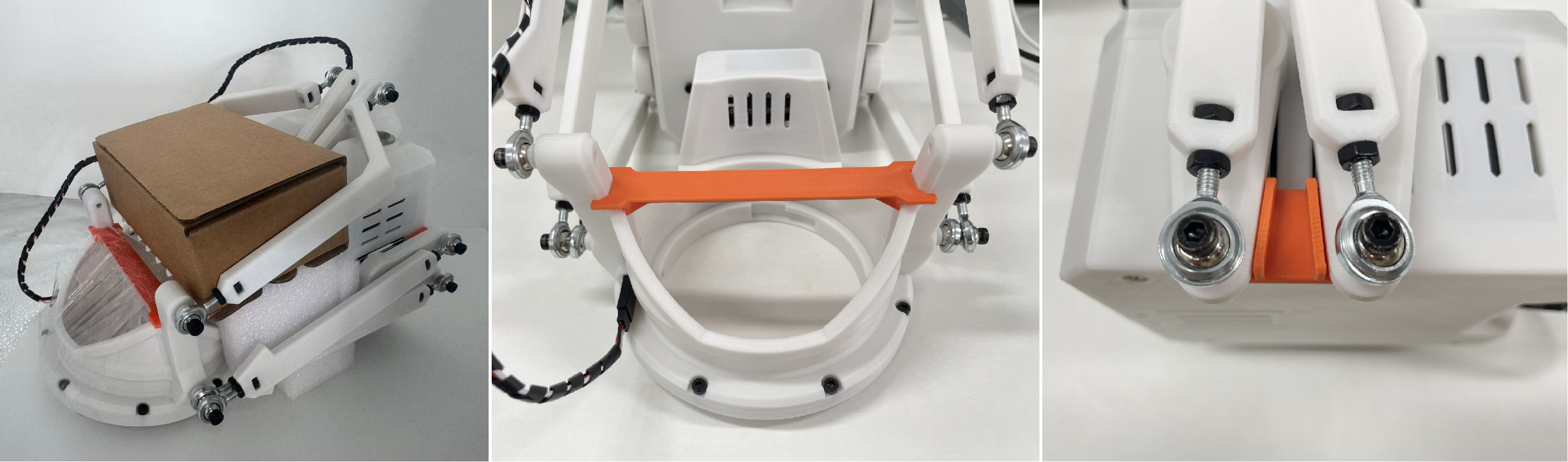
1. Improved shipping protection for S6
To better protect the S6 during international shipping, we upgraded the internal packaging, added support materials in key areas, and designed pressure-resistant supports for more delicate sections.
2. Stronger and easier-to-use Desk Mount
We redesigned the desk mount so the tightening handle is now on the top side of the clamp, making adjustment much easier. We also reinforced the structure and upgraded the bolt hardware for better durability.

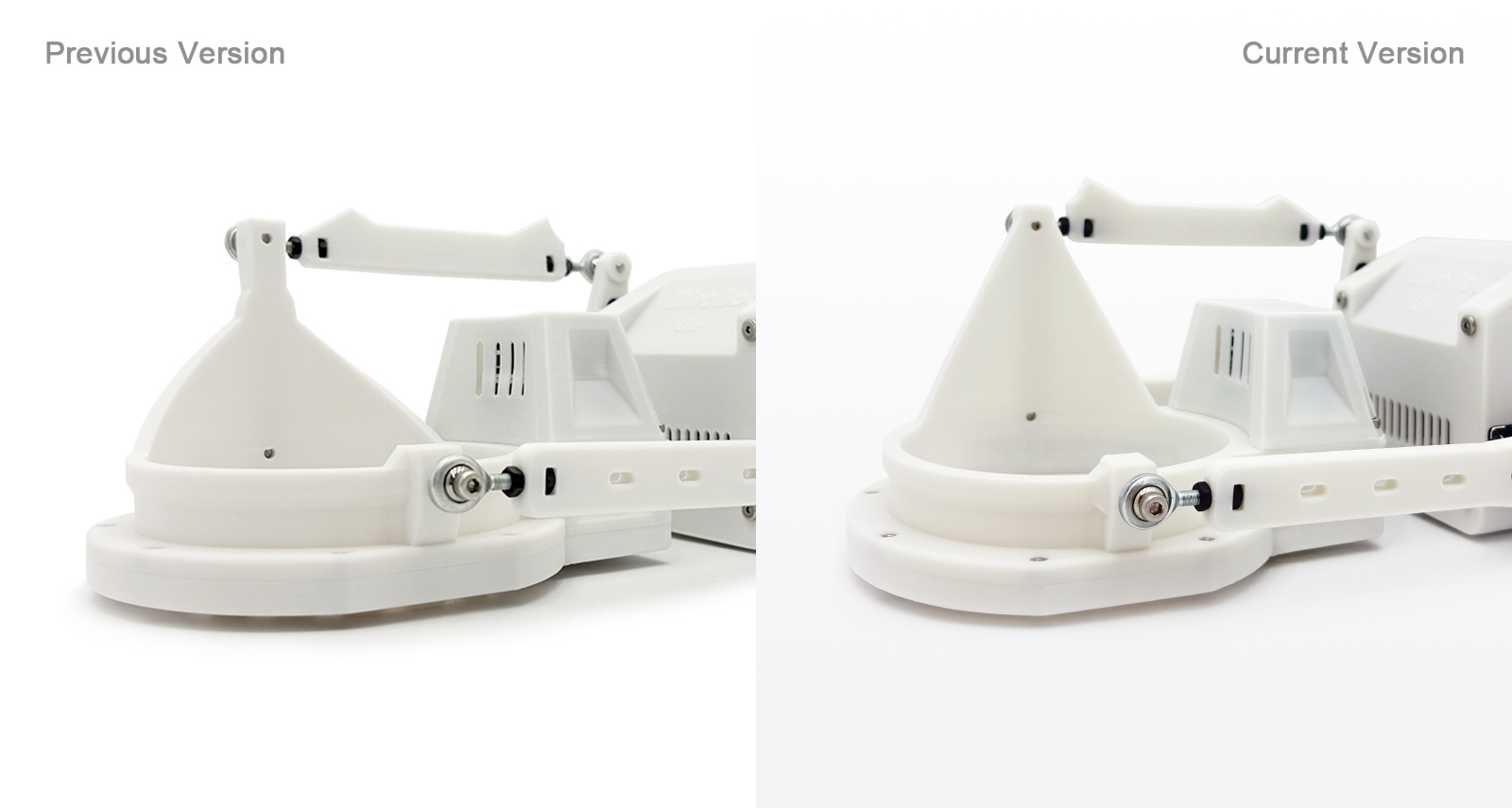
3. Reinforced MiraBot Lite Twist module
We improved packaging protection for the Lite Twist module and strengthened the most stress-sensitive areas to better withstand shipping pressure.
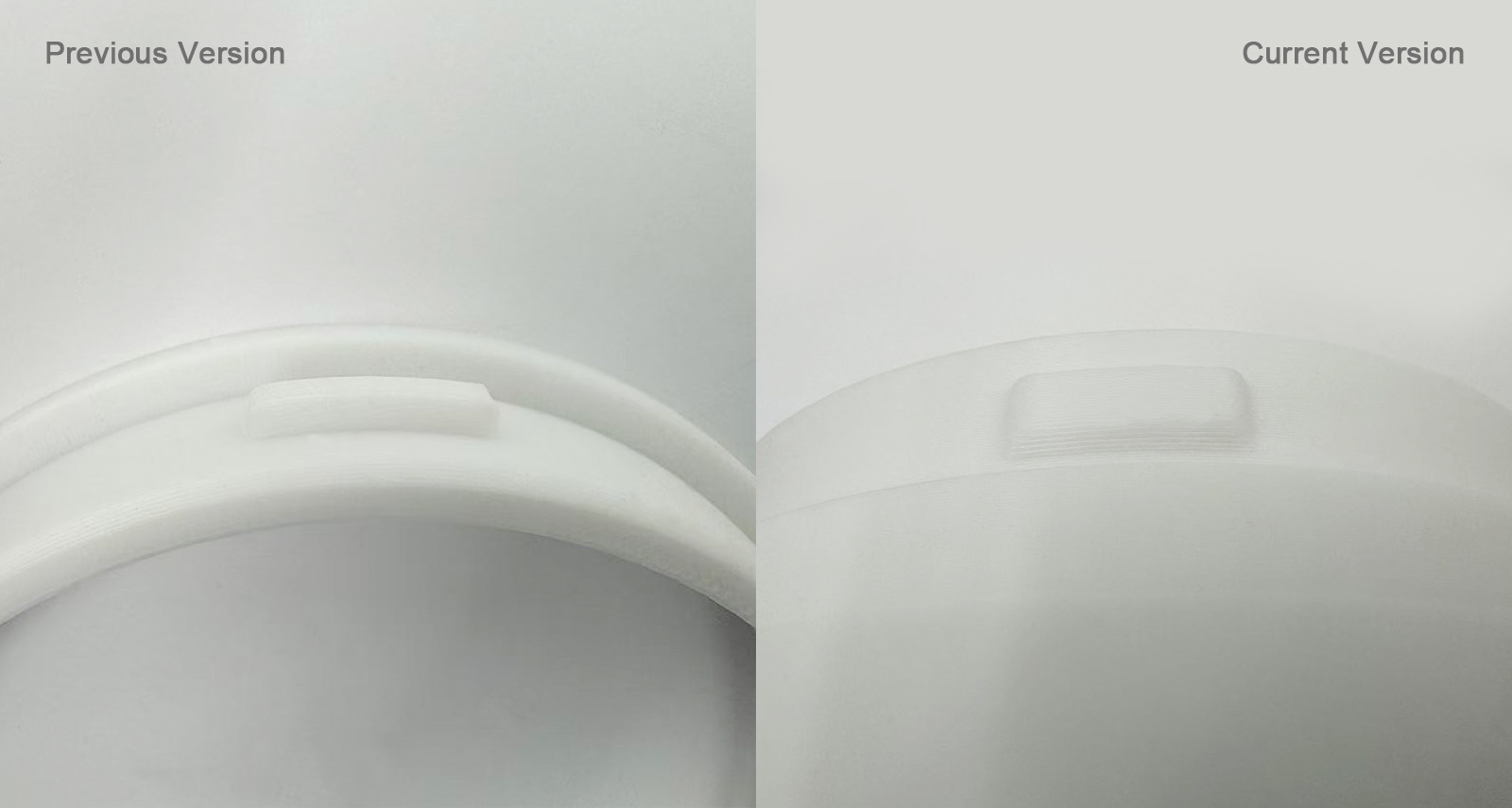
4. Easier installation for Open Receiver for Twist & Heated Case
We adjusted the latch tolerances and tested them repeatedly to make installation and removal smoother, while still keeping the connection secure.
We’ll continue refining the hardware based on user feedback.
Thanks to everyone who has shared suggestions and real-world experience — it genuinely helps us improve MiraBot step by step.
If you notice anything that could be better, feel free to let us know. We’re always listening.