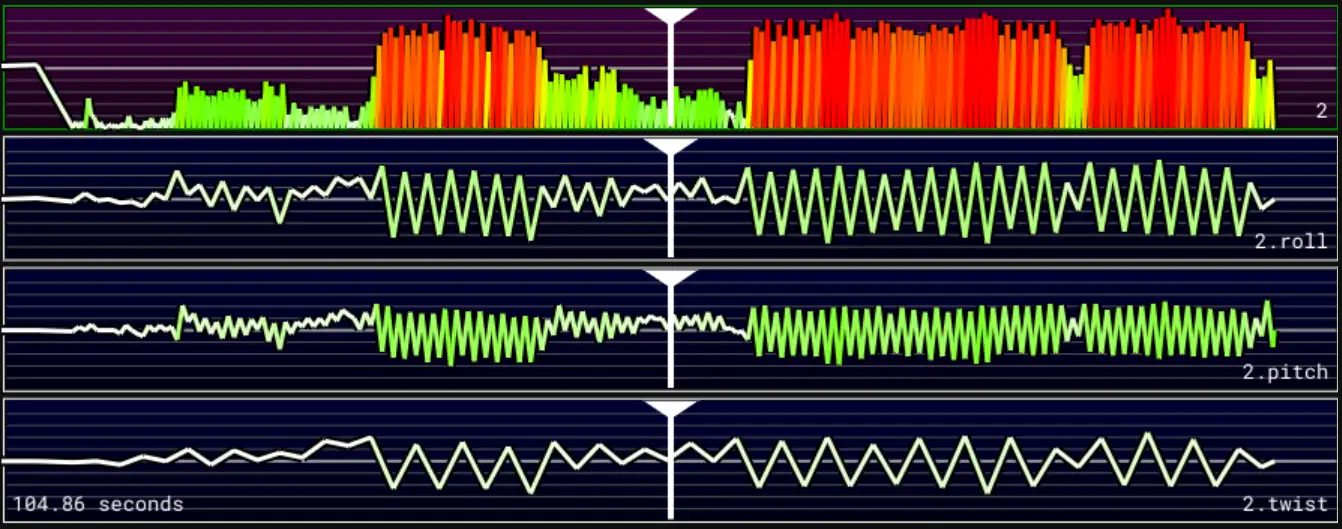
Multi-axis v2.0: Single file with bundled channels
Support Development
NekoDancer is open source and free to use. If you find it useful, consider purchasing the pre-built executable to support ongoing development.
NekoDancer.exe is a ready-to-run Windows CLI tool — no Python environment required. Just download, unzip, and use it directly from any command prompt or integrate it into your workflow.
Hi, I’ve purchased the executable but didn’t receive any download link, it’s been already a whole day, any help?
I’ve received on the email the confirmation from paypal and downloaded the invoice after the purchase.
Did anyone purchase it and incurred in the same issue?
Thank you for your support! The email is sent automatically. I checked our system and can see that the email containing the download link was sent successfully. Could you please check whether it was mistakenly filtered into your spam or junk folder? I’ll resend the email to you as well. We apologize for the inconvenience.
I need to test the scripts but well, it worked and really fast!
I’ll know once I’ll try the script… but for the multi-axis it analyse the videos?
Some stuff that I would like to see:
Any chance for a GUI XD?
It would be possible to support japanese characters, please? Funscript Flow had the same issue but they fixed it.
it would be possible to support other format of videos, like .avi and .mkv?
The multi-axis scripts are still generated based on audio analysis. At the moment, NekoDancer can’t process video directly. Support for MP4 files works by extracting the audio stream from the MP4, so it doesn’t actually analyze the video itself. As a result, video formats other than MP4 aren’t supported.
As for a GUI, I did consider making one at first. However, there are already quite a few similar tools with graphical interfaces, so I wanted NekoDancer to be a bit different. A CLI tool is much easier for AI to integrate with, and my vision is that in AI assistants like OpenClaw, you could simply say something like, “Convert the audio in the xxx directory into funscripts,” and NekoDancer would generate them automatically.
Also, NekoDancer does support Japanese characters.
Hello. Before I buy the .exe (I’m lazy, not expert with python and son on, and price is low enough for me to want to support), I would like more informations…
What kind of signal is generated (sharp sine waves only ?),? how are defined top and bottom of each move ? And same for speed, and other axis.
If there’s an updated version, will I have to pay again ?
And what kind of content would work the best with it ? Pmv, noisy vids, cockhero, music (which kind?) ?
Results are .funscript and they can be reworked later with other softwares, right ?
The generated motion is based on a triangle wave synchronized to the detected beat, rather than sine waves. The stroke depth and timing are adjusted dynamically based on the music to create more natural results.
The actual processing is more complex than that. The additional axes are derived from the main motion curve rather than generated independently. If you’re interested in the implementation details, the source code is the best reference.
The purchase is for the current version. Future major updates may require a new purchase. However, if you ever need the latest version, just send us an email and we’ll be happy to provide it free of charge.
It works best with music that has a clear and consistent beat. Audio with weak or irregular beats may produce less satisfying results.
Yes, the output is a standard .funscript file, so you can edit it later with any compatible funscript editor if you’d like to make further adjustments.
If you don’t receive the email with the download link, please let me know and I’ll send it to you manually. Feel free to reach out if you have any questions or feedback.
I’m glad you received the email. Yes, the sender name is “Beyond Blackwall”, which is also the name of the website. I’ve resent the email just in case. The email sending feature is still under testing, so you may occasionally experience some instability. Thank you for your patience.
Hey, it works really well! I’m using PythonDancer + Nekodancer, and it’s giving good results. I like the idea of using beats to generate the different axes.
NekoDancer creates funscripts that look eerily similar to the once I create myself with PythonDancer. Aside from the spooky factor, this is great NekoDancer is both faster and can batch process videos. I’m very pleased.