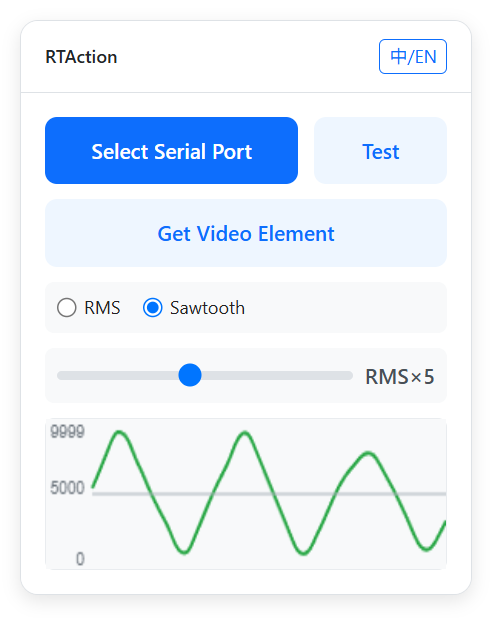
RTAction is a Tampermonkey script that runs in the browser. It extracts audio waveform features from videos on web pages and converts the analysis results into TCode-formatted serial commands in real time to drive OSR devices. It is suitable for most dance and music videos.
Performed a major overhaul of the sawtooth waveform calculation method, allowing it to better align with the rhythm of the music.
Fixed an issue where the waveform was rendered incorrectly when handling high frame rate videos.
V1.5 [2026/2/20 Update]
Automatic language switching is now available.
V1.4 [2026/2/1 Update]
Support for more websites, including livestreams.
Optimized some code.
V1.3 [2026/1/9 Update]
Significantly optimized the audio rhythm detection algorithm.
Added an RMS gain multiplier option. If the original video volume is low, increasing the multiplier can improve the accuracy of rhythm detection.
Optimized the sawtooth waveform calculation. It can now adjust the slope based on frequency, preventing OSR devices from failing to reach the target position in time when the frequency is too high.
V1.2 [2025/12/25 Update]
Inspired by @DJKong, I decided to further extract beat and amplitude information based on the RMS values to form a new sawtooth waveform. The results have proven to be excellent!
V1.1 [2025/12/14 Update]
It is now possible to adjust the segmentation of TCode command values in real time. For example, “0, 9999” will output only 0 and 9999, while “Raw” outputs the unprocessed raw values.
If you want this Tampermonkey script to support more websites, you can try modifying this part of the code:
As long as video correctly references the actual video element, the script should work.
Of course, you’ll also need to add a line at the top like // @match https://*.youtube.com/watch*
so that the script is loaded on the specified URLs.
Your browser must support the Web Serial API. Chrome or Edge is recommended.
You can switch languages using the button in the top-right corner.
For learning and personal use only. Any form of commercial use or abuse is strictly prohibited.
I have tried to keep the panel’s appearance and operation as simple as possible to reduce the learning curve. However, if anyone is willing to help further improve the i18n part, I would be greatly appreciated.
Glad to hear you like it. If you want this Tampermonkey script to support more websites, you can try modifying this part of the code:
let videoWrapSelector = '.bpx-player-video-wrap';
if (domain.includes("youtube")) {
    videoWrapSelector = '.html5-video-container';
}
const videoWrap = document.querySelector(videoWrapSelector);
const video = videoWrap.querySelector('video');
As long as video correctly references the actual video element, the script should work.
Of course, you’ll also need to add a line at the top like // @match https://*.youtube.com/watch*
so that the script is loaded on the specified URLs.
If you’re not sure how to modify it, you can ask ChatGPT for help.
I started messing with this 2 days ago. I’m not a programmer, but this script is the kind of thing I’ve been looking for so I gave coding with ai a shot for 1st time. The goal was to make the video container work with PMVHaven that then led me down a deep rabbit hole of seeing just what exactly I could get away with by describing my intentions to a glorified chat bot.
This script has a LOT going on, but it’s pretty close to what I want it to be.
To start it works with PMVHaven videos as well as their “I’m feeling lucky” section. It also works with hmvmania and Hypnotube. It should work with any website at this point. It’s easy to add a website yourself, but if you have any good ones, I can add them.
I add to this with the intention that it can follow along with the beat as best as possible while also staying interesting and not mechanical with some nice automation and quick finetuning that allows the strokes to feel different with swells and drops.
I added Multi Axis support but I’d highly suggest testing and fine tuning it before putting little johnny in there otherwise you’re gonna have a bad time.
Key Options
Tap BPM
Baseline Stroke
Tap (Filter+RMS) > Gain (IMPORTANT), Attack, Release
Pattern Randomizer (I like Drift)
There are a bunch of sliders and knobs. Dead ass just fuck around with shit until it starts doing what you like. Pay attention to the grey line on the chart, Its the raw audio data if its at 100 or 0 , you are losing detail, and should use the Gain under the Tap Section. The audio data is also connected to the video’s volume slider so if you turn it down it will mess with that. So if you turn down the videos volume, make sure to look at the chart and turn up the gain.
There is one issue, do not set the max of the stroke range too low (like 20). At least for me it causes my stroker the spaz a little. Nothing scary but be aware of it.
Oh and there is no disconnect button, you’ll need to close or refresh the page.
Thanks for the improvement! However, there is an issue with the value range of the output TCode commands. TCode and funscript use different value ranges: TCode ranges from 0 to 9999, while funscript ranges from 0 to 100. Therefore, when outputting TCode commands via the serial port, the values from 0 to 100 should be linearly mapped to the range 0 to 9999.
yeah I had it set to 9999 previously, kind of forgot why I changed it to 0-100 i think it was while I was try to figure out why it gets so sporadic if you lower the stroke range too low.
Thanks for the inspiration you shared. I’ve updated the script to version 1.2. The new version further processes the RMS values while keeping the operation as simple as possible, generating a new sawtooth-like waveform. The overall effect and usability have been greatly improved.
The usability of version 1.3 has been further improved. Anyone who is interested is welcome to give it a try. Compared to other audio-based Funscript generation tools, RTAction offers extremely high real-time performance and is exceptionally easy to install (you only need to copy it into the Tampermonkey extension).
Hello sir, I tried using this script but it didn’t work well. During the music process, it was either too fast or didn’t run in the rhythm. My idea was to lower the pitch part to 0 and then rebound upwards in the middle, changing the middle fluctuations to downward vibrations or setting the starting position at 70 and moving downward based on the fluctuations. When reaching a certain pitch or based on the drum beats, there should be a full downward point. In your script, I could only receive random up and down fluctuations. I tried using chatgtb to try to modify it, but after three days, I tried many versions but none of them were good. I hope these suggestions can be improved by you professionals. Thank you. PS:这是翻译,我不会英格里斯
I am using this ChatGPT code to convert Python program to extract computer system sound, but there are various issues, including the inability to open video player software for audio streams. Please try other devices