well, task manager don’t have running instances, it just not starting again, with process in task manager appear and instantly closes.
details: app closes when i trying to fullscreen, both options - double click on screen and GUI button. not 100% of the time, but about 70% i would say. and 50% chance it’s not starting again after that until PC restart
currently i ended up using 0.5 version only for VR videos, cause there is no needs of fullscreen on PC in this case
for some reason it only finds a very limited amount of my 3d media… (in a folder of 20 vids it only sees 1) im on the latest windows with klite codecs installed
np, if the name doesnt already have the code in the name when I download it I usually just append _LR_180 to the name.
That covers about 95% of the media I download.
We have discovered the MacOS Intel x64 version works (and most likely the Windows version), it just crashes during the initial thumb process. Once it finishes the initial thumb process it runs like normal.
This means you can keep launching the application until it finishes attempting to get the thumb for every video at least once. XTP will remember when a thumb fails and skip it next time. Im not sure but I think in this case it saves a black image at crash.
It sounded like the thumb can be generated manually after the fact. Probably only in some cases though.
You maybe able to turn off auto thumb gen in the system settings.
Have just been trying out XTPlayer (0.5b) found a couple of problems unfortunately.
Edit: redescribed problem.
I have a video with L0, L3, L6, L9, R1 and R2 funscripts (needed for Il Razzo: 1-3 sliders plus optional Pitch/Roll). I’ve defined the new channels (L3,L6,L9) in XTP settings but wasn’t sure what to put for Dimension and Type, so I copied L0.
R1, R2, L3, L6 and L9 seem to work OK when playing the video by double-clicking the thumbnail in the left panel, but L0 outputs nothing. Edit: I worked around this by putting the L0 content on L8 but would still like to know what the problem is.
Could anyone explain what Dimension and Type are in the channel settings ? Maybe that’s the problem.
Secondly, it seems there’s no direct control of DeoVR, only via XTWeb ? Apparently the local web streaming from local disk to the VR headset is too much effort for my laptop, it’s unusable. Whereas streaming with Kodi and controlling via MFP works smoothly. Maybe there’s something I can change to improve the streaming ?
I didn’t plan for it but two heave channels will probably be ok? Im thinking there will be some issues with detecting funscripts that are both heave as Its used in some places to determine the “main” .funscript. I may have to add an “Other” options or something. The other axes arent used much (I dont think) so you may be able to assign say “Surge” or another Translational axis to it and it work ok.
Type is how the specific channels device works. Say a device has an ON and an OFF with varying modes in between. For example vibrators and lube. Then it would be a Ramp type so 0 is “Home” position or OFF. Otherwise, dimensions in space have TCode 5000 as a “Home” position or middle, so the type is Oscillate as they usually vary in between two directions where ramp only increases in one direction and back down to the floor.
Half Oscillate is just that, Half of an Oscillation. So L0+ from 5001-9999 and L0- is 0-5000. It may be 0-4999 and 5000-9999 I dont remember.
After finding that image above, I may like the Translational motion term better than Oscillate. Not sure its worth changing at this point though.
Not sure what you mean direct control of DeoVR. XTP connects to DeoVR remote control and without XTP Web, if remote control sends a video files name, it will search your selected media folders for a funscript matching it. Its going to depend on what DeoVR sends back to XTP. If it cant find a script XTP will popup a box asking you to choose one. This happens mostly with DLNA streaming where the filename changes. If you’re asking about playing videos from SLR with DeoVR then no, XTP does not support SLR funscripts directly.
I Recommend Heresphere but In DeoVRs web browser on XTP web settings select External streaming and Heresphere connection. XTP basically copies the video from the media library and sends it to DeoVR directly. No media processing happens so it should be rather light on the cpu. High framerate videos can have issues Ive found. If you are low on ram, you maybe able to modify the chunk size of the streaming. This is just how much of the media is sent/requested from the player at a time.
Thanks for the detailed answer. I guess for the Dimension parameter what I meant to ask is the implication of selecting Heave vs e.g. Surge. Processing/output is affected in some way ? But since you suggest using Surge instead of Heave it gives me the idea maybe the only difference is between rotational and translational dimensions ?
L3,L6 and L9 are all set to Heave and work fine, I’m thinking there is some special L0 sauce somewhere as you say. I will try putting L3,L6 and L9 on Surge, maybe L0 will be happy then.
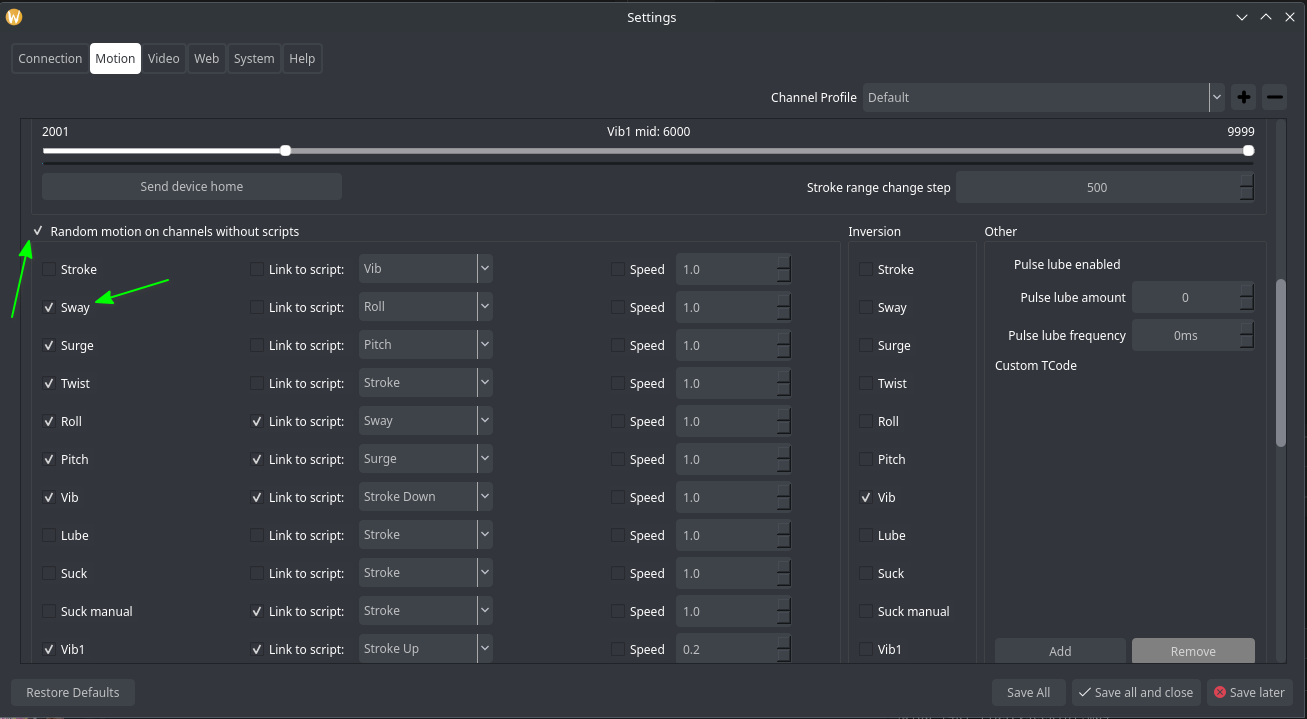
Scroll down on the motion tab and check the box for “Random motion on channels without scripts”. Then check the boxes for what channels you want added.
This will only add motion if there are not any scripts associated to the corresponding channel. Link to script will send duplicated output from the selected channel if the script exists. Otherwise it will be random. Speed is a multiplier of the corresponding channel script. The speed is always 1:1 with wither the main funscript or Linked funscript by default. Id this is checked then it will output the speed multiplied by the entered speed.
I believe so, I libeled all of them in case I needed them but im pretty sure the only one that actually changes anything in the program is Heave. Its generally associated with the main funscript. Since I added the ability for Other channels to become the main funscript if the main funscript doesnt exist, This is less so an issue. I do still see references to Heave enum in the code so I cant be 100% sure without fully auditing the code where its referenced. I believe allot of it is located in the metadata processing. Also performing functions like pause device and send all channels home.
Just adding that I was getting a bunch of crashes when skipping around on timelines in .5 using Mac M1 Ventura. I turned off timeline preview and they stopped completely. Not sure what the deal is there.
This is probably the same reason its crashing on startup. grabbing thumbnails for the preview. It will probably crash periodically while regenerating thumbs manually as well.
Then it’s even weirder, i think debug not respecting your config, but apparently it does
How in the world then it works fine via debug, but crash every time i doubleclicking for go fullscreen, or sometimes just on start, if run with regular .exe