I’d recommend the WiFi version. For the common SLR / DeoVR setup, most people connect the device through MFP, and wireless connection with MFP is generally better suited to WiFi (UDP) .
Hi guys,
I’ve just updated MiraPlay AiO with expanded T-Valve control support.
The new version adds more flexible T-Valve behavior, including improved control options and valve script support.
For full details, please check here
Hi. next month would be an upgrade to miraplay web ?
Yes, that’s the plan for now.
Hey guys, just wanted to say iam joining the club. Ordered my Mirabot S6 (full kit) yesterday.
Cant wait to try it out soonTM.
Thank you again for Rukas great review and Gesmax approachable stance here in the community. It feels like iam purchasing a quality product, but the producer is a part of the community not just as salesman!
Thanks a lot for the order, and welcome to the club 
That’s pretty much what we’re trying to do with MiraBot — take the OSR idea further, both on the hardware and software side, and make it easier and more fun to actually use.
Really appreciate the trust. Once you’ve had some time with it, I’d love to hear your thoughts!
Can I use this device in a horizontal position, mounted on a horizontal surface instead of a vertical one? Would this cause any damage or malfunction?
Yes, you can use it in a horizontal position. The orientation itself should not cause damage or malfunction. Just make sure the S6 is mounted very securely, since it is relatively heavy and moves with multiple axes. Also leave enough clearance so the arms and cables are not blocked during motion.
I must say that after reading all these posts and the very positive attitude from the developer it got me tempted… and I just ordered the S6 Full Set. Feels very exciting! I look forward to test it out thoroughly. Time to bring gooning to the next level! 
Thanks a lot for your order, and welcome to the MiraBot club
We’ll keep working hard to bring new updates, improvements, and hopefully a few nice surprises for everyone. Hope you enjoy the S6 Full Set! 
nice to see another firmware update already, looks like you guys are really keeping things moving, that’s awesome! probably a dumb question, but how do i check what firmware version is currently on my mirabot?
Just buy one
The product is very very great
This need to be a standard
It doing less noise than other, the quality is excellent
And the support is fast and very nice and pro.
Hey guys, so quick update. Ive received my MirabotS6 12days after the shipping notification without any problems (time frame is reasonable), delivery had 0 problems - very pleased. Unfortunately i dont have much time to test the Mirabot yet, only one session on the desk:
So far iam very happy with it, the “power” of the robot/machine is noticeable so iam trying to be cautious since i havent owned a stroker this powerful before.
Its definitely a new experience, especially the different axis are noticeable from someone coming from a Handy1.
Assembly was fine, ive watched all the Userguide Videos and read all the FAQs on the website.
First i was a bit confused why i needed the “spacers” but then i realised if i use the Miralube addon i need the space on the other side - and quickly learned how to assemble it.
Quality feels good and all the parts were/are in good condition, as what you expect of a premium machine.
In the following days i will take some pictures and “extensively” test it with different videos, sitting/laying down etc. Since i personally prefer VR videos over 2D (unfortunately there arent many good VR videos out there yet that use the full capabilities of the machine).
This being said, iam so far very happy with my purchase and will follow up once i got to proper testing!
See you in a few days
Thanks a lot for sharing your first impressions, and really glad to hear the S6 arrived safely and that you’re happy with the build quality so far 
We do have quite a few users coming from The Handy, and I think the biggest difference people usually notice is exactly what you mentioned: the power, the extra axes, and the fact that it feels like a more complete / ready-to-use machine rather than a DIY project.
For VR users, the next big step is MiraPlay Web: we’re working on a Quest / VR headset workflow where you can play VR videos in the headset browser and sync scripts to MiraBot wirelessly. MiraPlay AiO will also keep improving on the VR side.
Another thing we’re working on is a multi-axis assist / enhancement feature, so existing single-axis scripts — including a lot of Handy content — won’t go to waste. The idea is to make it possible to add extra axis movement on top, either automatically or with more custom control.
Really appreciate the feedback, and looking forward to hearing your thoughts after more testing. We’re always paying attention to what users actually want to do with the device, and that helps guide a lot of our updates.
Sorry for reply late.
That’s a good question, not a dumb one at all. This may be useful for other users too.
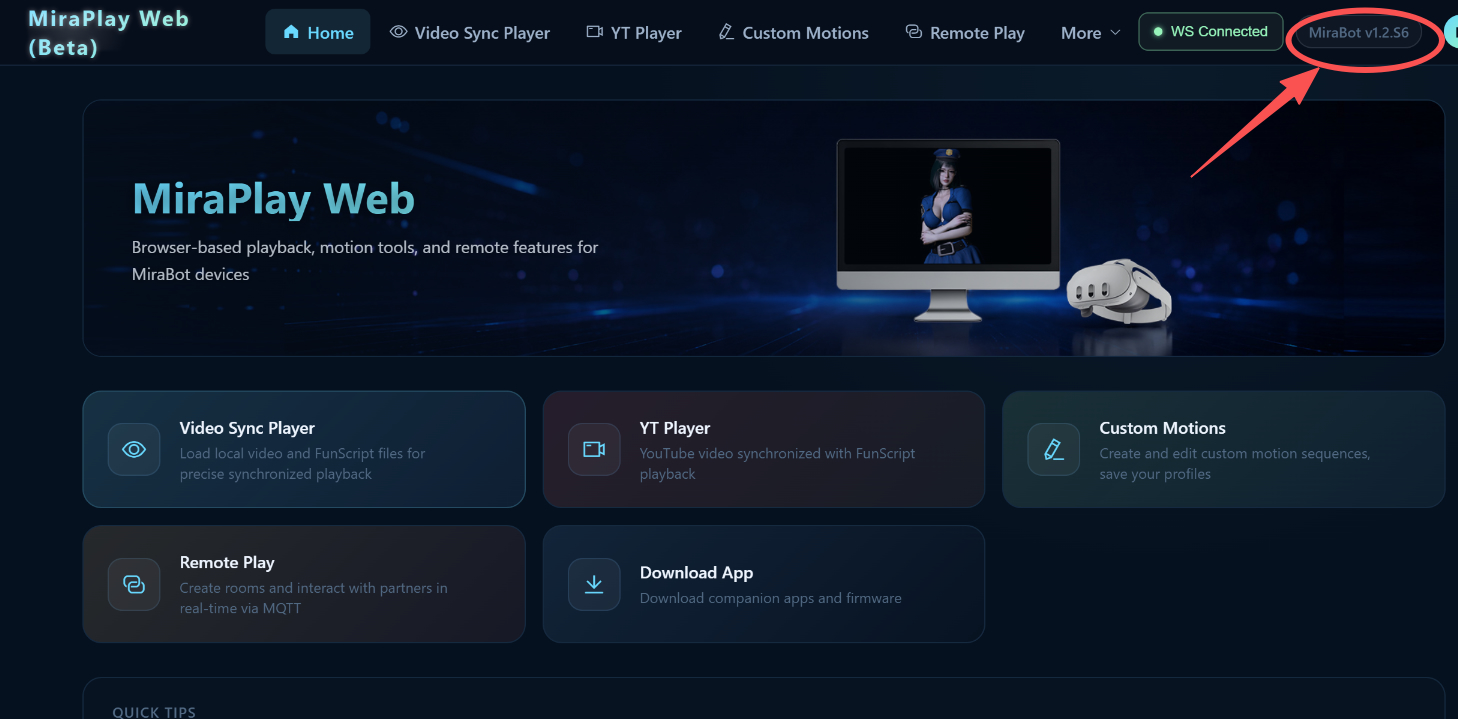
The easiest way is to check it in MiraPlay Web:
After logging in and connecting your MiraBot successfully, the device status area in the top-right corner should show the firmware version, along with the device model.
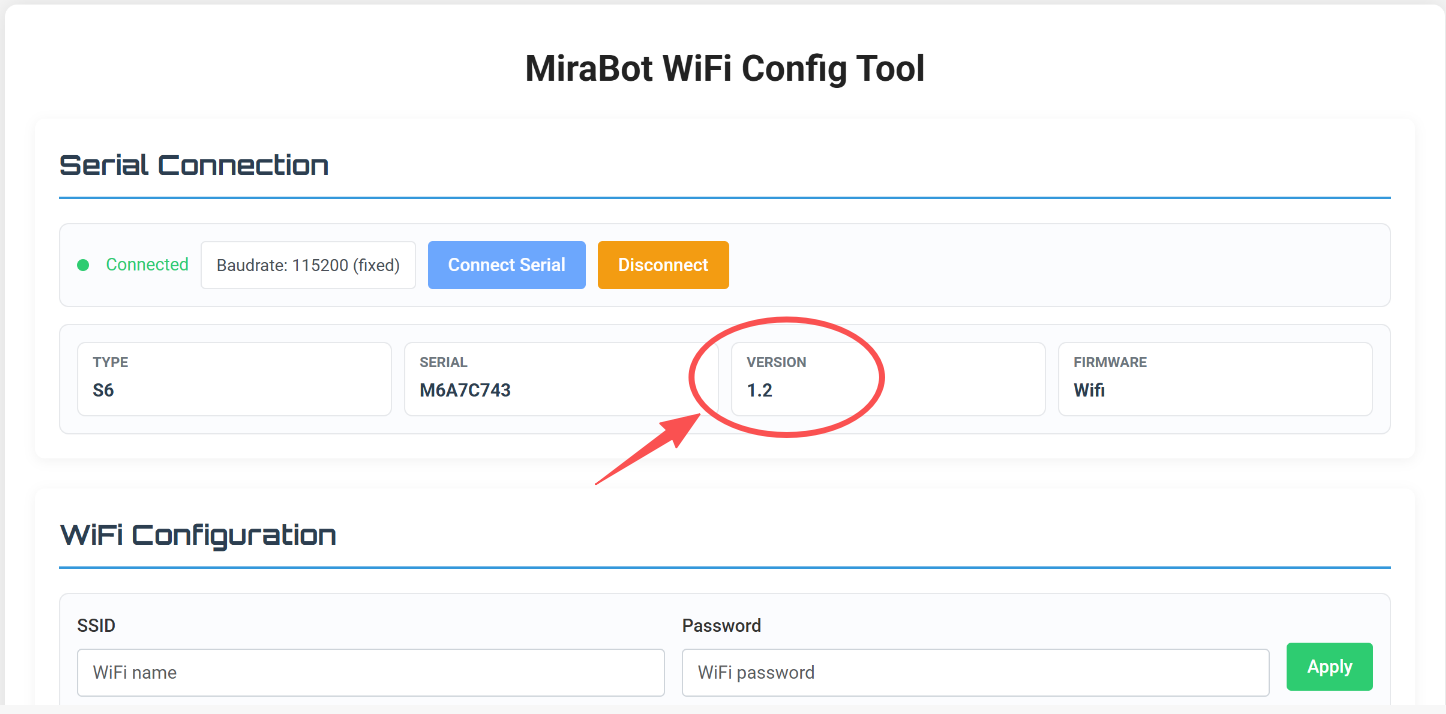
You can also check the firmware version in the MiraBot WiFi Config Tool after connecting the device.
Small VR Starter Gift for Feedback
Hi guys,
A couple of days ago, we released a new VR workflow update for MiraPlay AiO and MiraPlay Web.
You can check the details here:
VR is one of the directions we want to keep improving in the MiraPlay ecosystem. We hope to make the experience smoother, easier to set up, and more useful for real VR + funscript workflows.
So we’d like to hear more feedback from the community.
It doesn’t have to be praise — practical suggestions, problems you noticed, feature requests, setup ideas, or things you wish MiraBot / MiraPlay could do better are all very helpful for us.
As a small thank-you, we’re preparing a foldable smartphone VR glasses gift for users who share feedback and make a qualifying purchase.
Who can claim it?
You can claim the VR glasses gift if you are:
- A new user purchasing any model of MiraBot S6 or MiraBot Lite
- An existing MiraBot S6 / Lite user purchasing any accessory
How to claim
- Leave a comment in this MiraBot S6 thread or the MiraBot Lite thread with your feedback, suggestion, or feature request about MiraBot hardware or the MiraPlay apps.
- When placing your order, write your ES forum ID and “need VR glasses” in the order note.
- We’ll include one foldable smartphone VR glasses with your order.
Gift details / specifications:
What’s next?
We’re also working on improving MiraBot workflows with VR content platforms to create a better VR sync experience.
I can’t share all the details yet, but VR is an area we’re actively working on, and we hope to bring more useful improvements in future updates.
Thanks again for all the feedback and support — it really helps us decide what to improve next.
As a heavy VR user, I’m really interested in the new VR features.The only thing holding me back from ordering the S6 right now is that it seems like it can’t connect directly to DeoVR yet.I know you can probably make it work through a PC and other tools, but coming from the Handy, that feels a bit too complicated to me. Direct Deovr support like the Handy would be awesome.