1.  Intro & Disclaimer
Hello everybody and welcome to my in-depth review of the Handy 2 Pro!

On Saturday, September 27th, the wait was finally over — my Handy 2 Pro arrived at my doorstep. I backed it on Kickstarter as a Super Early Bird, and this review is based on that very unit. Just to make things clear right from the start: this is not a sponsored review. I bought the device myself and didn’t receive it for free.
That being said, I did recently join Handy’s affiliate program. So yes, all links you’ll find here are affiliate links, which means if you decide to get the Handy 2 (Pro) through one of them, you’ll be supporting my work (thank you!).
This review has been written with a little help from ChatGPT — not for the impressions, but for the structure and wording. Every thought, test result, and opinion here is based on my own experiences and hands-on testing.
So far, I’ve put the Handy 2 Pro through 8 sessions with a couple of dry sessions to really get a feel for it. For context, my personal device journey looks like this: Handy 1 → Syncbot → FUNSR1 → FUNSR1 2.0. Out of those, the FUNSR1 has been my go-to device up until now. That’s why in this review, I’ll be comparing the Handy 2 Pro primarily with the Handy 1 and the FUNSR1, since those are the most relevant benchmarks.
Behind the Scenes: How much work went into this review?
Creating this review was quite the journey! It involved:
- 8 testing sessions with the Handy 2 Pro (~30–45 minutes each)
- Dry tests and measuring decibels for the Handy 1, Handy 2, and FUNSR
- Taking detailed notes and bringing them into the draft
- Researching specs and comparing devices
- Capturing photos and short video clips
- Organizing, writing, formatting, and editing the full review
- Uploading media, links, and final adjustments
All in all, this review took roughly 15–21 hours from start to finish. A lot of effort went into making this a thorough and professional guide for anyone curious about the Handy 2 Pro!
…and yes, I personally made sure every motor vibration, stroke, and overclocked thrill was “experienced firsthand” so you don’t have to 
To give you the full picture, here’s the total cost of my Handy 2 Pro setup:
- Handy 2 Pro: $249
- Desk mount: $49
- Double band: $29 (not released yet, ETA: December)
- Fleshlight adapter: $59 (not released yet, ETA: December)
- Shipping: $48
 Total: $434
A small dent in your bank account, a big upgrade in your… experience.
And now something personal. Honestly, I thought it was “over” for Handy. Their competitors had either caught up or surpassed them, often at a lower price point. For a while, I believed Handy would never make a second-generation device and would only push out accessories like sleeves.
Turns out I was wrong — very wrong. Without spoiling too much of the review just yet:
Handy is back.
Heads up — this is a deep dive! Grab a coffee, it’ll take around ~ 45 minutes to get through all the details, TL;DR included at the end.
This review reflects my personal experience — every person is different, and sensations, preferences, experiences and comfort levels may vary.
 About the Ratings
Some categories in this review are rated on a 1–5 star scale ( to ). Not every category will have a rating, though — if a section is rated, it will be clearly marked at the beginning of that category. This way, the review stays balanced between structured scores and personal impressions.

2.  Packaging & Delivery
 Not rated section
The whole delivery process was surprisingly smooth. From start to finish, it took about five days — with the actual shipping from Handy’s warehouse in the Netherlands to my doorstep taking just two days. That’s honestly quicker than I expected for a Kickstarter-backed product.
The package itself was completely discreet. No logos, no hints, nothing that would reveal what was inside. Definitely a relief for anyone who values privacy when it comes to their toys. Everything arrived securely packed and safely protected — no dents, no scratches, no drama.
Inside, the Handy 2 Pro greets you in a sleek, well-designed box. As soon as you open it, you’re met with the bold words: “Feel the future.” A nice little touch — and of course, the only real question left was: well then, let’s see how the future feels.
Alongside the device itself, you’ll find a USB-C cable, the updated Handy 2 strap, a compact storage/travel bag, the new Gen 3 sleeve, and a user manual to get you started. Everything is neatly arranged, making the unboxing feel polished and well thought-out.
 Everything you need, neatly packed. A complete starter set that makes you feel ready right from the first unboxing.
3.  Kickstarter Campaign & Communication
Not rated section
The Handy 2 Pro Kickstarter campaign launched on May 28th and quickly smashed its funding goal. Watching it take off that fast was honestly pretty impressive — clearly, there’s a lot of demand (and curiosity) for what Handy was planning with their next-generation device.
Overall, I’d say the campaign itself was handled really well, with only a few minor complaints. Communication was solid throughout: backers regularly received email updates, and the team was generally transparent about where things stood.
The estimated delivery for the Super Early Bird tier was August this year. In reality, the Handy 2 Pro arrived with about a one-month delay. A bit frustrating, yes — I personally expected it at the beginning of September. But in fairness, when the delay happened, the team explained exactly what went wrong and what they were doing to fix it. That level of transparency does take the sting out of waiting.
So, while the delay wasn’t ideal, the overall presentation, communication, and handling of the Kickstarter campaign left me with a positive impression. They showed that they’re listening to backers and willing to be upfront about issues — which, in the long run, matters more than trying to cover up delays.
Transparent, professional, and well-handled — even a small delay couldn’t ruin the excitement of getting your hands on the Handy 2 Pro.
4.  Looks, Build & First Impressions
 Rated section
Right out of the box, the Handy 2 Pro makes a strong first impression. It looks sleek, elegant, and distinctly futuristic — exactly the kind of design language you’d expect from a next-generation device. The black finish gives it a premium look, and the overall build quality feels like a big step forward.
The device itself is smaller and slimmer than the original Handy. Gone is the bulky plastic casing of the Handy 1 — which honestly looked like something you’d find in a discount bin at a hardware store. In its place, the Handy 2 now shines with a modern silicone-covered body, smooth to the touch and solid in the hand. Just holding it reinforces the impression of a well-built, high-quality product designed to last.
One of the most noticeable changes is the button layout. The buttons have moved to the right side (if the slider faces you), instead of being on the front like in the Handy 1. This makes them easier to reach, and since the up/down and left/right buttons are now spaced out, accidentally pressing the wrong one is much less likely. The power button has been moved under the directional buttons — a smart choice, because nobody wants to accidentally power down their rocket ship mid-flight. Next to it is the Bluetooth button, which makes pairing simple.
The buttons themselves feel good to press: responsive, firm, and a clear improvement over the Handy 1. When powered on, the new LED matrix display lights up — and this is a real game-changer. It shows connection status (Wi-Fi and Bluetooth), stroke length changes, and even firmware update progress in numbers. Compared to the Handy 1’s basic light system, this feels like stepping from a flip phone into the smartphone age.


That said, the small LED indicator lights (still present, like on the Handy 1) could be a bit clearer. Differentiating Wi-Fi and Bluetooth status by color isn’t always obvious since the shades are too similar.
On the back, you’ll find the USB-C port for charging, and beneath it one of the two mounting holes (the other is at the bottom of the device). This gives you flexibility in how you mount it for hands-free use, which is a very welcome addition.
Overall, the Handy 2 Pro’s build quality and design leave a strong impression. Compared to the Handy 1 and the FUNSR1, it feels like a properly premium device with none of the cheap plastic or 3D-printed casing vibes. At a retail price of $249, I’d say the quality absolutely justifies the cost.
Score: 5/5
Sleek, futuristic, and premium. The Handy 2 Pro doesn’t just look like a next-gen device, it feels like one too.
5.  Setup
Setup
Rated section
Let’s be honest — when it comes to new tech, nobody wants to spend ages fiddling with setup screens. We’re like kids on Christmas morning: we want to rip open the box and play right away. Thankfully, the Handy 2 Pro respects that energy and keeps things quick and painless.
The process is simple:
- Download the HandyOnboarding app (QR code included in the box).
- Power on the Handy 2.
- Pair it to your phone via Bluetooth.
- Use the app to connect it to your Wi-Fi (just enter your Wi-Fi key).
And that’s it. The whole process takes less than 10 minutes. No confusing menus, no trial and error. It’s about as smooth as it can get.
Compared to the Handy 1, where the initial setup could be a bit clunky, this feels like a big improvement. It’s also slightly more convenient than the FUNSR1, since that one requires cables connection to get started. The Handy 2 has streamlined the process nicely.
I’ll go into more detail about the HandyOnboarding app under the App & Software Ecosystem section, since it offers a surprising amount of customization. For now, it’s worth noting that the Handy 2 connects just like the Handy 1 did — using a connection key. What’s new (afaik) is that you can now set the length of the connection key (6–32 characters) and even generate new ones directly in the app. A small but welcome upgrade for both convenience and safety.
One small note: when you’re done setting it up, you’ll want to charge it. Out of the box, the device was at around 25% battery. Charging it fully took me about six hours with a standard charger. A proper 65W charger (which I’ve since ordered) should cut that time down significantly.
While charging with a lower-power adapter, I did notice a bit of coil whine — a faint, high-pitched noise that some electronics make when the electrical current vibrates tiny components inside. It’s harmless (just mildly annoying), and from what I’ve gathered, fairly common with certain chargers.
All in all, I was really impressed with how easy, fast, and straightforward the setup process was. Handy clearly learned from the hiccups of the first generation.
Score: 5/5
Quick, painless, and smooth — exactly how setup should be. No roadblocks between you and the fun.
6.  Usage, Performance & Reliability
Rated section
Now to the heart of the matter: how the Handy 2 Pro actually performs. After all, looks are nice, but it’s the experience that counts. And let me tell you — the leap from the Handy 1 to the Handy 2 Pro is nothing short of dramatic.
Stroke length and smoothness
The Handy 2 Pro comes with a 125 mm stroke length, compared to the 110 mm on both the Handy 1 and FUNSR1. On paper that might not sound huge, but in practice? It’s very noticeable and a massive improvement. Every script feels more detailed, more immersive, and more natural. This is especially true with slow, precise movements — detailed scripts really shine here.
The new motor is not only stronger, it’s also much smoother. Compared to the Handy 1, it’s a day-and-night difference. Movements feel fluid and controlled, even during fast script sections that used to trip the Handy 1 up. Against the FUNSR1, the gap isn’t quite as dramatic, but the Handy 2 still comes out on top, especially with nuanced slow parts and high-speed sequences.
Min / max stroke length Handy 2 vs. Handy 1. Stroke length comparison FUNSR1 vs. Handy 2.


Power & torque
The Handy 2 Pro’s motor delivers more torque, which basically means it has the strength to keep the sleeve moving consistently even when there’s resistance. (Think of torque like leg strength when pedaling a bike uphill — more torque means it doesn’t stall or struggle under pressure.) This is why the Handy 2 feels so reliable during heavy use.
(Note: The Handy 2 Pro’s motor upgrades from the Handy 2 standard version, include a higher RPM, stronger bearings, and optimized internals for smoother and more powerful operation — which also enables features like overclocking.)
Weight and handling
At 815 g, the Handy 2 is a bit heavier than the Handy 1 (700 g). In practice, though, it doesn’t feel like a burden. Holding it manually feels fine — and honestly, thanks to the improved shape and slimmer form factor, I’d argue it’s even more comfortable than the Handy 1 in “handheld mode.”
I’ve done sessions of 30–45 minutes at various speeds and intensities. The motor does get a little warm, but nothing alarming, and there’s even a red LED warning system in case of overheating. That said, in all my testing it never got to that point.
The built-in battery is another big plus. Not being tethered to a cable is a huge quality-of-life improvement, and after four uses I still had 74% battery left. That’s a solid performance for wireless play.
The big problem: strapping & mounting
Unfortunately, it’s not all sunshine. The strapping system is where the Handy 2 Pro stumbles — and in my opinion, it’s a serious design flaw.
The new click-on system is clever, but the slider is too close to the device body. This causes many sleeves and Onaholes to rub or collide with the unit itself. For example, with the Gokusai Uterus Onahole, it constantly touched the Handy 2 and even triggered an error that the slider was “blocked.” Repositioning helps a little, but it doesn’t solve the issue.
Comparison between the Handy 2 (left) and the Handy 1 (right) of how the sliders are placed.

Ironically, the Handy 1’s slider worked better — it was larger, slightly further away, and curved more effectively to give the sleeve extra clearance. The FUNSR1, on the other hand, nails this aspect: its slider is big and far away from the device, so collisions simply don’t happen. It baffles me why the Handy team didn’t follow that example.
How the slider looks for the FUNSR1. Much more space between the slider and the device.

Then there’s the strap length. The Handy 2 strap is only ~24 cm, compared to the FUNSR1’s generous 33 cm. That’s a massive difference. Even sleeves feel a bit cramped, and Onaholes? Forget it. I replaced the Handy 2 strap with a 26 cm alternative, and even those extra 2 cm made a world of difference. (No, you don’t get a “that’s what she said” joke here — I’ll leave that one to you.)
First one: Handy 2 strap.
Second one: Strap similar to the FUNSR1 strap, just shorter. Replaced for the Handy 2 strap.
Third one: FUNSR1 strap.

To put it bluntly: sleeves are fine, but Onaholes are far better. If sleeves are like a decent burger from your local diner, Onaholes are like a perfectly cooked steak. Both can fill you up, but one clearly hits different. And right now, the Handy 2 strap system holds the device back from steak-level greatness.
Attempts to adjust the device’s angle in hands-free mode don’t help much either. The issue is slightly less noticeable in handheld use (since the angle of your anatomy curves differently), but the core problem remains.
To summarize the strapping issue:
- Slider is too close to the device → sleeves/Onaholes rub or collide.
- Strap is too short → very limiting, especially for Onaholes.
- Collisions cause annoyance, errors, and unnecessary frustration.
The 2-strap system and alternative click-on adapter (further away from the device) could fix this, but they’re not out until December. Honestly, both of these should have been standard right out of the box.
Strap reliability
One last note: the strap usually holds sleeves securely, but sometimes it loosened mid-session and shifted up slightly — forcing me to stop and re-strap. This was also a problem on the Handy 1.
Handy 2 vs. Handy 2 Pro
Here’s a quick breakdown of the Pro vs. standard model:
| Feature | Handy 2 Standard | Handy 2 Pro |
|---|---|---|
| Price | 176.12€ / 199$ | 303.93€ / 309$ |
| Speed Range | 32–400 mm/s | 32–450 mm/s |
| Motor Strength | 13.3k RPM | 20k RPM |
| Overclocking |  |
 |
| Battery Life | ~1 hour (700 mAh) | ~5 hours (3200 mAh) |
| Charging Power | 15W USB-C | 30W USB-C |
| Color | Dark Grey | Stealth Black |
| Bearings | Standard | Premium |
The Pro is clearly the more powerful, longer-lasting, and better-equipped version. If you’re already investing in the Handy 2, the upgrade to Pro feels well worth it.
Final thoughts on performance
To answer the obvious questions:
- Is the Handy 2 Pro better than the Handy 1? Absolutely — it’s a night-and-day difference.
- Is it better than the FUNSR1? Yes, but not night-and-day. Still, it edges ahead overall.
- What’s holding it back? The strap and slider system.
Right now, the Handy 2 Pro feels like a Super Saiyan halfway through powering up — impressive, but not yet at full strength. Once the 2-strap system drops in December, this device will finally reach its “final form.”
My recommendation: if you’re going for the Handy 2, get the Pro. The extra €130 is justified, and you’ll regret not having the better version. And the moment the 2-strap system becomes available? Buy it instantly.
This section is long, and yes, it’s emotional for me — because the Handy 2 Pro really could be the ultimate device. It’s just held back, for now, by avoidable design decisions. Once fixed, it’ll be a game-changer.
Score: 3.5/5
The potential is huge, and the improvements are real. But the flawed strap system keeps the Handy 2 Pro from reaching its true form… for now.
7.  VR & Content Sync
Rated section
Now to another very important aspect: how the Handy 2 Pro syncs to VR and other interactive content.
The Handy 2 connects in the same way as the Handy 1 — through a connection key. Just pop your connection key into DeoVR, Heresphere, or ScriptPlayer, and you’re set. Everything works exactly as it did with the Handy 1, only smoother and more reliable.
I tested it with ScriptPlayer, DeoVR, and Syncopathy, and I had zero issues connecting the device. Personally, I mainly use Wi-Fi, and the experience has been excellent. I’m not noticing any delay — it feels 1:1 accurate. Even better, I haven’t run into any disconnections or drops yet. Compared to the Handy 1, which occasionally had Wi-Fi hiccups, this feels like a real improvement.
Bluetooth is also impressive this time around. I’d even say it’s on par with Wi-Fi, with almost zero noticeable delay. More importantly, Bluetooth now handles faster and more detailed scripts without choking, something the Handy 1 struggled with. I tested Bluetooth with Syncopathy, and it worked flawlessly. If you’re looking to use the Handy 2 offline, Syncopathy is a player I can highly recommend.
When it comes to VR, the Handy 2 Pro is fantastic. Yes, the strapping issues are still there (as discussed before), but the improved motor, smoother movements, and overall better performance really make VR content shine. In fact, VR is where you can feel the Handy 2 step up the most. Of course, this applies to 2D content as well — syncing works just as smoothly, and the stability is rock-solid.
Another plus: Handy has expanded offline content sync through their own app (more on that in the “App & Software Ecosystem” section). This makes the Handy 2 much more versatile, even without a constant Wi-Fi connection.
Comparing it to older devices:
- Versus the Handy 1, syncing is just as easy but with improved stability and performance — especially over Bluetooth.
- Versus the FUNSR1, I’d say it’s on par in terms of syncing accuracy. The FUNSR1 had the advantage of a wired USB connection for perfect stability, but that came at the cost of an extra cable. Connecting the FUNSR1 to VR also wasn’t as straightforward as it is with the Handy 2.
All in all, the Handy 2 Pro nails syncing — wireless, stable, and future-ready.
Score: 5/5
Seamless, wireless, and future-ready. The Handy 2 Pro finally nails both Wi-Fi and Bluetooth syncing — VR feels alive, and 2D content shines just as bright.
8.  Sleeve & Onahole Compatibility
Rated section
Let’s take a closer look at how the Handy 2 Pro performs with sleeves and Onaholes. Since these two categories are quite different in practice, I’ll rate them separately and then combine them into a total score.
Sleeves
I tested the Handy 2 with both the new Gen 3 sleeve and the older Gen 2. And while the strap and slider issues still loom over this section like the Sword of Damocles, they’re not as critical here as with Onaholes.
Even though I find the strap too short, you can still strap a sleeve onto the Handy 2 fairly well. The strap could definitely be longer to make things more secure, but at least it gets the job done. I did run into situations where the sleeve slipped upward during use, forcing me to pause and re-strap.
Switching to a slightly longer FUNSR1-style strap improved things quite a bit. Having the option to adjust tightness better is useful — sometimes you want a snug fit, sometimes a looser one depending on the kind of action. Unfortunately, the core issue remains: the sleeve collides with the device due to the slider being too close. This is especially noticeable in handsfree mode (where anatomy makes the angle worse). In handheld mode, it’s better, but still not ideal.
Sleeves work, but they feel more like a compromise than a perfect match.
Score: 3/5
 Gets the job done, but with friction — sleeves are usable, though not without annoyances.
Onaholes
This is where things get messy. I tested (or at least tried to test) the Handy 2 with the Gokusai Uterus and the Otokonoko Twist — both medium-sized Onaholes. Straight up: it doesn’t work properly.
The standard strap is too short to hold an Onahole securely. On top of that, Onaholes sit closer to the device due to their shape, which makes them rub or collide with it constantly. With the Gokusai Uterus, I even got a “slider blocked” error because the Onahole was pressing against the Handy 2. Swapping to a longer strap helped only a little — I could kind of make it work with the Gokusai, but the Otokonoko Twist was a complete no-go. Larger Onaholes? Forget it.
Gokusai Uterus strapped to the Handy 2 (not standard strap). Notice the Onahole touches the device.


Yes, gravity naturally pulls the Onahole down. But it still shouldn’t touch the device in order to maintain proper movement.

This is a huge design flaw. The two-strap system should have launched alongside the Handy 2. Even if it came at an extra cost, it should’ve been available out of the box. Without it, Onaholes — which make up a massive part of the market — are basically unusable here.
For me personally, this was the most disappointing part. I love Onaholes, and I was hoping the Handy 2 Pro could replace the FUNSR1. As it stands, it simply can’t — at least not until I get the two-strap system in December.
Score: 0/5
 A complete miss — Onahole compatibility is practically non-existent without the upcoming two-strap system.
The FUNSR1 Comparison
The FUNSR1 does everything better for Onahole use:
- Its slider is bigger, better shaped, and positioned further away from the device, preventing annoying collisions.
- It comes with a two-strap system by default, which means even large and heavy Onaholes like the Brain Hacker DX, the Seductive Maid’s or Bread de Ecstasy work perfectly fine.
- For Onahole use, the FUNSR1 feels like a fully optimized solution, while the Handy 2 feels like a work-in-progress.
To put it bluntly: the FUNSR1 is like a custom-fitted glove for Onaholes, while the Handy 2 is like trying to squeeze them into a pair of one-size-fits-all mittens. The potential is there, but without the right support system, it just doesn’t work.
Personal Note
This section is especially important to me, because I’m an Onahole enjoyer and don’t want to go back to using just sleeves. I had hoped the Handy 2 could replace the FUNSR1 entirely, but until the promised two-strap system arrives (hopefully in December), that’s simply not an option for me. Others may feel differently if they mainly use sleeves, but for anyone who values Onahole compatibility, the Handy 2 has some serious catching up to do.
Total Score: 1.5/5
 When it comes to sleeves, the Handy 2 Pro scrapes by. With Onaholes, though, it falls flat. Until the two-strap system releases, compatibility is its Achilles’ heel.
9.  Overclock Mode
Rated section
Let’s talk about the feature everyone’s been waiting for: Overclock Mode. Exclusive to the Handy 2 Pro, this is the “turbo button” you never knew you needed. Why do people want it? Same reason gamers overclock their PCs — because “fast enough” is never fast enough.
Enabling it is easy: open the HandyOnboarding app → go to settings → advanced → slider overclocking → slider speed → type in your numbers. Done. The coolest part? It’s completely customizable. You can set minimum and maximum speeds individually, or just pick one of the premade profiles. For example:
- Silent Profile: throttles max speed at 300 for a quieter experience.
- Fast Profile: min 20 / max 600 – a sweet spot that balances intensity with safety.
- Maximum Setting: min 15 / max 1200. Yes, twelve hundred. The app even slaps you with a warning here, and for good reason. Use it if you’re curious, but not for long. (I haven’t tried it myself — I don’t want to risk blowing up either the device or myself. Mostly the device.
 )
) - Custom Profile: type in your own numbers if you like to experiment.
Personally, I’ve settled on the fast profile. It’s intense without being reckless, and I don’t need to worry about overheating.
On paper, the Handy 2 Pro goes from the standard 32–450 mms range to an overclocked 1–800 mms. That’s nearly double the potential speed (and double the fun?). But before you crank it up, let’s cover the key questions:
- Safety? Sleeves are fine, but don’t even think about using an Onahole at high speeds with the current one-strap system. Slippage is a real risk. At reasonable settings (up to ~600–800), I see no safety issues. 1200, though, is another story.
- Overheating? The device runs hotter at higher speeds, but nothing alarming. Officially, 130°C is the danger zone and will destroy the device. The app lets you monitor the temperature of the battery, not the motor itself (Bluetooth required). Still a good feature.
- Battery Drain? Naturally higher, but not extreme.
- Noise? Faster = louder. The profile you choose affects it. With the fast profile, the noise is still tolerable. I’ll cover sound levels in detail later.
These values (20 min speed, 600 max speed) is what should translate to scripting the min / max speed in OFS as well. While this is subject to correction, because I can’t say for sure, that means keep the max speed at 600 units/s in OFS, should translate to the 600mms.
Again, this is subject to correction, since I am not sure if 600mms = 600 units/s. If you are number guru and know more about that, please let us know.
Now, the important bit: performance. Is it noticeable? Hell yes.
I tested an old script of mine, full of “newbie mistakes” with insane speeds ranging from ~560–840 units/s. The Handy 1 struggled, shortening strokes. The Handy 2 Pro? It blitzed through it like Usain Bolt — except Bolt never had to worry about overheating. The device kept pace beautifully, even with stroke lengths pushing the limits. The difference is night and day.
Compared to the FUNSR1, the Handy 2 Pro in overclock mode feels smoother and more capable in extremely fast sections. FUNSR1 does well, but still struggles at the upper end, where Handy 2 Pro holds steady.
This isn’t just a gimmick. Overclock mode genuinely changes the game. Imagine the Handy 1 as a reliable family sedan… and the Handy 2 Pro in overclock mode as a Formula 1 car that just got NOS injected.
Score: 5/5
 A true game-changer — not just faster, but smarter, and a feature that puts the Handy 2 Pro in a league of its own.
10.  Noise Levels
Rated section
Noise levels are a big deal for many of us. After all, nobody wants the neighbors or roommates to wonder why your room suddenly sounds like a construction site at 2 a.m. (Pro tip: “I was building IKEA furniture” only works so many times ).
According to Handy’s own specs, the Handy 2 runs at <60 dB max, while the Handy 1 is listed at 60 dB. That doesn’t sound like much of a difference on paper, but in reality, the Handy 2 is much quieter than its predecessor.
The Handy 1 always had this mechanical “clunking” noise, especially when hitting the top or bottom of a stroke. Over time, it got worse — annoying, loud, and immersion-breaking. The Handy 2 fixes this issue beautifully.
To get a clearer picture, I compared the Handy 1, the FUNSR1, and the Handy 2 in the same test section (dry test, no sleeve/Onahole). I measured the noise levels with a smartphone app. While not laboratory-grade accurate, it gives a solid idea of relative loudness.
 Noise Comparison (Fast & Very Fast Sections)
| Device | Fast Section (~370 u/s) | Very Fast Section (~540 u/s) |
|---|---|---|
| Handy 1 | 60–65 dB | 60–70 dB |
| FUNSR1 | 55–62 dB | 60–62 dB |
| Handy 2 | 55–60 dB | 56–60 dB |
As you can see, the Handy 2 and FUNSR1 are close in performance, while both are clearly quieter than the Handy 1.
I also tested the Handy 2 with a medium Onahole (Gokusai Uterus). The results stayed about the same, with occasional peaks around 62 dB.
Short noise test, faster action ~ 370 units/s, with Gokusai Uterus.
Noise Levels in Overclock Mode (~840 u/s)
- 600 max speed, no sleeve/Onahole: 60–65 dB
- 600 max speed, gen 2 sleeve: 60–64 dB
- 600 max speed, medium Onahole (Gokusai Uterus): 58–62 dB (a bit quieter, since the added weight reduces stroke length slightly)
- 800 max speed, gen 2 sleeve: 60–65 dB
Even at higher overclocked speeds, the Handy 2 never crosses 70 dB, which is impressive.
Overall Verdict:
The Handy 2 is significantly quieter than the Handy 1 and avoids the immersion-breaking mechanical clunking. If you live in a shared apartment, you might still want to cap the speed for peace of mind, but for me, the Handy 2’s noise levels are absolutely fine. Using (noise cancelling) headphones, almost eliminates the sound of the device completely.
Score: 5/5
 Finally quiet enough to enjoy — without sounding like you’re running power tools in your bedroom.
11.  Cleaning & Aftercare
Rated section
Cleaning your device is just as important as cleaning yourself — otherwise things get messy real quick (and not in the fun way ).
After a session, simply unstrap the sleeve from the Handy 2. Because the slider sits quite close to the device, you’ll almost always notice some traces of lube or usage marks on the device. It’s not a design flaw per se, but it does mean a quick wipe-down is part of the routine.
Fortunately, the Handy 2’s silicone cover makes cleaning very easy. A damp paper towel or cloth gets rid of the residue without effort, followed by a quick dry towel to finish. Everything comes off clean, and the device looks good as new.
The silicone shell also adds peace of mind. Unlike the old plastic casing of the Handy 1, silicone is naturally more resistant to fluids and much easier to wipe down. With the Handy 1, lube residue could stubbornly stick to the plastic, making cleanup more annoying. Here, it’s smooth, fast, and painless.
Another plus is, that you can just remove the slider, thanks to the new click-on system. This allows an even easier cleaning process.
Comparing it to the FUNSR1, however, there’s a slight edge: because the FUNSR1’s slider is positioned further away from the device, sleeves or Onaholes rarely touch the main body at all — meaning it often requires little to no cleaning. That’s a convenience win.
Still, the Handy 2’s aftercare process is simple, reliable, and much less frustrating than with its predecessor. Keeping it clean is no hassle at all.
Score: 5/5
Easy wipe, spotless shine — cleanup has never been this smooth.
12. Safety
Rated section
Let’s be real — fun is only fun as long as it doesn’t end with a trip to the ER. Nobody wants to explain to a nurse why their “mechanical best friend” suddenly stopped cooperating. Luckily, with the Handy 2, you don’t need to worry about that.
From my experience, the device feels very safe at all times. The Handy team clearly put a lot of thought into this, just like they did with the Handy 1. Everything about the design shows they care about making the experience smooth and worry-free. If I compare it with the FUNSR1, I’d say the safety levels are equally high across the board.
That said, there are a few things to keep in mind. The standard strap can sometimes slip a little — so it’s always smart to check and re-strap if needed, especially if you’re deep into a VR session and not paying much attention to the physical side of things. With my upgraded strap, this problem disappeared entirely, so that’s an easy fix.
One of the best safety aspects is the built-in smart measures. The Handy 2 stops moving automatically if it detects something blocking it. You can also set your own speed limits, which adds another level of control. If you decide to overclock the Handy 2 Pro, just don’t push it too far — staying at a reasonable max speed is the way to go.
There’s also the option to adjust the slider’s minimum and maximum values, meaning you can reduce stroke length if needed. This is great for safety since longer strokes can sometimes risk slipping out. On top of that, you can set a maximum motor temperature. If that threshold is reached, the device stops working until it cools down — protecting both you and the motor.
The new click-on system for attaching the sleeve is also very secure. Once it’s locked in, it holds firmly — there’s no risk of it coming loose mid-session.
Overall, I’m really impressed with how much effort went into making the Handy 2 safe. While the Handy 1 and FUNSR1 already gave me confidence during use, the Handy 2 goes the extra mile with customizable safety settings and smart failsafes.
Score: 5/5
 Safe, smart, and foolproof — The Handy 2 keeps the fun where it belongs.
13.  App & Software Ecosystem
Rated section
Let’s talk about the apps, software, and overall ecosystem of the Handy 2. While the device works well in offline mode, let’s be honest — we all buy a Handy because we want to sync it with real content and custom scripts. My Handy 2 Pro currently runs on firmware 4 without any issues.
The first and most important question: does the Handy 2 connect to all the apps that worked with the Handy 1? The short answer: yes. While I can’t test every single app or service (there are plenty by now), it connects without problems to all I use: ScriptPlayer, DeoVR, and Syncopathy. If you’re a Heresphere user, there’s a handy tutorial online that shows you exactly how to connect. In theory, everywhere you could connect your Handy 1, your Handy 2 will also connect — no worries here.
A closer look at the HandyOnboarding app: I never used it with the Handy 1, but with the Handy 2 I gave it a spin. The app requires an active Bluetooth connection to access settings, but it’s very well-structured and organized. Everything is easy to find, nothing confusing. You’ll first use it during setup, but it offers a lot more. Under “Settings → Control” you can manage stroke range, speed, vibration patterns (yes, you can make your own), and even pre-set actions (doggy, cowgirl, blowjob etc.). The patterns work surprisingly well, making this a solid offline option too.
The app also handles connection methods, letting you switch between Wi-Fi, Bluetooth, both, or offline mode. It displays your connection key and allows you to generate a new one with your preferred length. Under “Advanced” you’ll find deeper customization options: privacy settings (data collection and crash reports), server environments, slider min/max ranges, slider reversal, overclocking profiles, and motor parameters (temperature cutoffs, speed limits, end-zone buffer settings). You can even set boot modes (Wi-Fi only, Bluetooth only, both, or offline). It’s very thorough.
The app shows device info such as firmware version, battery level, and battery temperature. I did notice that the battery section sometimes shows nothing until I plug in a USB-C cable — it’s a known problem. Either way, it doesn’t affect usability.
There’s also a tutorial section covering button functions, video syncing, service connections (like SLR), plus access to the user manual. More tutorials are planned. The app includes a Help Center, linking directly to Handy’s website.
All in all, I’m impressed. This isn’t just a “connection app” — it’s a full-featured control hub with real depth and customization. Honestly, a great example of how interactive device apps should be made.
You can also connect to the HandyFeeling website, which offers a basic video and script player. It works, but it’s very barebones compared to third-party apps. HandyFeeling is more useful for linking devices together or remote control, but I personally stick to ScriptPlayer and Syncopathy.
Another point worth highlighting: the Handy team consistently supports their devices with firmware updates. The Handy 1 improved a lot through these updates, and the Handy 2 will only get better. That’s an important reassurance when investing in a device like this.
Compared to the FUNSR1, the Handy 2 clearly has the edge here. While you can connect the FUNSR1 via Intiface and through that to most apps, it doesn’t offer any dedicated app or the deep customization options that Handy provides. Even compared to the Handy 1, the 2 takes things up a notch.
Overall, the app and software ecosystem of the Handy 2 is excellent. The Wi-Fi connection is stable, I never experienced dropouts or interruptions. If I had one wish, it would be for the Handy team to develop their own professional Script Player app for PC and mobile — a polished, official solution would be fantastic. Honestly, I’d happily pay for it.
Score: 5/5
 A rock-solid ecosystem—Handy 2 doesn’t just play along, it plays ahead.
14.  Accessories
Rated individually, excluded from final score.
Let’s take a look at the accessories for the Handy 2. These add-ons each get their own rating, but keep in mind they won’t affect the final overall score.
Bag (no rating)
The Handy 2 comes with a handy handy bag (yes, pun fully intended). It’s a small but thoughtful addition — great for traveling or simply storing the device safely at home. Personally, I keep my Handy 2 Pro in it when not in use.
A handy handy bag — simple, useful, and actually quite nice for storage.
 New Click-On System – Score: 4/5
As mentioned in the safety section, the new click-on system is a huge improvement over the old design. It’s fast, sturdy, and the magnet holds the slider firmly in place. There’s no need to worry about it coming loose mid-session. Removal requires a bit of force, but that actually inspires confidence in its durability and stability. Only problem – you guessed it: slider is too close to the device.
Fast, sturdy, and reliable — a small change that makes a big difference.
 Strap – Score: 2.5/5
The included strap measures about 24 cm and does a decent job holding standard sleeves in place. However, it’s not without flaws: slipping can happen from time to time, and when it comes to Onaholes, it’s almost impossible to secure them properly. For basic use it works, but serious Onahole enjoyers will find it too limiting.
Gets the job done with sleeves, but too short to shine with Onaholes.
 Sleeve — Score: 3/5
As part of the Kickstarter campaign hitting the 500k stretch goal, a new Gen 3 sleeve was added. It’s okay, but nothing groundbreaking. At ~13 cm it feels a bit too short, though it does offer two different inner textures. I personally prefer the Gen 2 sleeve at ~15 cm, as it feels more versatile. As I’ve mentioned before, I lean heavily toward Onaholes instead of built-in sleeves, but for what it is, this one’s solid enough.
Solid, but too short — works fine, yet leaves you wanting more.
 Handsfree Desk Mount — Score: 4/5
I ordered this through the Kickstarter campaign, where it was $49 (a bit cheaper than the regular $59 / €58). It’s a very solid mount and doesn’t require a cup attachment for the Handy 2. You can screw it into the back (hole under the USB-C port) or directly under the device. While the side mount works, I found the bottom hole provides much more stability.
Build quality is good, and the adjustable arms give you a lot of flexibility in positioning. A quick tip: if you clamp it upside down, the Handy 2 sits lower — super helpful if your desk height isn’t adjustable. Price-wise I think it’s a touch steep; €40 / $40 would feel more appropriate. That said, it’s still a strong, reliable mounting option. Handy also teased a new handsfree solution, and if it’s fairly priced, I’ll be upgrading for sure.
Stable and flexible, but slightly overpriced.
 Two-Strap System (ETA December, not yet rated)
Available as a Kickstarter add-on, the two-strap system is a must for anyone wanting to properly strap Onaholes. With the current strap being too short and the slider too close to the device, Onaholes are nearly impossible to secure. Honestly, this should have been included from the start.
My hope is that the two-strap design will create more space between the slider and the device, allowing larger Onaholes to work seamlessly. At $29 it feels overpriced (I’d expect $15–20), but I’ll fully test and rate it once it arrives. For now: if you’re into Onaholes, keep this accessory on your radar.
@ Handy team: Please consider releasing it earlier.
A must-have for Onahole users — can’t come soon enough.
 Fleshlight Holder (ETA December, not yet rated)
Another Kickstarter add-on, the Fleshlight holder is essential if you plan to use your Handy 2 with Fleshlights. Without it, there’s simply no way. Like the two-strap system, it was marketed as a limited Kickstarter-only option, but I strongly doubt it’ll stay that way.
At $59, though, I find it far too expensive. I almost skipped it for that reason, but curiosity won: I want to see how the Handy 2 handles Fleshlights. Ideally, this would be in the $20–25 range. Reportedly, a 3D blueprint version will also become available, which could be a nice alternative.
Edit: 3D blueprints are available → here
Finally makes Fleshlights possible, but at a premium price.
Overall takeaway: Handy’s accessory lineup is promising but not perfect. Some items feel overpriced, but each one adds real value depending on how you plan to use your Handy 2.
15.  Support & Updates
Not rated section
Something not to be neglected is how support is handled and what we can expect from updates — whether firmware or improvements to the overall Handy ecosystem.
I have to say, I don’t have any personal experience with the support team myself, simply because I haven’t run into any problems so far. That said, my impression is very positive. The Handy team works hard to take in questions and user reports, and they seem to act on them quickly. You can reach them directly via email (contact@thehandy.com), but their official Discord server is where much of the real support action happens. Even if you don’t get an answer from the team right away, the community there is very active and often jumps in to help.
I also appreciate how transparent the Handy team is. They acknowledge common questions or quirks — like why the device “whines” while charging or why noise levels can vary — and offer clear explanations and guidance. Recently, they even shared a survey on how to improve their communication, asking what formats and content their community prefers. That kind of open feedback loop shows they really care about how they engage with users.
From my experience, their communication has always been strong. They run community highlights showcasing self-developed apps, and they even sponsor events like ours — thank you again, Handy team! It shows they’re not just selling a product, but actively supporting the community that builds around it.
Looking ahead, we can expect continued firmware updates, new accessories, and further ecosystem improvements — just as we saw with the Handy 1 and Handy 2. While I haven’t needed direct support yet, my overall impression is very good, and I have full faith in what the Handy team is building.
Transparent, supportive, and forward-looking — the Handy team keeps both the hardware and the community in good hands.
16.  TL;DR – Short Summary
The Handy 2 Pro takes what already made the Handy 1 great and pushes it further with smart refinements. The new click-on system is a big step up, locking sleeves firmly in place while still being easy to remove. Build quality is excellent, and the device offers smooth, versatile performance whether used solo or synced with scripts. Plus, just like the Handy 1, it connects seamlessly to all apps and services in the Handy ecosystem.
That said, the strap is still too short. While strapping sleeves works fine, securing Onaholes is nearly impossible without alternatives. Another drawback is the slider sitting very close to the device, which can cause sleeves to rub or collide during use. These design quirks can get in the way of an otherwise stellar experience.
On the flip side, the Pro introduces overclocking, giving advanced users more control—though with great power comes the responsibility not to overdo it. Combined with adjustable safety settings, this makes the device not only powerful but also impressively safe.
With transparent communication, strong community support, and the promise of regular firmware updates, the Handy 2 Pro feels like more than just a device — it’s part of a constantly growing platform.
If you’re after one of the most capable and future-proof interactive devices available today, the Handy 2 Pro deserves a spot at the very top of your list.
A worthy evolution of the Handy — smarter, stronger, but still with room to grow.
17. Pros & Cons
Pros
- Excellent build quality with a premium, sturdy feel
- Build in battery allows for a wireless experience
- New click-on system is fast, secure, and reliable
- Longer stroke length than the Handy 1 and FUNSR1
- Noticeably more powerful motor with smoother movement
- Highly adjustable stroke speed, length, and limits
- Built-in safety measures (auto-stop, temp limit, customizable ranges)
- Overclocking option for advanced users
- Wide compatibility with apps and services (just like the Handy 1)
- Good ecosystem with more future improvements almost certain
- Great handsfree mounting option available
- Improved transparency and communication from the Handy team
- Active and helpful community support
- Included bag is a nice touch for storage/travel
Cons
- Strap is too short (~24 cm) and prone to slipping
- Slider sits very close to the device, causing sleeves to rub or collide
- Strapping Onaholes is nearly impossible with the current strap system
- Two-strap system and Fleshlight adapter are not available yet (ETA December)
- Accessories like the desk mount, Fleshlight holder, and two-strap system are quite expensive
- Sleeve included (Gen 3) is short (~13 cm) and underwhelming compared to Gen 2 or Onaholes
18.  Conclusion & Final Rating
The Handy 2 Pro takes what already made the Handy 1 a great interactive device and elevates it to a whole new level. The longer stroke length, smoother movement, more powerful motor, and highly customizable overclocking options make it an absolute pleasure to use. The device feels more precise, more responsive, and just plain more fun – whether in 2D content or VR. Add in the improved app ecosystem, wide compatibility with all the same services as the Handy 1, and the promise of continued updates and accessories, and the Handy 2 Pro clearly demonstrates the potential of next-generation interactive devices.
That said, the strap remains too short and the slider sits very close to the device, causing sleeves to rub or collide – strapping Onaholes with the current setup is nearly impossible. This is really the only thing holding the Handy 2 Pro back from being perfect. Think of it as a Super Saiyajin who still has one hand tied behind their back – immensely powerful, but not yet fully unleashed. Once this is addressed with the two-strap system, the Handy 2 Pro will truly be the ultimate interactive device on the market.
Would I recommend upgrading from the Handy 1? Absolutely – it’s a day-and-night difference. Over the FUNSR1? Yes, though the FUNSR1 still has the edge for Onahole users until the two-strap system is released. And is the Pro version worth the extra over the standard Handy 2? Definitely – the overclocking mode and enhanced performance make the price premium worthwhile.
Overall, I am very happy with the Handy 2 Pro. I am confident the Handy team will continue to refine and improve the device, just as they did with the Handy 1, and I am excited to see what the future holds for this ecosystem.
Final Score: 4.5/5
A powerful, smooth, and versatile interactive device — only the strap and slider keep it from perfection.
19.  Tips and Advice
- If possible, change the strap to a slightly longer strap for better stability, especially if you want to try smaller Onaholes.
- Keep an eye if the strap sits correctly during use, when using the standard strap — slight slipping can happen.
- Get a 65W charger for fast charging — only costs around 20$/€, and will save you some waiting time.
- Try a handsfree setup — using the desk mount or other solutions can improve the experience a lot.
- If you use the Handy desk mount, screwing it into the hole under the device provides a more stable hold than the side hole.
- For Pro users, activating overclocking adds intensity and fun — but don’t overdo it! Start with the “fast profile” for a good balance.
- Explore the HandyOnboarding app and adjust the settings to your liking: min/max stroke length, slider speed, vibration patterns, overclock profiles, and motor temperature limits.
- The first video and script you try with your Handy 2 should be your favorite — set the tone for your new interactive experience.
- Once the two-strap system is available, grab it ASAP to fully unlock Onahole compatibility.
- Until then, stick to smaller Onaholes or your favorite sleeves.
- Check temperatures occasionally if using overclock mode. The app makes this easy with Bluetooth monitoring.
- Occasionally check for firmware updates, to keep the Handy 2 up to date.
- Never underestimate the power of lube… and a paper towel — because cleaning the device properly is just as important as cleaning yourself!
20.  A Look in the Future and My Wishes
The Handy 2 Pro is already a potent device, but there’s still room to dream. My biggest wish is that it becomes 100% usable with Onaholes, ideally with the two-strap system — and hopefully sooner than December!
Looking positively at the future, the Handy team has already shown how much they care for their devices. The Handy 1 received continuous support and firmware updates over time, and I expect the same dedication for the Handy 2. I’m excited for more firmware updates that improve performance, stability, and usability.
I’d love to see a slider with twisting capabilities — they’ve teased this already, and it would take immersion to the next level. More accessories are also on my wishlist, like a Desk Mount 2.0 for an even better handsfree experience.
One of my top wishes is a professionally developed Script Player for PC and phones. As mentioned under the App & Software Ecosystem section, I’d even pay for it. A dedicated, feature-rich Script Player with ongoing updates would elevate the entire ecosystem and make the Handy experience even more seamless.
Overall, I have high confidence in the Handy team and their commitment. I’m excited to see how they continue to improve the Handy 2 over time, and I trust they’ll deliver on these future enhancements.
Eyes on the future: more features, more fun, and the Handy 2 just keeps getting better!
21.  Outro
Outro
Thank you so much for reading through this very long and detailed review! I really hope you found it useful and enjoyed following along as I put the Handy 2 Pro through its paces. Creating this review and testing the device in every way was a lot of fun.
If you’d like to support me, feel free to use my affiliate link — it helps me keep making detailed reviews like this!
Personally, I really like the Handy 2 Pro. Despite being a bit disappointed with the strap and slider issues, and the fact that I can’t use it properly with Onaholes just yet, it’s still an incredibly fun device thanks to the longer stroke length, more powerful and smoother motor, and the fantastic overclock mode.
I will update this review, once I get my hands on the two-strap system and the Fleshlight adapter.
I’d love to hear from you! Did you find this review useful? Do you have any questions I didn’t cover? What are your impressions of the Handy 2 Pro? How do you feel about the strap and slider issues — am I the only one noticing them? Which features are your favorites? If you’ve tried the overclock mode, what profile or settings do you use? Onahole fans, have you found a way to strap your favorites to the Handy 2 that I didn’t think of? Which Onaholes already work well?
Thank you again for taking the time to read this review! You can find more Onahole reviews under “Other Links,” and stay tuned — more Onahole and device reviews are coming as soon as something new hits the market.
And remember: The Handy 2 won’t whisper sweet nothings… but it sure knows how to make you feel everything. 
With that, until next time
Slibowitz
22. Updates
This review is meant to be ever-evolving. The Handy 2 Pro is a device that will continue to grow with new firmware updates, accessories, and community feedback – and I want this review to reflect that.
In this section, I’ll post updates whenever something important happens:
- Firmware updates and how they change/improve the experience
- New accessories like the two-strap adapter, Fleshlight adapter, or new sleeves
- Personal impressions after longer-term use
- Fixes or improvements for issues I mentioned earlier
- Community findings that might be useful for everyone
Think of this as a living changelog for the Handy 2 Pro. If you’re considering getting one, or already own it, this should help you keep up with what’s new without digging through scattered posts.
 Update – 22.10.2025
Shortly after publishing my review, @handyAlexander from the Handy team reached out to me and offered to send a set of 3D-printed prototype adapters — designed to solve the problem of the slider being too close to the device.
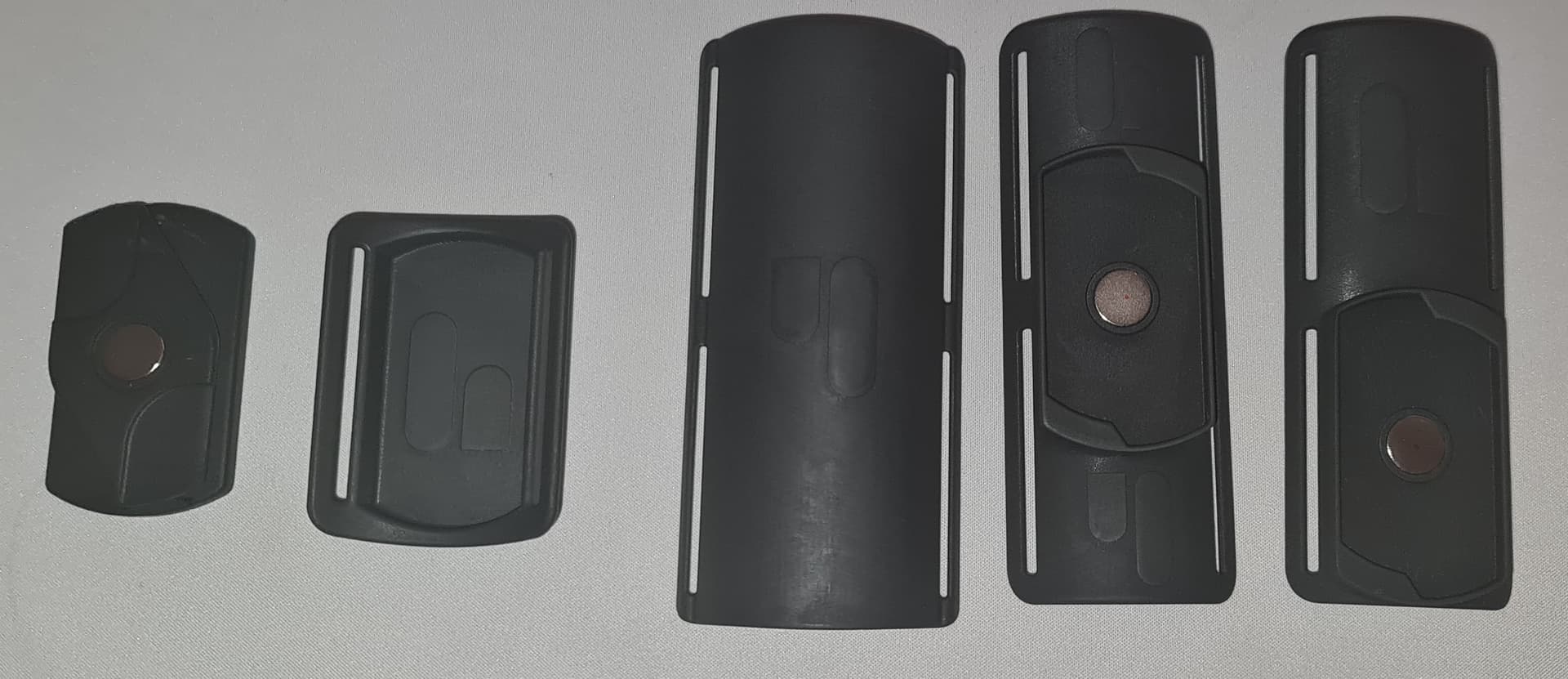
I received the prototypes a few days ago, and while these are not final versions, they already make a huge difference. Here’s what I got (from left to right):
Something important to consider:
- Extender → creates more space between device and slider
- New sleeve holder → thicker than the original, automatically increasing the distance
- Front cap for the upcoming double-strap system
- Holder of the double-strap system (with centered magnet)
- Holder of the double-strap system (with magnet offset at top or bottom)
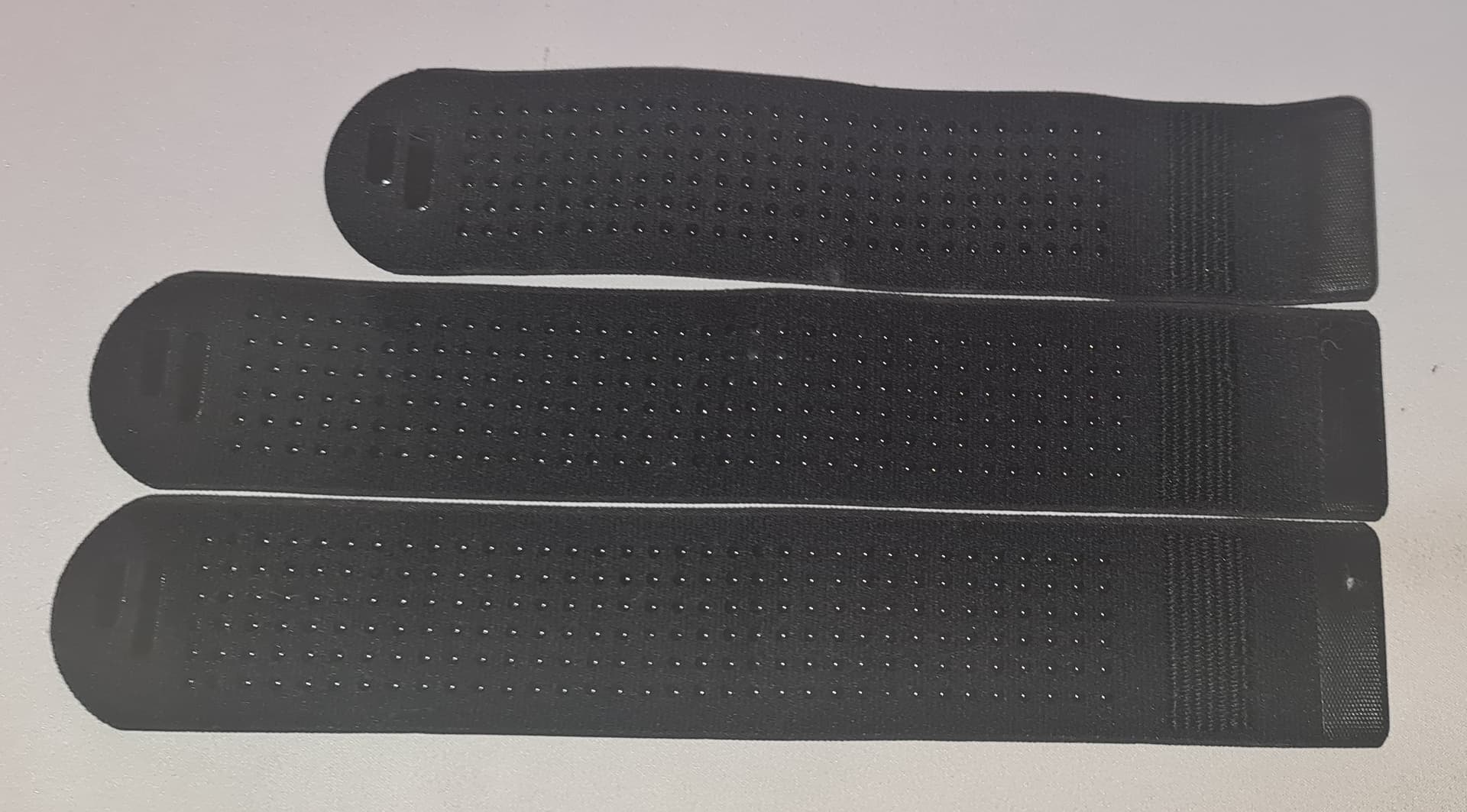
They also sent me two new straps.
Top strap = standard one (~24 cm)
Bottom two = new prototypes (~28 cm)
That’s 4 cm longer, which makes a huge difference when strapping Onaholes or sleeves — much more secure now.
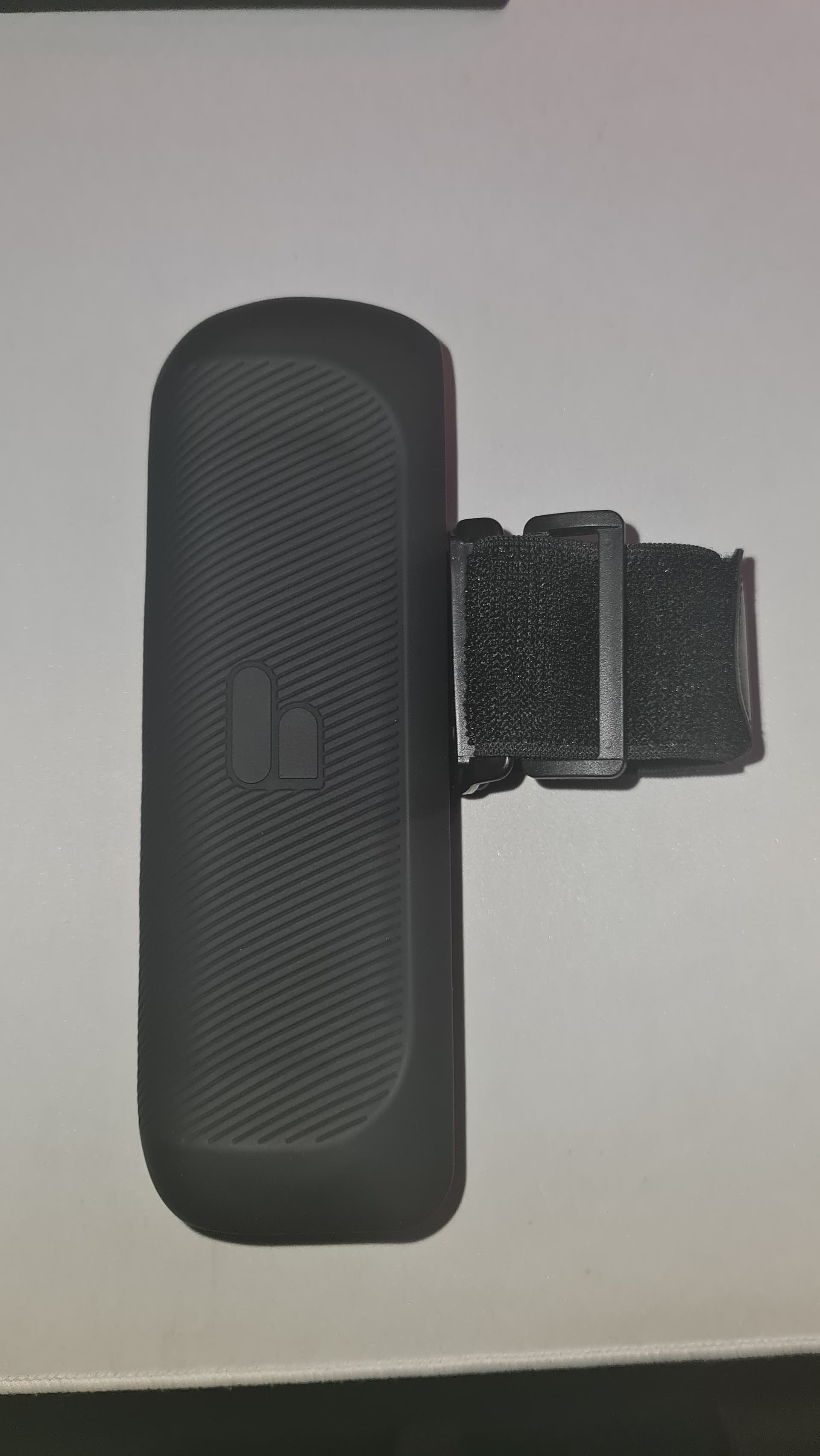
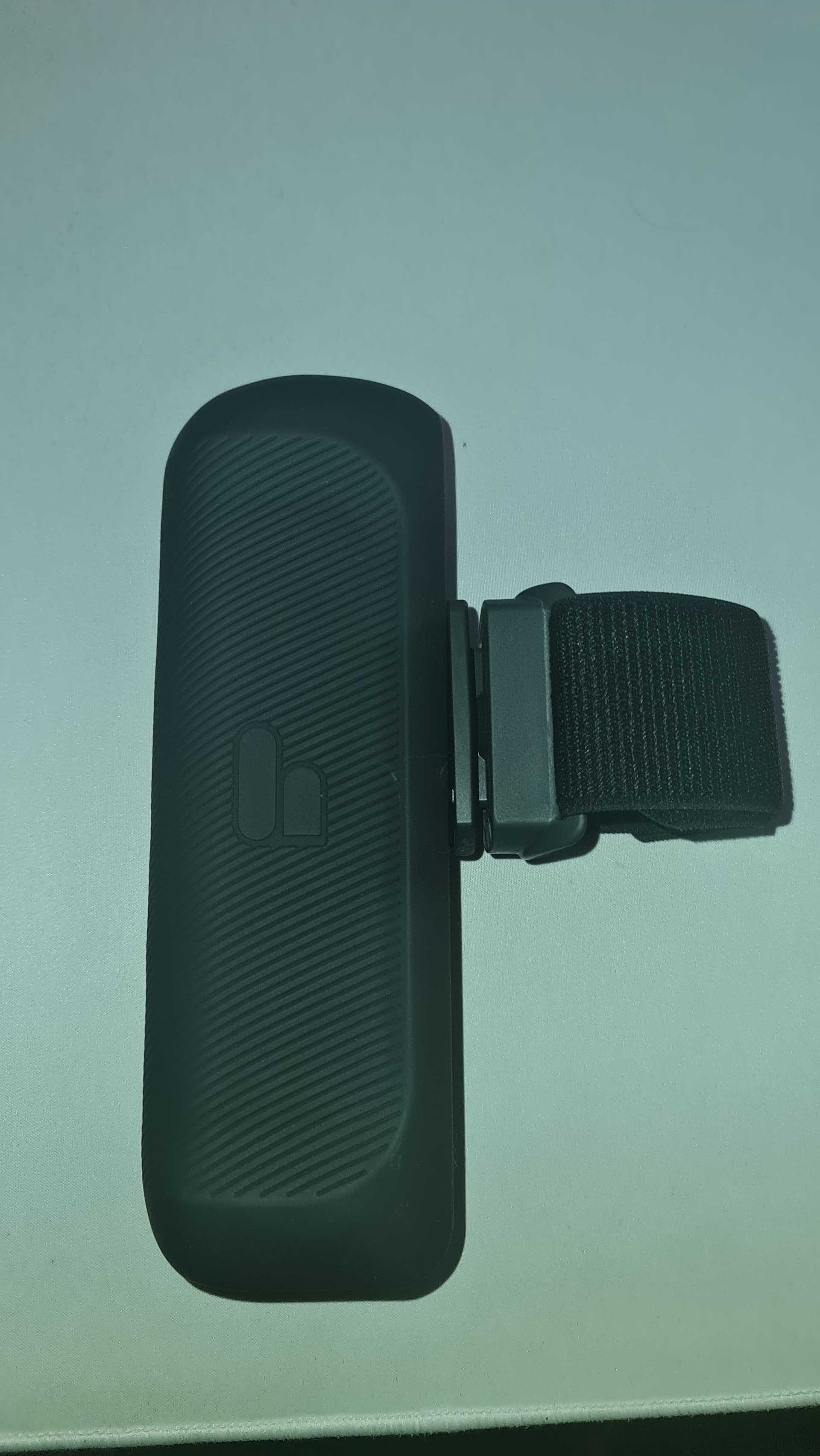
Here’s a quick comparison between the old holder (left) and the new slider + extension (right).
You can already see that a sleeve or Onahole no longer collides with the device — a massive improvement!
Left → old Holder. Right → new holder + extender.
Handy True Grip Sleeve Gen 2 and Gokusai Uterus


Gokusai Uterus side view and front view.


Lewd and Seductive Maid’s Devoted Service - big Onahole.

First Impressions
- Big improvement overall — Onaholes are finally usable thanks to the double-strap system and the improved holder.
- The holder could still be slightly larger, but it works.
- Compared to the FUNSR1, the Handy 2’s new holder is smaller (see below), but still functional.


Performance Tests (so far)
- Gokusai Uterus → Works perfectly.
- Nezuko’s Double Tooth Blowjob - EU / Nezuko’s Double Tooth Blowjob - US → Works perfectly.
- Urethral Twist Otokonoko - EU / Urethral Twist Otokonoko - US → Works, but the Handy 2 sometimes shortens strokes slightly.
→ Likely because this Onahole “pushes back,” causing reduced range (see my review). The FUNSR1 doesn’t have this issue. - Lewd and Seductive Maid’s Devoted Service → Large Onahole test planned. Early test shows minor contact but no major issue.
Using the extender + new single holder now gives ~2 cm of space between slider and device (previously <0.2 cm).
No more sleeves or Onaholes rubbing against the body — except the biggest ones, which only touch slightly.
Using the extender + the new double holder, gives ~1cm of space between slider and device.
 Video Showcase
Showcase of the Handy 2 Pro in motion with Gokusai Uterus and Lewd and Seductive Maid’s Devoted Service.
All videos are SFW, no explicit use.
Click, to see the videos
Uterus Gokusai Onahole - single strap.
Uterus Gokusai Onahole - double strap.
Lewd and Seductive Maid’s Devoted Service - normal speed.
Lewd and Seductive Maid’s Devoted Service - full speed.
See how the Desk Mount struggles with its position during the use of the Lewd and Seductive Maid’s Devoted Service .
 Handy Desk Mount Issue
The only problem so far is with the Handy Desk Mount — it tends to slip or sag under the additional weight of heavier Onaholes.
I’ll experiment with positioning and tightening to see if this can be improved.
 Final Thoughts on the Update
This is a fantastic improvement and shows once again how dedicated and community-focused the Handy team is.
Huge thanks to @handyAlexander and the team for immediately reacting to my feedback and sending these prototypes.
I’ll continue testing and update the review’s total score once I’ve had more sessions and long-term results.
For now, things are looking very promising! 
Firmware Update 4.1 (18 November 2025)
Handy released firmware update 4.1 on November 18th, and I want to briefly share the changelog and my first impressions of it.
For better readability, I’ve placed the full changelog inside a “hide details” section in the review.
Changelog - Firmware 4.1
Directly copied from the official Handy Discord.
One known bug: the battery percentage may remain visible (“ghost”) on the LED matrix after power-down. Temporary fix: power the device on and off again.
Full release notes:
User experience and UI
• Crisper LED-matrix video playback
• Updated Wi-Fi animations (connecting/connected)
• Play animation when starting a mode from the button
• Battery information shown when powering off
• Option to invert LED matrix + button orientation (upside-down mode)
• Adjustable LED matrix brightness
• Adjustable RGB indicator brightnessPlayback and controls
• Long-press left/right to adjust playback speed; configurable step size
• Minimum-stroke tuning improved: top stroke moves at the 10% boundary for easier fine control
• Customizable button step counts for stroke range, velocity, frequency, and amplitude (via onboarding app)Connectivity and networking
• Improved WebSocket reliability with keep-alive
• More reliable reconnection + reduced memory usage by reordering Wi-Fi/BLE initialization
• More forgiving OTA behavior after a failed update
• Ability to roll back to a previous firmware locally by switching OTA images
• Graceful disconnects (BLE, Wi-Fi, socket) before sleep and graceful BLE shutdown on power-downBattery, charging, and power
• More accurate battery percentage measurement
• Better detection of charge completion and charger-fault states
• More frequent and accurate battery-status updates
• Prevented faulty battery-temperature readings when unplugging the charger
• Fixed low-voltage cases that triggered a reboot instead of deep sleep
• Improved shutdown-voltage handling and calibration
• Fixed cases where battery-calibration data was not saved
• Improved recovery to factory-default calibration valuesReliability, recovery, and storage
• Recovery routines for critical storage errors
• Safer writes to critical data (full partition backup before write)
• Improved recovery paths
• Better full-factory-reset behavior and base-settings reset
• Fixed an issue blocking some units from entering safe mode
• Lower memory usage on constrained devices
• Fixed a video-sync issue that could stop under certain conditions
• Added notification when settings changeIdle and power management
• Idle timer: device sleeps/disconnects after 60 minutes of inactivity (with 60-second warning); configurable or disable-able in the onboarding appFile changes
106 files changed, 8564 insertions(+), 4144 deletions(-)
General Impression
The new firmware is very stable. I haven’t encountered any issues so far — performance remains unchanged, smooth, and reliable.
Update 4.1 is mainly focused on bug fixes and quality-of-life improvements, and they delivered on that front.
LED Matrix Improvements
The LED matrix is noticeably crisper, brighter, and easier to read.
The Wi-Fi icon in particular is now much clearer. It wasn’t “bad” before, but it definitely looks cleaner and more refined now.
One of the best QoL changes:
When powering off the Handy 2, the battery percentage is now displayed.
A small change on paper, but extremely helpful in daily use — now you instantly know whether you need to charge it before your next session.
 Customizable Button Steps
The new option to customize button step counts for stroke range, velocity, frequency, and amplitude (via the HandyOnboarding app) is a very welcome improvement — especially if you occasionally use your Handy 2 in manual mode.
It’s nice to see the Handy team giving attention to both scripted and manual users.
 Battery & Charging Improvements
Firmware 4.1 includes several adjustments to battery and charging behavior.
It also seems like the bug where battery levels didn’t display in the onboarding app is now fixed — it shows correctly for me.
One thing I still miss:
A clear charging indicator and a “charging complete” indicator.
Right now, you have to turn the device on or check the app manually.
I hope this gets added in a future update, as it would make charging management much easier.
Overall Impression
Firmware 4.1 is a solid update with meaningful QoL improvements.
They may seem small at first glance, but they really enhance daily usability.
Everything runs stable, clean, and without any issues so far.
23. Affiliate Links
24. Other Links
 Join me on Patreon

 Onahole Reviews:
 Onahole Review - Gokusai Uterus Onahole
- Onahole Review - Nezuko’s Double Tooth Blowjob
- Onahole Review - Urethral Fuck Twist Otokonoko
- Onahole Review - Brain Hacker DX
- Onahole Review - Bread de Ecstasy - Croissant
- Onahole Review - Lewd and Seductive Maid’s Devoted Service
- Onahole Review - Cute Dragon Impregnated
- Onahole Review - Warm Mouth of a Swimsuit Girl
- Onahole Review - Rika Likes Anal
 Onahips & Onatorso Reviews:
- Onahip Review - Ereshkigal Cherry - Hard and Soft
- Torso Review - Super Realistic Body Ultimate Aska Mai
- Torso Review - Beautiful Legs - Nakadashi Life
Hardware Reviews:
 Other Reviews:


 should have orderered the 2 band slider.